Users Manual Henkovac 04-serie V2019
7.2.2 Reviewing Function Values for P1-P9
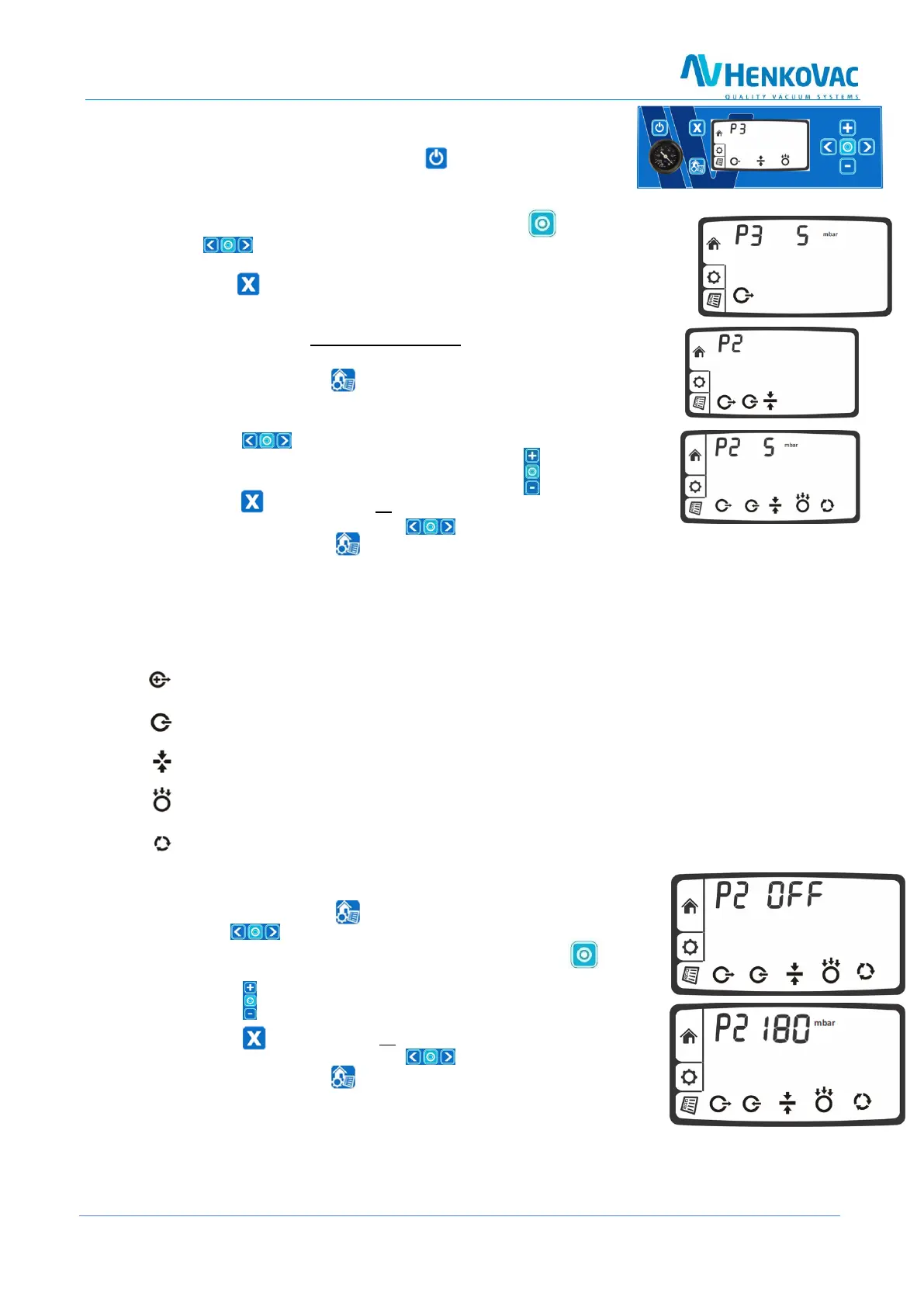
1. Turn the machine on by pushing the button
2. The most-recently used program will be indicated, for instance P3
3. All selected functions for this program are indicated at the bottom of the display
4. To review the values for these functions, push the button; use
the button to display each function value
5. The values cannot be changed; this can only be done in the Settings menu
6. Push the button to return to the Home menu
7.2.3 Programming and Adjusting Values for P1-P9
1. Select the program to be set up or adjusted, for instance P2
2. Push the menu button to access the Settings menu
3. All functions for the selected program are indicated at the bottom of
the display
4. Push the button to select the blinking function to be adjusted
5. Adjust the value of the selected function with the button
6. Press the button to reset all functions to their original values
7. Select the next function with the button
8. Press the menu button to save the entered values and to return to the Home menu
7.2.4 Turning Program Functions ON/OFF
The following functions can be turned ON/OFF for each program P1-P9:
Vacuum Plus: on/off, in seconds
Gassing: on/off, in seconds or in mbar (only with sensor)
Clean Cut Controlled (CCC) Seal: on/off, in seconds
Soft-Air: on/off, in seconds or in mbar (only with sensor)
Multi-cycle: on/off, in number of cycles
7.2.5 Adjusting ON/OFF Function Values
1. Press the menu button to select the Settings menu
2. Use the button to select the blinking function to be adjusted
3. For instance, the gassing function is turned off. Press the button
to turn this function on
4. Press the button to select the desired value, for instance 180 mbar
5. Press the button to reset all functions to their original values
6. Select the next function with the button
7. Push the menu button to store all selected values and to
return to the Home menu
7.2.6 Turning Off Machine
Follow the same procedure as for the One-Program control system, as explained on page 14



 To Next Page