Users Manual Henkovac 04-serie V2019
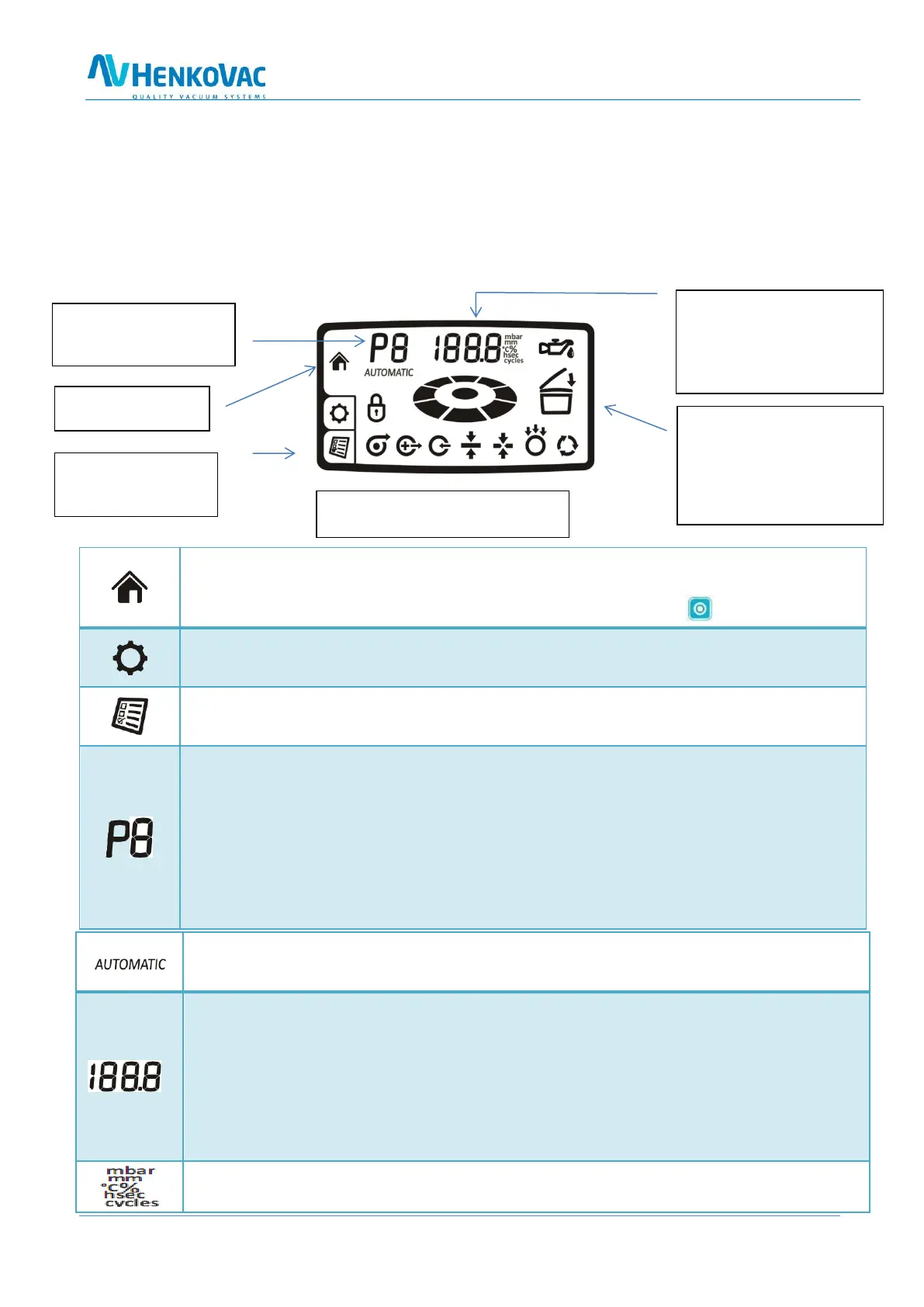
8.0 Symbols in the Display
Not all symbols are visible at all times
By default, the display will show the Home menu, indicating the program number (P1 through P9)
and digital readout for actual vacuum time or pressure (mbar)
The symbols for all selected program functions will show at the bottom of the display. The symbol
for the active function will be blinking
The remaining two symbols on the right-hand side will be visible when applicable
Home Menu
o Standard default display, showing the progress of the packing cycle
o Programmed function values can be reviewed by pushing the button
Service Menu
o Factory settings; dealer access only
Settings Menu
o To enter and adjust the programmable function values
o P -Active-Program Display
o Up to 9 customizable programs may be entered and displayed
o The PA and P H2O programs are pre-set at the factory
o PA = Program Automatic: This Plug & Play program has factory settings for vacu-
um and sealing functions. The pre set values are most commonly used
o P H
2
O program: This program is specially designed for liquid products to prevent
boiling and excessive evaporation
o P1-P9 can be individually programmed depending on the options available
o Standard Plug & Play program runs when turning on the machine for the first time
o Vacuum time or pressure, and sealing time are factory pre-set and cannot be changed
Display of the value of the active function
o Displays vacuum pressure in mbar (standard) or in % (for sensor-based applications)
o Displays remaining vacuum time in seconds (for time-based applications)
o sealing time, vacuum-plus time, soft-air time or pressure, MAP time or pressure, mul-
ti-cycle count, etc.
o when oil change indicator is shorty shown at the start of the machine: displays re-
maining production hours or cycles before an oil change is required
o Programmable in the Settings menu
Home Menu:
Default display
Settings Menu:
To adjust values for
program functions
Symbols to show the active function
and the packing cycle progress
Indicator for actual vacuum pres-
sure or time, sealing time, etc.
In the presence of the service indi-
cator, the remaining production
hours or cycles will be briefly incat-
ed at start up
This symbol will blink when turning
off the machine. When closing the
cover, the machine will perform a
number of vacuum cycles before
turning off automatically. This al-
lows any moisture in the oil to
evaporate
Programs P1 thru P9
PA Automatic (sensor)
P H2O liquid (sensor)



 To Next Page