Setting up the centrifuge
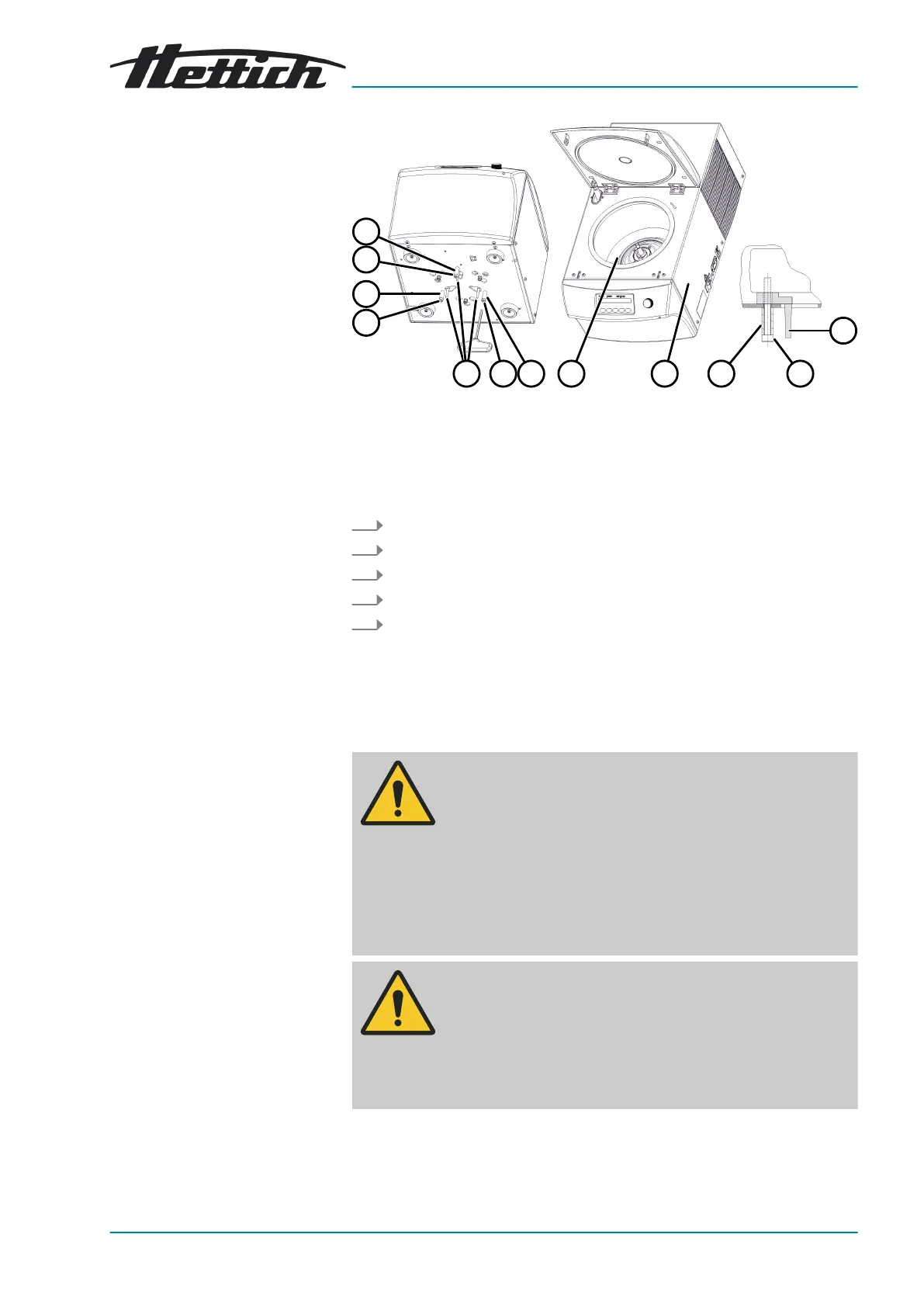
Fig. 14: Transport lock
1 Transport lock
2 Screws
3 Spacer sleeves
4 Right side of device
5 Bellows
1.
Lay the device down onto its right-hand side (
4
).
2.
Remove 3 screws (
2
) and 3 spacer sleeves (
3
).
3. Remove 3 transport locks (
1
).
4. Keep the screws, spacer sleeves and transport locks in a safe place.
5. For MIKRO 220 R:
Open the lid.
Check the bellows (
5
) underneath the motor cover for correct
seating.
5.3
Setting up and connecting the centrifuge
WARNING
Risk of injury due to failing to maintain a
sufcient distance to
the centrifuge.
− As per EN/IEC 61010-2-020, no persons, hazardous
materials or objects may be present within a safety zone
of 300mm around the centrifuge during a centrifugation
run.
−
A distance of 300mm from the ventilation slots and ven-
tilation openings of the centrifuge must be maintained.
CAUTION
Risk of crushing and damage to the device due to it falling
down because of vibration-induced position alterations.
− Place the device on a stable and level surface.
− Select the installation surface dependent on the weight
of the device.


 To Next Page
 Loading...