26 January 2019
PAM configuration PLT-01628, Rev. D.2
9. From the PAM Configuration application main menu (see Section 5.3 PAM Configuration application
overview), click Signing Certificate.
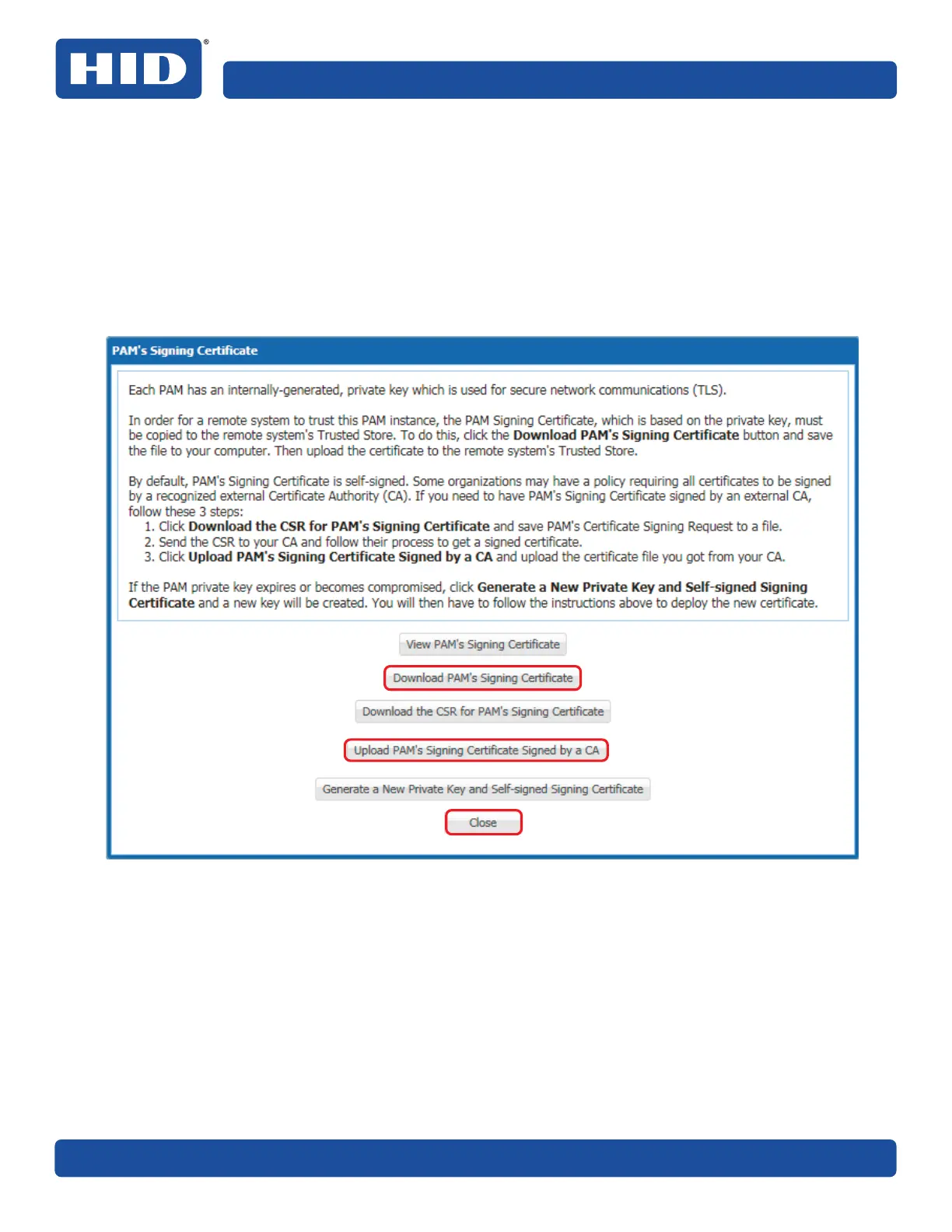
10.In the PAM’s Signing Certificate window either:
႑ Download PAM’s self-signed Signing Certificate .cer file to your computer. Select Download
PAM’s Signing Certificate.
႑ Follow the on-screen instructions to get the PAMs Signing Certificate signed by an external
Certificate Authority (CA).
11. Click Close to exit the screen.
12. For the PACS Service to trust the PAMs Signing Certificate move/copy the certificate .cer file to:
C:\Program Files (x86)\HID Global\pivCLASS PACS Service\pam\clientcerts
where: C:\Program Files (x86)\HID Global\pivCLASS PACS Service is the PACS Service installation
directory.



 To Next Page