Need help?
Do you have a question about the HIKVISION DS-1004KI and is the answer not in the manual?
Details the keyboard's ability to control DVR, Dome Camera, VMS, and Analog Matrix.
Explains how to select the keyboard's operational mode using the front panel key.
Details the physical interfaces and connectors on the rear panel of the keyboard.
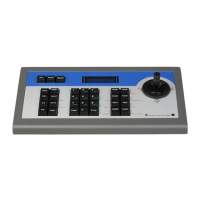
Describes the layout and function of buttons and controls on the front panel.
Explains the operation and capabilities of the keyboard's joystick for PTZ control.
Illustrates common connection configurations for keyboards, cameras, and DVRs.
Guide on setting parameters and operating the DVR using the keyboard.
Instructions for setting parameters and operating dome cameras with the keyboard.
Steps to configure and control the Video Management System (VMS) with the keyboard.
Details on setting up and operating the analog matrix using the keyboard.
The DS-1004KI keyboard is a versatile control device designed for managing various surveillance systems, including Digital Video Recorders (DVRs), analog dome cameras, Video Management Platforms (VMS), and analog matrices. Its design emphasizes steady and user-friendly operation, making it suitable for complex surveillance environments.
The DS-1004KI keyboard offers multiple controlling modes, allowing it to interface with different types of surveillance equipment. The controlling mode can be easily switched by pressing the "MODE" button on the front panel.
DVR Controlling: In this mode, the keyboard provides complete functionality for operating DVRs, mirroring the front panel operations. An LED screen displays all operations, enhancing user feedback. A single keyboard can connect to and control up to 128 DVRs, with DVR address codes ranging from 0 to 255. This allows for extensive DVR management from a central point.
Analog Dome Controlling: The keyboard facilitates PTZ (Pan, Tilt, Zoom) functions for analog dome cameras. It supports dome address codes from 0 to 255, with a maximum capacity of 128 connected analog domes. This enables precise control over camera movement and focus for a large number of dome cameras.
VMS Controlling: When operating in VMS mode, the keyboard controls the video management platform. This includes functionalities such as TV wall switching and display, PTZ parameter settings, and general PTZ control. It integrates the keyboard into a broader, software-based surveillance ecosystem.
Analog Matrix Controlling: This mode allows the keyboard to control signal input and output switching within an analog matrix system. This is crucial for managing video routing and display in systems that rely on analog video matrices.
The keyboard also features multiple working modes, selected by turning a key on the front panel:
MENU (Keyboard Configuration Mode): In this mode, users can set various keyboard parameters, including the keyboard address, RS-485 parameters, and RS-232 parameters. This is essential for initial setup and customization to match the specific system requirements.
OPERATE (Keyboard Operation Mode): This is the primary mode for controlling connected devices. In OPERATE mode, the keyboard can control DVRs, PTZ functions of dome cameras, and the analog matrix.
PROGRAM (Keyboard Function Settings Mode): This mode is dedicated to setting parameters for presets, patterns, and patrols for dome cameras. This allows for the configuration of automated camera movements and positions.
The DS-1004KI supports a wide range of protocols for PTZ control of dome cameras, including HIKVISION, PELCO-P, PELCO-D, SAMSUNG, YAAN-1, SONY, SIEMENS, DRAGON, NAIJIE, KALATEL, VICON, and others, totaling 63 protocols. For analog matrix control, it supports ZT-1.0, ZT-2.0, EXTRON, and CREATOR protocols.
The keyboard is designed for intuitive operation with a combination of buttons, a jog shuttle, and a joystick.
Joystick Functionality: The joystick provides 8-direction pan and tilt movement for PTZ control. In DVR control mode, it enables fast play during playback (up/down movement) and navigation through menu items. Left/right movements allow skipping backward/forward during playback or navigating through menus. The 4-axis joystick also controls zoom (left/right rotate) and features a central button for "Enter" functionality and picture capture.
Button Functions:
Cascade Connection: The DS-1004KI supports cascade connection, allowing up to 16 auxiliary keyboards to be connected. Auxiliary keyboard addresses range from 0 to 255, enabling a scalable control system.
Flexible RS485 Parameters: The keyboard allows setting different RS485 parameters (protocol, baud rate) for flexible parallel connection to various devices, enhancing compatibility.
Key Locking Function: A convenient key locking function is included to ensure secure operation, preventing unauthorized changes or accidental inputs.
To ensure optimal performance and longevity of the DS-1004KI keyboard, several preventive and cautionary tips are provided:
Ventilation and Dust-Free Environment: The unit should always be placed in a well-ventilated and dust-free environment to prevent overheating and accumulation of debris that could affect internal components.
Liquid Avoidance: Keep all liquids away from the keyboard to prevent short circuits and damage to electronic components.
Power Supply Check: Always verify the power supply to ensure it matches the keyboard's voltage requirements, thereby avoiding damage from voltage mismatches.
Temperature and Humidity Range: Ensure the keyboard operates within its specified temperature and humidity ranges to prevent malfunctions caused by extreme environmental conditions.
Horizontal Placement and Vibration Avoidance: The device should be kept horizontal, and installation in environments with severe vibration should be avoided to protect internal components and maintain stability.
Regular Dedusting: The dust board can cause a short circuit if it becomes damp. Regular dedusting of the board, connectors, and chassis fan with a brush is recommended to prevent dust accumulation and potential issues.
These features collectively make the DS-1004KI keyboard a robust and adaptable tool for comprehensive surveillance system management, emphasizing both operational efficiency and device care.
 General
| Numeric keypad | Yes |
|---|---|
| Keyboard layout | - |
| Pointing device | Trackball |
| Device interface | RS-485 |
| Connectivity technology | Wired |
| Wrist rest | No |
| Product color | Black |
| Keyboard style | Straight |
| Operating temperature (T-T) | -10 - 55 °C |
| Operating relative humidity (H-H) | 10 - 90 % |
| Product type | Control panel |
| Quantity per pack | 1 pc(s) |
 Weight and Dimensions
| Depth | 163 mm |
|---|---|
| Width | 434 mm |
| Height | 43 mm |
| Keyboard weight | 1250 g |
| Keyboard dimensions (WxDxH) | 434 x 163 x 43 mm |


 To Next Page