Chapter 1 Introduction | Hillstone
Hillstone SG-6000 E-Series Hardware Reference Guide
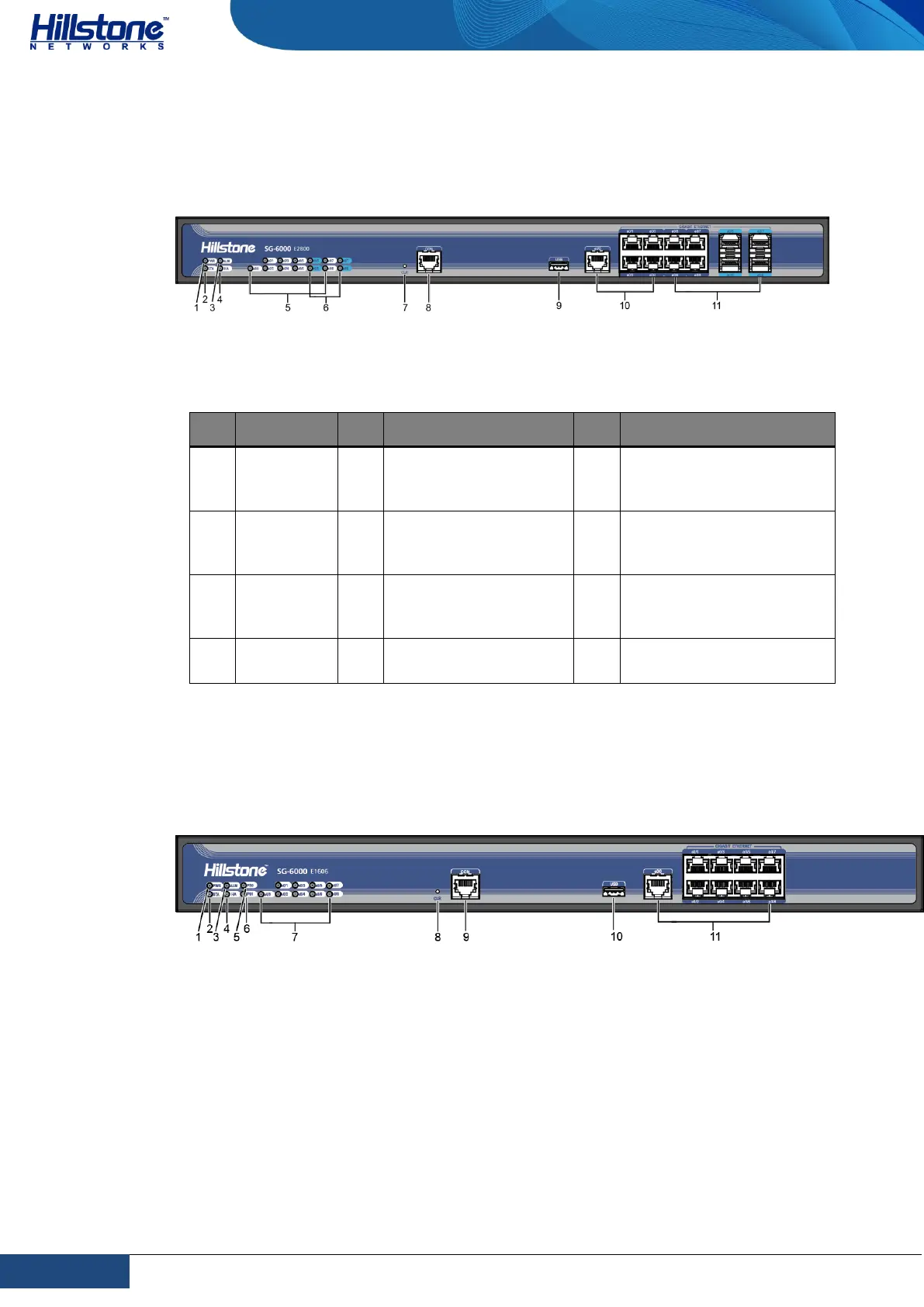
SG-6000-E2800 and SG-6000-E2300 have the same front panel. The front panel
consists of 5 Gigabit Ethernet ports, 4 Combo ports (Ethernet port + SFP port), 1
USB port, 1 Console port, 1 CLR button and some LED indicators.
Figure 1-7: Front Panel of SG-6000-E2800
Table 1-7: Front Panel Description of SG-6000-E2800 and SG-6000-E2300
e0/0 - e0/8: Gigabit
Ethernet port status
LED
e0/5 - e0/8: SFP
interface LED
e0/0 - e0/4: Gigabit
Ethernet ports
e0/0 - e0/4: Combo
ports (Ethernet port +
SFP port)
SG-6000-E1700 and SG-6000-E1606 have the same front panel. The front panel
consists of 9 Gigabit Ethernet ports, 1 USB port, 1 Console port, 1 CLR button and
some LED indicators.
Figure 1-8: SG-6000-E1700 Front Panel



 To Next Page