Chapter 1 Introduction | Hillstone
Hillstone SG-6000 E-Series Hardware Reference Guide
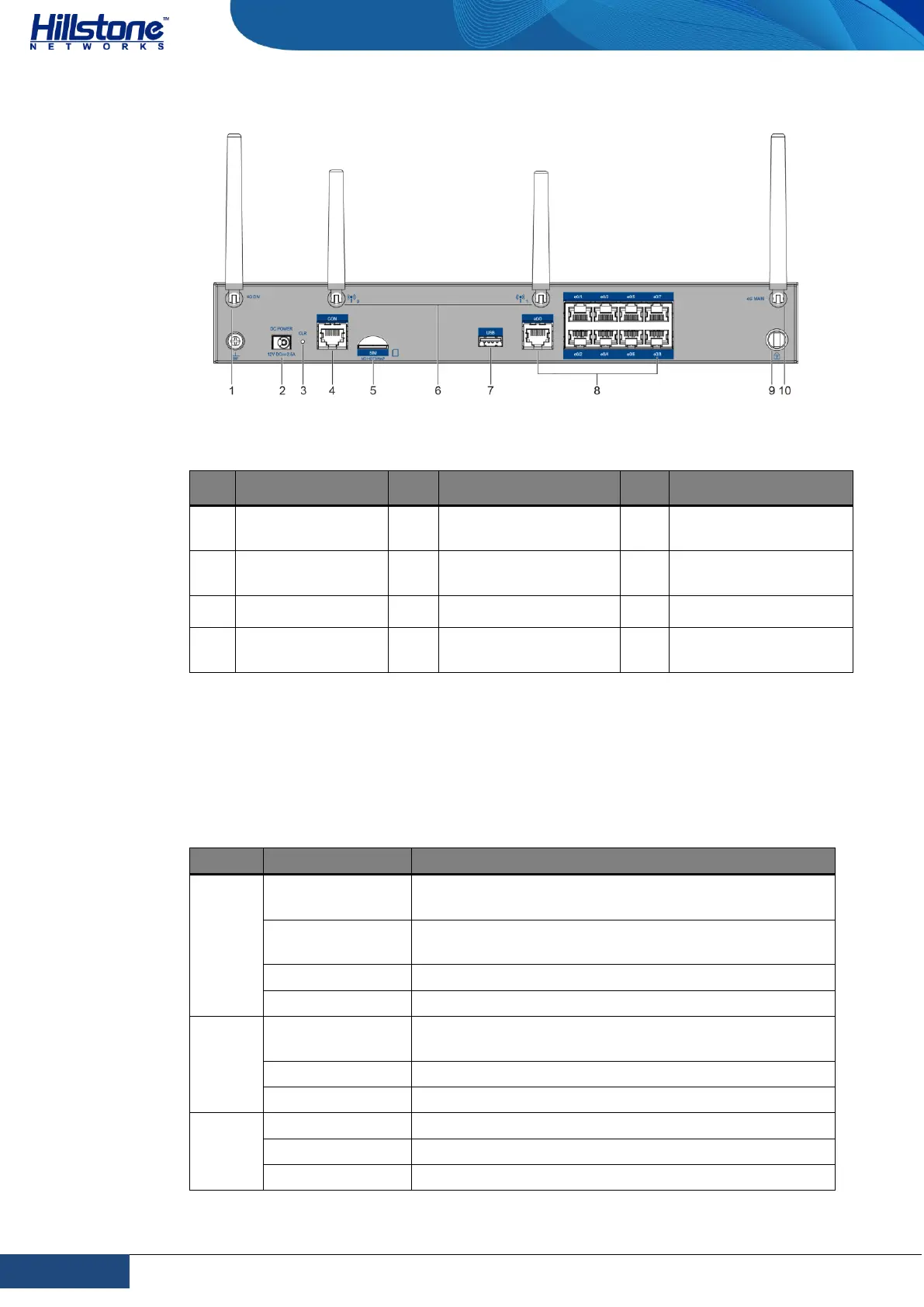
Figure 1-22: SG-6000-E1100 (WLAN+4G version) Back Panel
Table 1-18: Back Panel Description of SG-6000-E1100 (WLAN+4G version)
SMA connector
for 4G antenna
DC POWER: DC
power interface
SMA connectors for
WLAN antennas
SMA connector for
4G antenna
e0/0 - e0/8: Gigabit
Ethernet port
LED Indicators
The following table describes the meanings of LED indicators on the front panels of
Hillstone devices.
Table 1-19: Front Panel LED Descriptions
The device power is running normally.
The device power is running abnormally.
Power failure so the system is down.
The device is powered off.
The system is running normally.
The system has failed to boot or has an error.
The system is sending alarm(s).
The system is using a trial license.



 To Next Page