Chapter 1 Introduction | Hillstone
Hillstone SG-6000 E-Series Hardware Reference Guide
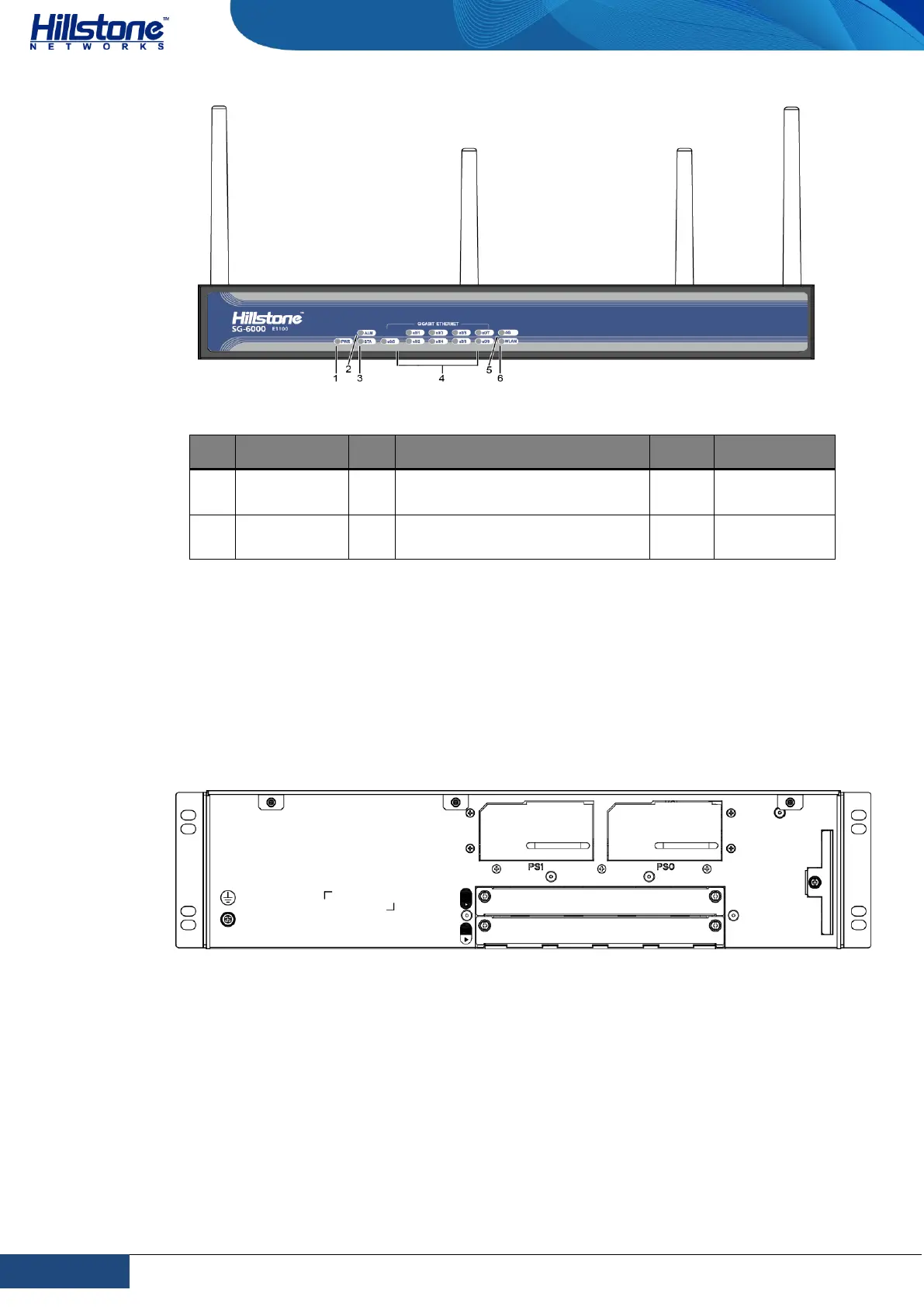
Table 1-13: Front Panel Description of SG-6000-E1100 (WLAN+4G version)
e0/0 - e0/8: Gigabit Ethernet
port status LED
Back Panel
SG-6000-E6368, SG-6000-E6360, SG-6000-E6168 and SG-6000-E6160 have the
same back panel layout. The back panel layout of SG-6000-E6368, SG-6000-
E6360, SG-6000-E6168 and SG-6000-E6160 consists of 2 power supply sockets, 2
expansion slots, 1 grounding screw and 1 anti-dust mesh.
Figure 1-14: SG-6000-E6360 Back Panel
SG-6000-E5960, SG-6000-E5760 and SG-6000-E5660 have the same back panel
layout. The back panel layout of SG-6000-E5960/E5760/E5660 consists of 2 power
supply sockets, 1 grounding screw. The standard product of SG-6000-
E5960/E5760/E5660 adopts dual power supplies and it is also available in single
power supply.



 To Next Page