EasyManua.ls Logo

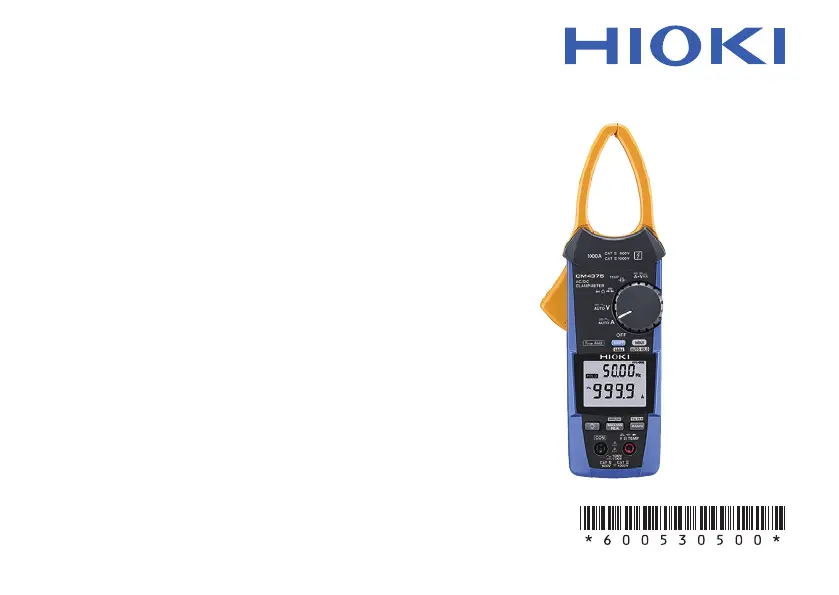
Hioki CM4375 - User Manual

Hioki CM4375
72 pages
Print Icon
To Next Page IconTo Next Page
Loading...
EN
EN
Instruction Manual
Sept. 2018 Edition 1
CM4375A961-00 18-09H
CM4375
CM4376
AC/DC CLAMP METER
Instruction Manual
Sept. 2018 Edition 1
CM4375A961-00 18-09H
CM4375
CM4376
AC/DC CLAMP METER

Questions and Answers

  • K
    kristenmurphyAug 15, 2025
    How to fix abnormal measured value on Hioki CM4375 Measuring Instruments?
    • V
      valerie69Aug 15, 2025
      If your Hioki Measuring Instruments display an abnormal measured value, and you suspect the measured current is too small for the instrument's range, try wrapping the wire around the jaw multiple times. Wrapping the wire once doubles the measured value; wrapping it twice triples it, and so on. Also, if the jaw is damaged or cracked, it will not be able to measure current accurately, so send the instrument for repair.
  • A
    Amy CookAug 18, 2025
    Why do readings differ between Hioki Measuring Instruments and other meters?
    • B
      Bryan JonesAug 18, 2025
      If the readings from your Hioki Measuring Instruments differ from another clamp-on current meter, it may be because the instrument cannot accurately measure waveforms that contain a component that falls outside the frequency characteristics range. Also, since the instrument performs true RMS measurement, it can accurately measure distorted waveforms. When measuring a distorted waveform, the measured value will differ from a clamp-on current meter that uses the averaging method.
  • S
    Suzanne ParsonsAug 21, 2025
    Why is my Hioki CM4375 Measuring Instruments' jaw emitting sound?
    • T
      Tiffany KlineAug 21, 2025
      If your Hioki Measuring Instruments' jaw emits sound when measuring AC currents in excess of approximately 500 A, there is no effect on the measurement. It is normal behavior.
  • R
    Ryan CabreraAug 25, 2025
    What to do if Hioki CM4375 Measuring Instruments' measured value does not appear?
    • E
      emily13Aug 26, 2025
      If no measured value is displayed on your Hioki Measuring Instruments, even when the test leads are shorted and zero adjustment is impossible, check the continuity of the test leads and replace them if a wiring break is found. Also, ensure the test leads are fully inserted and you are using the proper measurement method. When performing current measurement, perform zero-adjustment while no measurement target is being clamped. If the problem persists, the instrument may be damaged and require repair.
  • G
    Gina DixonAug 28, 2025
    Why is my Hioki CM4375 showing abnormal measured values?
    • A
      abeardAug 28, 2025
      If your Hioki Measuring Instrument shows an abnormal measured value, it could be due to several reasons: * The measured current might be too small for the instrument's range. To address this, wrap the wire around the jaw multiple times to increase the measured value. Wrapping it once doubles the value; wrapping it twice triples it. * The jaw of the instrument might be damaged. If you notice any damage or cracks, the instrument won't measure current accurately and should be sent for repair. * Fluctuations in displayed values can occur due to induction potential, even without applied voltage. This is not necessarily a malfunction.
  • D
    David WoodsAug 31, 2025
    What to do if my Hioki CM4375 doesn't display a measured value?
    • M
      Michael SimsAug 31, 2025
      If your Hioki Measuring Instrument isn't displaying a measured value, even when the test leads are shorted, and zero adjustment is impossible, consider these potential solutions: 1. Check the continuity of the test leads. If there's a break in the wiring, replace the test leads. 2. Ensure the test leads are fully inserted and that you're using the correct measurement method. If problems persist, the instrument may be damaged and require repair. 3. When measuring current, make sure to perform zero-adjustment without clamping any measurement target.
  • M
    Margaret BrownSep 4, 2025
    Why do readings from my Hioki Measuring Instruments differ from another clamp-on current meter?
    • L
      Lori WalterSep 4, 2025
      If your Hioki Measuring Instrument shows different readings compared to another clamp-on current meter, it could be because: * The instrument may not accurately measure waveforms with components outside its frequency characteristics range. * The instrument uses true RMS measurement, which accurately measures distorted waveforms. This can lead to different values compared to clamp-on meters using the averaging method when measuring distorted waveforms.
  • A
    Alicia OlsonSep 7, 2025
    Why does my Hioki Measuring Instruments show a larger current value than expected?
    • E
      Elizabeth MillerSep 7, 2025
      The Hioki Measuring Instrument might display a larger than expected current value, even with no input, if it's exposed to a strong magnetic field (like near a transformer or high-current circuit) or a strong electric field (like from a wireless device).
  • J
    Jonathan FloresSep 10, 2025
    Why is my Hioki CM4375 Measuring Instruments jaw emitting a sound?
    • K
      Kevin MarshSep 12, 2025
      The jaw of your Hioki Measuring Instruments may emit sound when measuring AC currents exceeding approximately 500 A. This does not affect the measurement.

Summary

Introduction to the Clamp Meter

Target Audience for Manual

Manual is for individuals with basic electrical knowledge.

Trademark Acknowledgements

Lists trademarks used in the manual.

Understanding Notation and Symbols

Instrument Symbol Meanings

Explains symbols used on the instrument and their meanings.

Screen Display Conventions

Describes how alphanumeric characters are displayed on the instrument screen.

Accuracy Specification Definitions

Defining f.s., rdg., and dgt.

Defines f.s., rdg., and dgt. accuracy terms.

Package Contents Verification

Verify Main Product and Accessories

Check for the clamp meter, leads, case, and batteries.

Confirm Documentation Inclusion

Ensure instruction manual and precautions are present.

Optional Accessories List

Test Leads, Cables, and Adapters

Lists various optional test leads, cables, and adapters.

Other Optional Accessories

Lists thermocouples, cases, and pin sets.

Critical Safety Precautions (Danger)

Electric Shock and Current Hazards

Warns about electric shock, current limits, and cable integrity.

Important Safety Warnings and Cautions

Water, Rating, and Handling Precautions

Covers warnings for water, rating exceedance, sensor obstruction, and dropping.

Test Lead and Cable Safety

Test Lead Requirements for Voltage Measurement

Specifies requirements for test leads used in voltage measurements.

Cable Care in Cold Conditions

Warns about handling cables in freezing temperatures.

Magnetic Adapter Safety Considerations

Pacemaker Hazard and Environmental Use

Warns about pacemaker risks and environmental use of magnetic adapters.

Magnetic Interference and Shock Warnings

Warns against magnetic interference and mechanical shock.

Product Overview and Functions

Key Product Features

Describes the clamp meter's capabilities and functions.

Instrument Part Identification

Front and Rear Panel Components

Identifies and describes parts on the front and rear of the instrument.

Preparing for Measurement

Pre-Measurement Inspection Checklist

Details checks required before performing measurements.

Performing Current Measurements

Step-by-Step Current Measurement

Explains the procedure for measuring current.

Current Measurement Notes

Provides notes on AC/DC current measurement and polarity detection.

Current Measurement Hold Features

Manual and Auto Hold Operations

Explains how to use manual and auto hold functions.

Auto Hold Measurement Conditions

Auto Hold Activation Criteria

Describes the conditions for auto hold activation.

Functions Supporting Auto Hold

Auto Hold Applicability and Conditions

Lists functions where auto hold is applicable and its conditions.

Filter Function for Current Measurement

Filter ON vs. OFF Performance

Compares measurement results with the filter on and off.

Capturing Statistical Current Values

Using MAX;MIN;AVG;PEAK Functions

Explains how to capture and display statistical current values.

Measuring Rush Current (INRUSH)

INRUSH Measurement Procedure and Details

Details the procedure and parameters for measuring rush current.

Other Measurement Functions Overview

Voltage Measurement (AC;DC)

Explains how to measure AC and DC voltage.

Basic Electrical Measurements

Continuity, Resistance, and Diode Tests

Describes procedures for continuity, resistance, and diode tests.

Advanced Electrical Measurements

Capacitance and Temperature Measurements

Explains capacitance and temperature measurement procedures.

DC Power and Voltage;Current Display

Simultaneous DC Voltage;Current Display

Describes simultaneous display of DC current and voltage.

DC Power Measurement Procedure

Explains how to measure DC power.

Bluetooth Connectivity Setup

Install GENNECT Cross Mobile App

Instructs on installing the mobile application for Bluetooth connectivity.

Enable and Pair Bluetooth Functionality

Guides on enabling Bluetooth and pairing the app with the meter.

GENNECT Cross Application Installation

Downloading and Installing the App

Provides steps for downloading and installing the GENNECT Cross app from stores.

Controlling Bluetooth Functionality

Turning Bluetooth ON and OFF

Explains how to turn the Bluetooth function on and off on the instrument.

Pairing the CM4376 with the Mobile App

Mobile App Pairing Procedure

Details the process of pairing the mobile app with the CM4376 instrument.

Making Measurements via Bluetooth

Using Bluetooth for Data Measurement

Explains how to make measurements and view data using Bluetooth.

Backlight and Auto Power Save Features

Backlight Operation and Control

Describes backlight operation modes and manual control.

Auto Power Save (APS) Functionality

Explains the APS feature and its automatic activation and cancellation.

Power-on Configuration Options

Setting Device Options at Power-on

Details how to set various device functions during power-on.

Temperature Unit Setting Configuration

Changing and Saving Temperature Units

Explains how to switch temperature units and save the setting.

General Product Specifications

Operating Environment, Standards, and Power

Covers operating environment, safety standards, and power supply.

Physical and Warranty Specifications

Dimensions, Mass, and Warranty Period

Details physical dimensions, mass, and product warranty period.

Input and Measurement Specifications

Basic Input and Current Measurement Specs

Covers basic input specs and current measurement specifications.

Measurement Performance Specifications

Display Rate, Crest Factor, and INRUSH Specs

Specifies display rates, crest factor, and INRUSH parameters.

Frequency Derating and Voltage Specifications

Frequency Derating Characteristics

Shows how measurement current is affected by frequency.

Voltage Measurement Specifications

Details specifications for voltage measurements.

Voltage Measurement Details

Voltage Display Rate and Input Impedance

Lists voltage measurement display rates and input impedance.

Specifications for Other Measurements

Overload, Current, and Display Rate Specs

Covers overload protection, current, and display rates for other functions.

Capacitance and Temperature Correction Specs

Max Capacity, Inductive Load, and Temp Correction

Details max capacity, inductive load, and temperature correction time.

Accuracy Specification Overview

Accuracy Conditions, Input, and Effects

Outlines accuracy conditions, input, and effects of measurements.

Current Measurement Accuracy Tables

AUTO A and AC Current Accuracy

Provides accuracy for AUTO A and AC current (MAX/MIN/AVE).

Current Peak Measurement Accuracy

AC and DC Current Peak Accuracy

Lists accuracy for AC and DC current PEAK MAX/MIN.

AC+DC Current Accuracy Tables

AC+DC Current Accuracy (MAX;MIN;AVE)

Lists accuracy for AC+DC current (MAX/MIN/AVE).

Frequency and INRUSH Accuracy

Frequency and INRUSH Accuracy Details

Lists accuracy for frequency and INRUSH measurements.

Voltage Measurement Accuracy Tables

AUTO V and AC Voltage Accuracy

Lists accuracy for AUTO V and AC voltage (MAX/MIN/AVE).

Voltage Peak and Range Accuracy

AC Voltage Peak and Range Accuracy

Lists accuracy for AC voltage PEAK MAX/MIN and ranges.

Voltage Peak Accuracy by Range

Voltage Peak Accuracy Details

Provides accuracy for voltage PEAK MAX/MIN by range.

DC Voltage Measurement Accuracy

DC Voltage Accuracy (MAX;MIN;AVE)

Lists accuracy for DC voltage (MAX/MIN/AVE).

DC Voltage Peak Accuracy

DC Voltage Peak Accuracy Details

Provides accuracy for DC voltage PEAK MAX/MIN.

AC+DC Voltage Accuracy Tables

AC+DC Voltage Accuracy (MAX;MIN;AVE)

Lists accuracy for AC+DC voltage (MAX/MIN/AVE).

AC+DC Voltage Peak and Range Accuracy

AC+DC Voltage Peak and Range Accuracy

Lists accuracy for AC+DC voltage PEAK MAX/MIN and ranges.

Continuity and Resistance Accuracy

Continuity and Resistance Accuracy Details

Lists accuracy for continuity and resistance measurements.

Diode Test Accuracy

Diode Test Accuracy Details

Lists accuracy for diode tests.

Capacitance and Temperature Accuracy

Capacitance and Temperature Accuracy Details

Lists accuracy for capacitance and temperature measurements.

DC Power Measurement Accuracy

DC Power Accuracy Details

Lists accuracy for DC power measurements.

Troubleshooting Instrument Issues

Addressing Abnormal Measured Values

Lists common symptoms and solutions for abnormal measured values.

Advanced Troubleshooting Scenarios

Addressing Measurement Discrepancies and Input Issues

Covers issues like comparison differences, input problems, and sounds.

Error Code Reference and Solutions

Understanding Instrument Error Codes

Explains error codes and their corresponding solutions.

Battery Maintenance and Replacement

Battery Replacement Procedure and Warnings

Provides instructions for battery replacement and related warnings.

Instrument Cleaning and Care

Cleaning Instructions for the Instrument

Gives instructions on how to clean the instrument.

Product Warranty Information

Important Warranty Certificate Details

Instructions for retaining and completing the warranty certificate.

Warranty Terms and Conditions

Details the terms and conditions of the product warranty.

Company Contact and Legal Information

Contact Details and Copyright Notices

Provides contact information and legal notices.

Hioki CM4375 Specifications

General IconGeneral
TypeClamp Meter
Measurement CategoryCAT IV 600 V, CAT III 1000 V
Measurement Range (AC Voltage)0.1 V to 1000 V
Measurement Range (DC Voltage)0.1 V to 1000 V
ContinuityYes
DiodeYes
Operating Temperature-10 °C to 50 °C
Storage Temperature-20 °C to 60 °C
DisplayLCD
Safety StandardsIEC 61010-1, IEC 61010-2-032
WeightApprox. 600g (including batteries)
Crest Factor3
Jaw Diameter34 mm

Related product manuals