OPERATOR'S STATION
1-36
MAINTENANCE SETTINGS
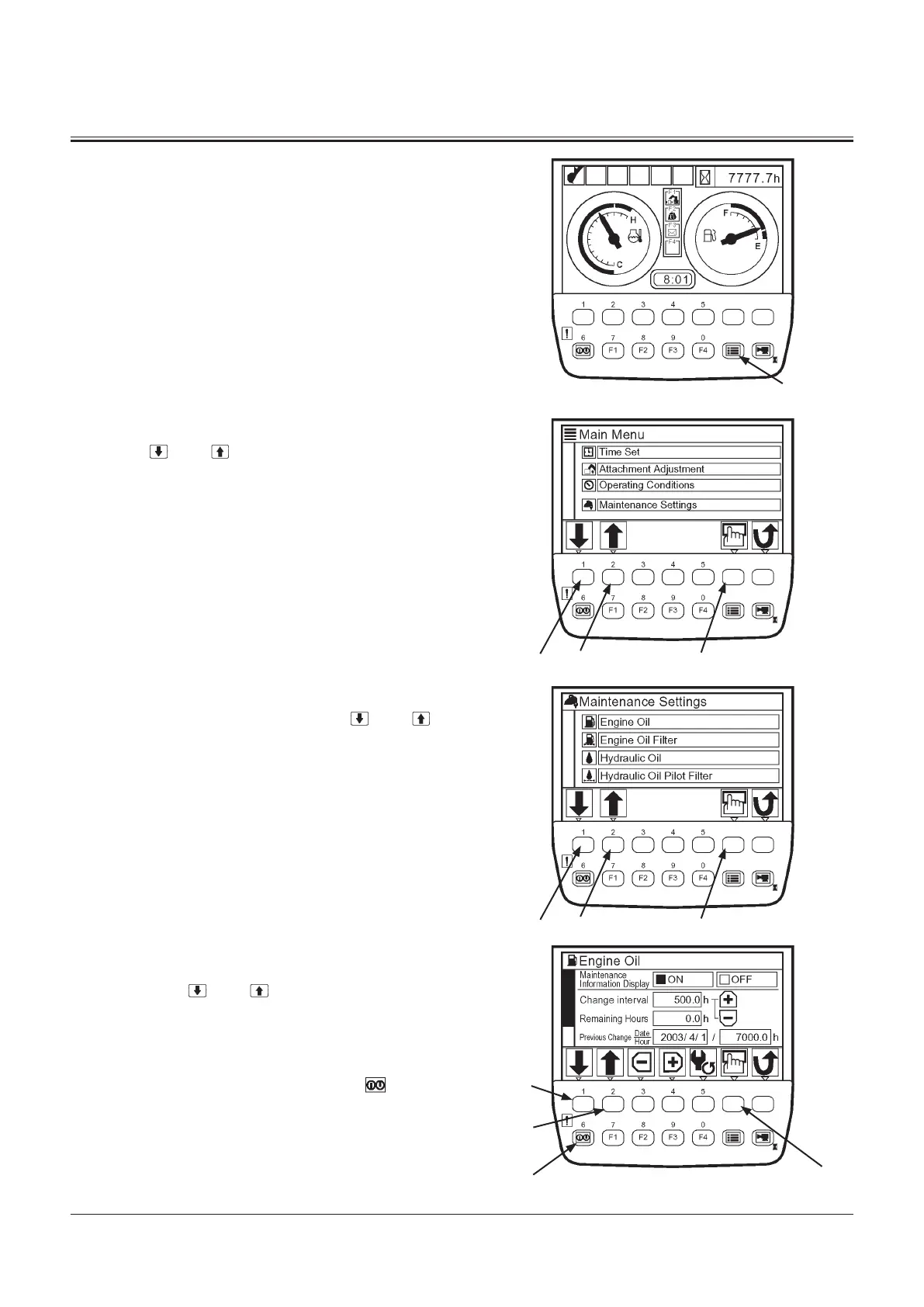
1. When the basic screen displays, push the menu key and
display main menu.
2. Select maintenance settings from main menu by using
keys 1 and 2 . Push the determination key. Then,
the maintenance settings screen displays.
3. Select an item to be set from among the list of mainte-
nance settings screen by using keys 1 and 2 . Push
the determination key. Then, the Interval ON/OFF set-
tings screen displays.
(In the right example, Engine Oil is selected.)
Maintenance Information Display ON/OFF
1. Select ON or OFF for maintenance information display by
using keys 1 and 2 . Push the determination key.
ON: When time comes to change, a information mes-
sage is displayed on the screen.
OFF: No information message is displayed.
2. In order to complete setting, push key 6 . Then, the
basic screen displays.
Determination KeyKey 6
Key 1
Key 2
Menu Key
T1V1-05-01-123
Basic Screen
T1V5-05-01-019
Determination KeyKey 2Key 1
T1V5-05-01-049
Determination KeyKey 2Key 1
T1V5-05-01-052
Interval ON/OFF Settings Screen


 To Next Page
 Loading...