22
ENGLISH
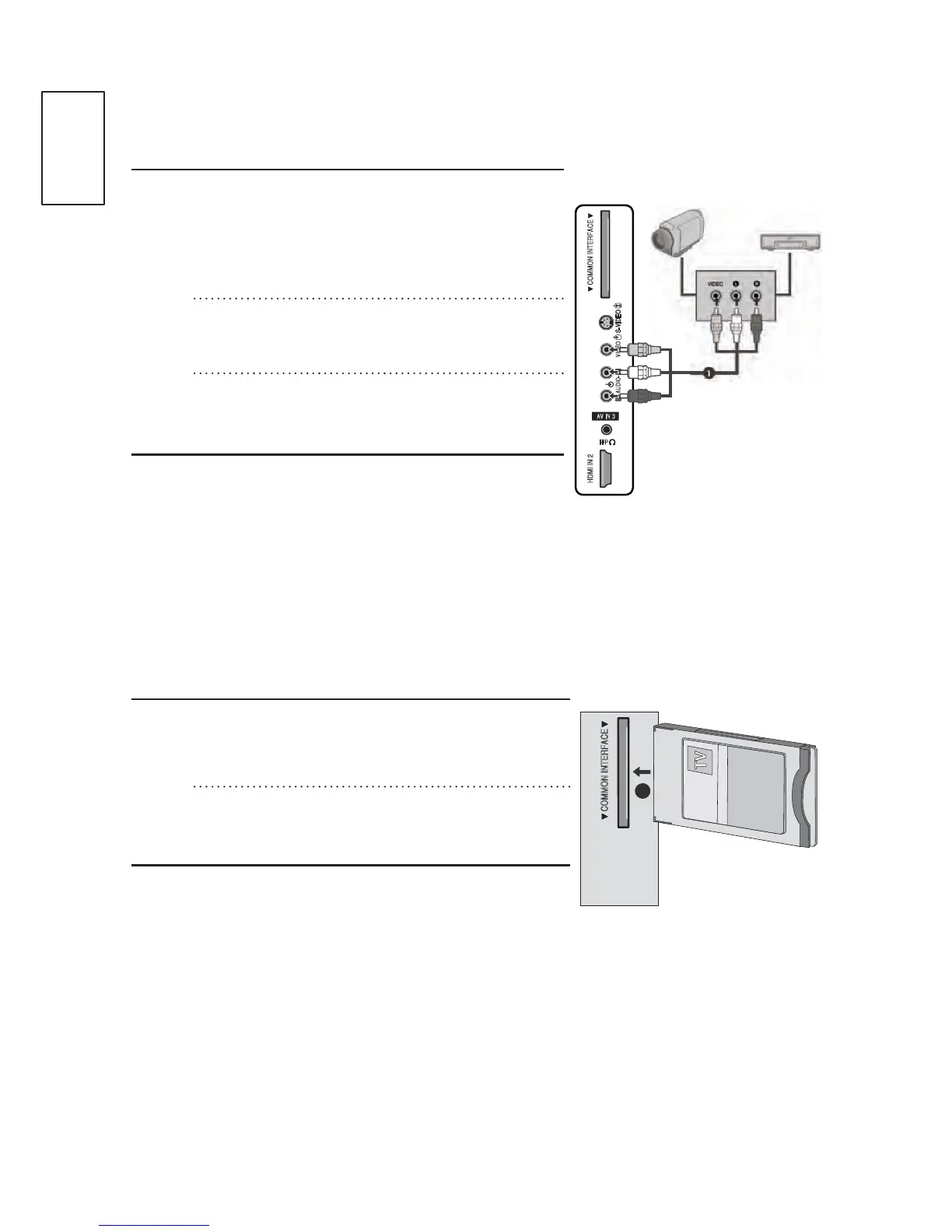
Other A/V Source Setup
n
o
p
Connect the AUDIO/VIDEO jacks
EHWZHHQ79DQGH[WHUQDOHTXLSPHQW
0DWFKWKHMDFNFRORXUV9LGHR \HOORZ
$XGLR/HIW ZKLWHDQG$XGLR5LJKW
red)
Select AV3 (CVBS) input source using
the INPUT button on the remote control.
Operate the corresponding external
HTXLSPHQW5HIHUWRH[WHUQDOHTXLSPHQW
operating guide.
Insertion Of CI Module
- To view the encrypted (pay) services in digital TV mode.
- This feature is not available in all countries.
n
Insert the CI Card to the CI (Common
Interface) CARD SLOT of the TV as
shown.
For further information, see p.60.
AV IN 3
H/P
S-VIDEO
COMMON INTERFACEHDMI IN 2 COMMON INTERFACE
L
R
AUDIO
VIDEO
Camcorder
Video
Game Set
COMMON INTERFACE COMMON INTERFACE
1


 To Next Page