44
ENGLISH
Preset Picture Settings
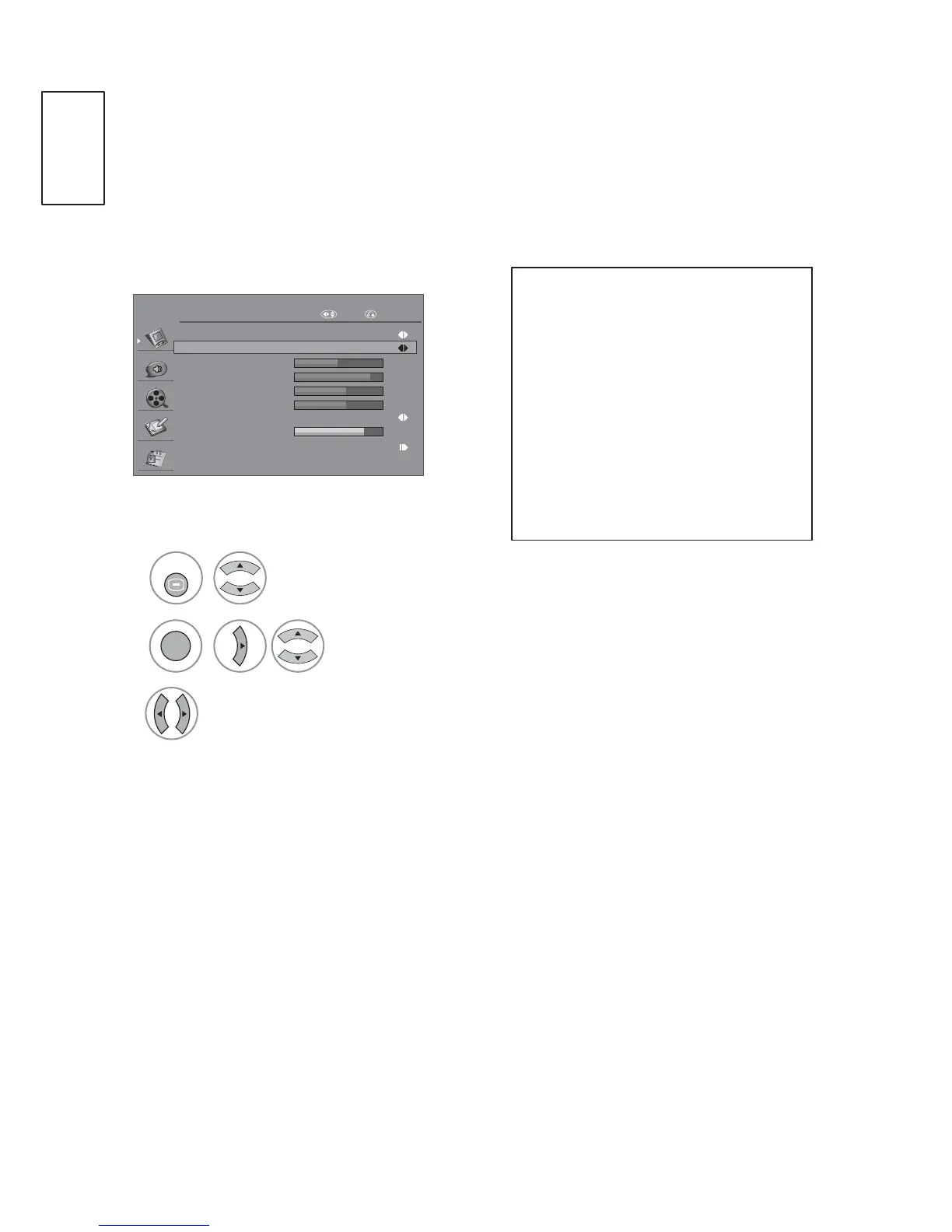
Picture Mode-Preset
You can adjust the best picture appearance from preset value in picture mode..
PICTURE
Aspect Ratio Zoom 1
Picture Mode
Brightness
Contrast
Colour
Sharpness
50
90
60
60
80
Backlight
Sport
Advanced Control
Colour Temperature Normal
Move RETURN
1
2
3
or
MENU
OK
Select PICTURE.
Select Picture Mode.
Select desired Picture Mode.
3UHVVWKHMENU or EXIT button to return to normal TV viewing.
3UHVVWKHRETURN button to move to the previous menu screen.
3LFWXUHPRGHDGMXVWVWKH
TV for the best picture
appearance. Select the
preset value in the picture
mode menu based on the
programme category.
3LFWXUHPRGHFRQWDLQV
“Dynamic, Nature, Cinema,
6SRUW*DPHDQG8VHU”.



 To Next Page