26
ENGLISH
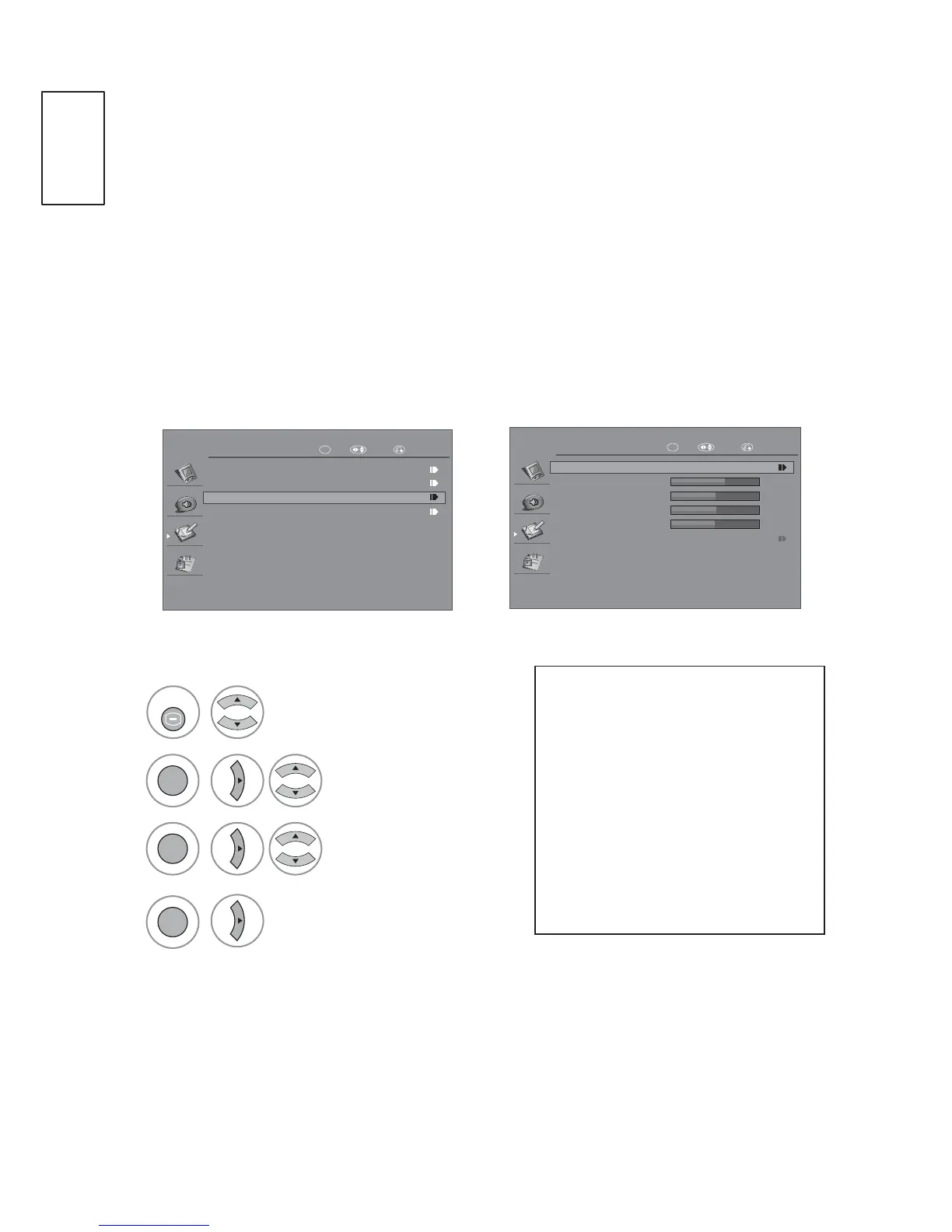
$XWR&RQ¿JXUH5*%>3&@PRGHRQO\
Automatically adjusts picture position and minimizes image instability. After
adjustment, if the image is still not correct, your TV is functioning properly but
needs further adjustment.
$XWRFRQ¿JXUH
This function is for automatic adjustment of the screen position, size, and phase.
The displayed image will be unstable for a few seconds while the auto
FRQ¿JXUDWLRQLVLQSURJUHVV
OK
OPTION
Menu Language
Input List
Screen
Factory Reset
RETURNOK Move
OK
Screen
Auto Config
H.Position
V.Position
Phase
Size
61
49
16
127
Resolution
RETURNOK Move
Select OPTION
Select Screen.
Select $XWR&RQ¿J
Make Appropriate
Adjustments
1
2
or
or
3
4
MENU
or
OK
OK
OK
3UHVVWKHMENU or EXIT button to return to normal TV viewing.
3UHVVWKHRETURN button to move to the previous menu screen.
,IWKHSRVLWLRQRIWKHLPDJH
is still not correct, try Auto
FRQ¿JDJDLQ
,ISLFWXUHQHHGVWREH
adjusted again after Auto
FRQILJXUHLQ5*%3&\RX
can adjust the Position, Size
or Phase manually.


 To Next Page