–
28
–
EN
2C15
–
28
–
EN
2C15
CHANNEL
VIDEO IN
TIMER REC
DVD OUTPUT VCR
L
(mono)
AUDIO IN R
LINE 2
AERIAL
RF OUT
AV2 (DECODER)
DVD/VCR
AV1 (TV)
DVD
DIGITAL
AUDIO OUT
L
R
COAXIAL OPTICAL
ANALOG
AUDIO OUT
S-VIDEO
OUT
VCR
AV1 (TV)
Playing VCR
Playing VCR
to the audio output jack
to 21-Pin
Scart jack
to the video output jack
Recording DVD/VCR (this unit)
Recording DVD/VCR
(this unit)
to AV1 (TV)
Scart jack on
the back of the
DVD/VCR
Using AV from terminals
Using scart jacks
to 21-Pin
Scart Jack
(TV)
(TV)
COPYING A VIDEO TAPE
You can make copies of videotapes made by friends or
relatives for your own enjoyment.
WARNING:
Unauthorized recordings of copyrighted video
tapes may be an infringement of copyright laws.
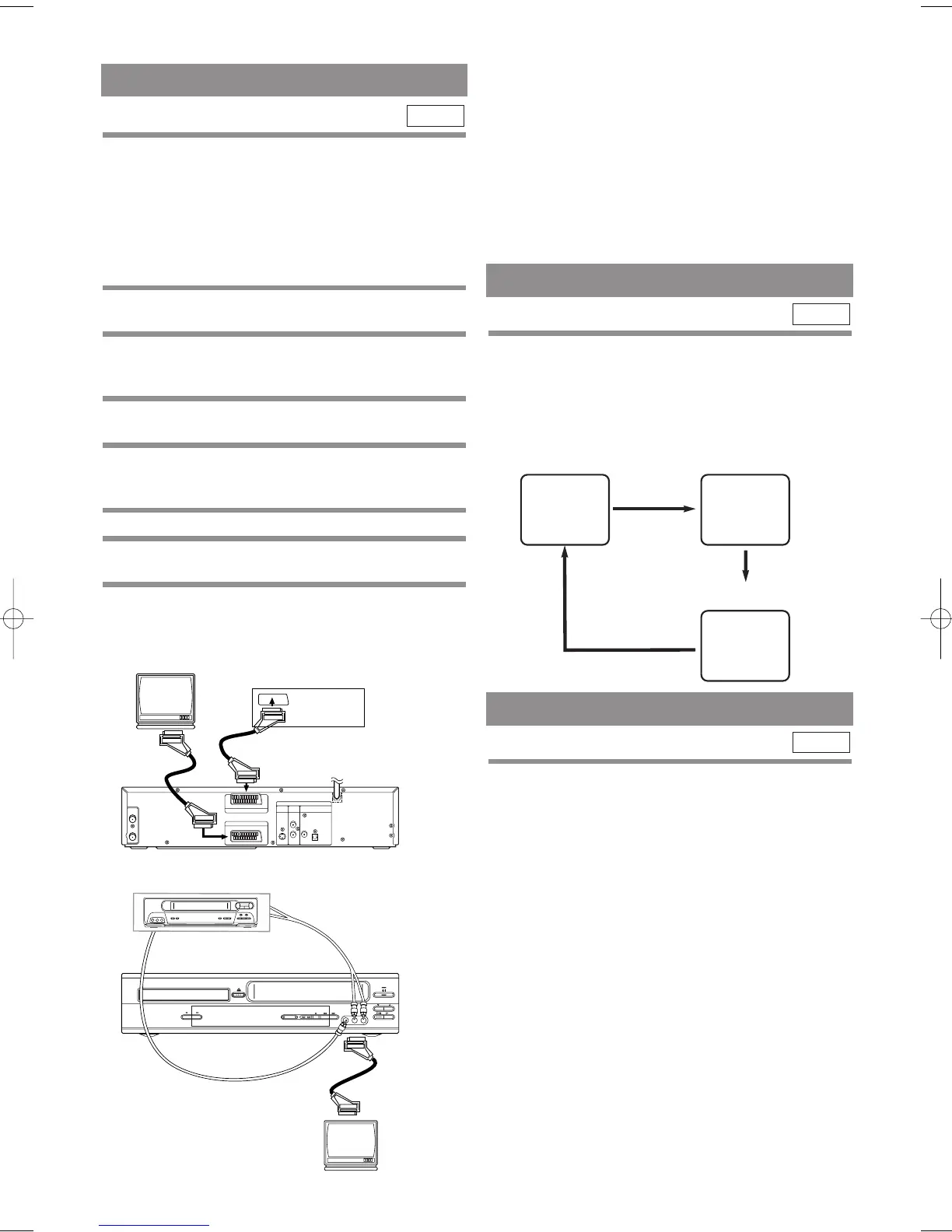
Connect the recording VCR (this unit), playing VCR
(another VCR) and your TV as outline in the following
diagram.
1 Insert a pre-recorded video cassette into
the playing VCR.
2 Insert a blank video cassette, or one you
want to record over, into the cassette com-
partment of the recording DVD/VCR.
3 Press SPEED on the remote control to
select the desired recording speed (SP/LP).
4 Select “AV2” or “AV3” position on the
recording DVD/VCR.
See “OTHER CONNECTIONS” on page 14.
5 Press REC on the recording DVD/VCR.
6 Begin playback of the tape in the playback
VCR.
7 To stop recording, press STOP
( C )
on the
recording DVD/VCR, then stop playback of
the tape in the playing VCR.
VCR
Turn on the TV and select the video channel on the TV.
Notes
• For best results during dubbing, use the DVD/VCR’s
front panel controls whenever possible. The remote
control might affect the playback DVD/VCR's oper-
ation.
• If video or colour fades in and out, you may be copy-
ing a copy guarded video tape.
TO MONITOR THE RECORDING
A STATUS DISPLAY
To check the Counter, or Clock & Channel num-
ber, press DISPLAY. Each time you press the DIS-
PLAY, TV screen will change as illustrated:
When you select the channel using the remote control
number buttons, select the desired channel (position
number).
VCR
■
SP
0:12:34
■
SP
17:40
P02
<CLOCK and CHANNEL
NUMBER mode>
<COUNTER mode>
Press once.
Press once.
Press once.
<OFF mode>
Different countries use different television colour sys-
tems. Tapes recorded in the PAL or NTSC system can
be played back on this unit. Usually, the picture on the
TV screen will be in black and white when you play
back a tape that is recorded in a different colour system.
•
Tapes recorded in the NTSC system can be played
back on this unit and a PAL system TV set. This fea-
ture is only available in the SP mode. When playing
back such tapes, the picture may roll up or down,
shrink vertically and black bars may appear both at the
top and bottom of the screen. Adjust the vertical hold
control on your TV, if the TV features this control.
VCR
TV COLOUR SYSTEM
H9550ED.qxd 03.5.20 3:07 PM Page 28



 To Next Page