9
OVERVIEW OF CONTROLS
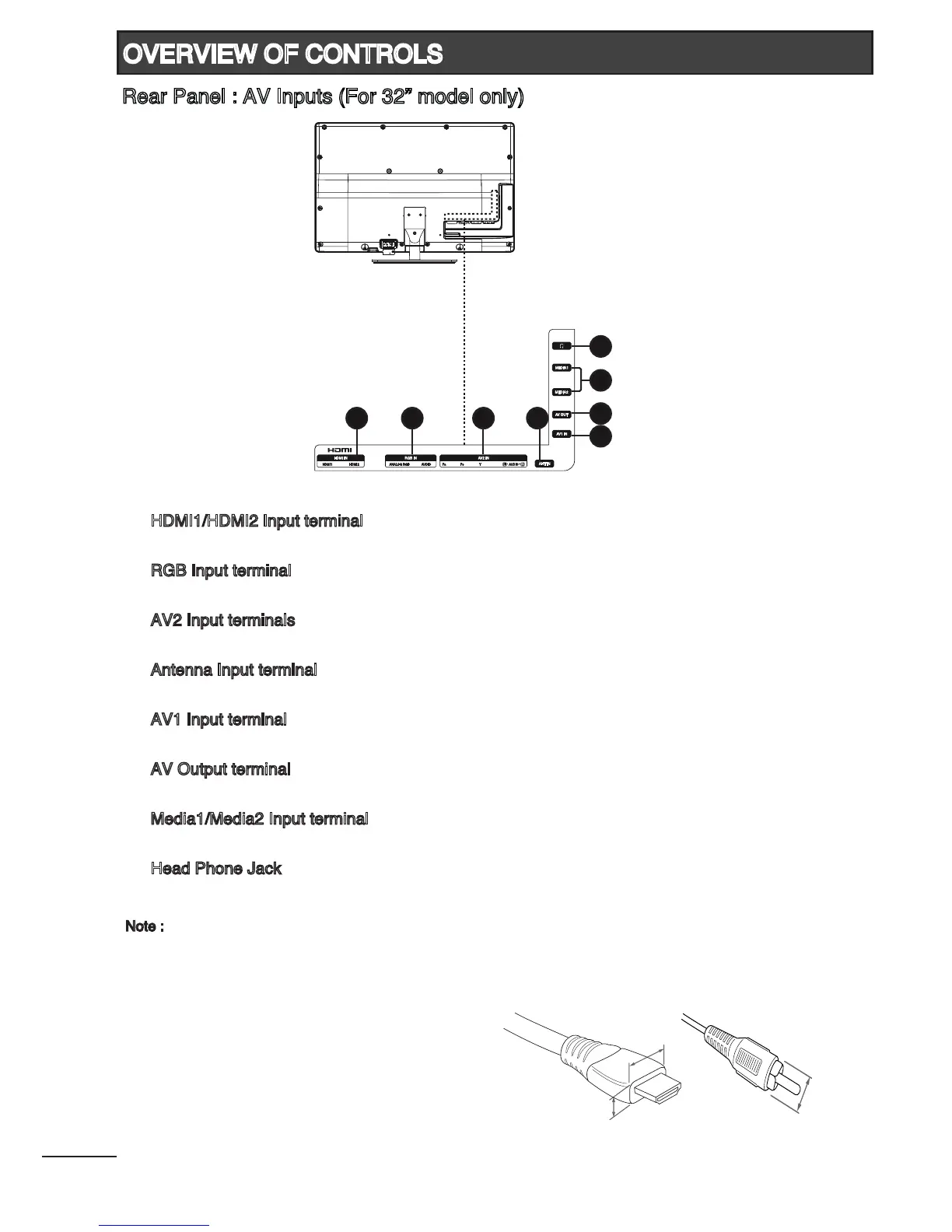
Rear Panel : AV Inputs (For 32” model only)
1. HDMI1/HDMI2 Input terminal
Connect to equipment with HDMI output.
2. RGB Input terminal
Connect to PC.
3. AV2 Input terminals
Connect to equipment with component video output.
4. Antenna Input terminal
Connect to equipment with antenna output or wall antenna socket.
5. AV1 Input terminal
Connect to equipment with composite video output.
6. AV Output terminal
Connect to equipment with composite video input.
7. Media1/Media2 Input terminal
Connect USB storage devices to playback video, music, photo and text les.
8. Head Phone Jack
Connect to head phone.
Note :
- Please use the HDMI cable that support at least HDMI version 1.3. If your HDMI cable does
not support HDMI version 1.3, ickering or no screen display may result.
- To prevent any damage, do not connect to the mains outlet until all connections are completed.
- HDMI Input : Should not exceed 10(H) x 20(W)mm.
* Dimension of (H) should not exceed 10mm.
- AV Input : Should not exceed by 13(D)mm.
1
2 3 4
5
6
7
8



 To Next Page