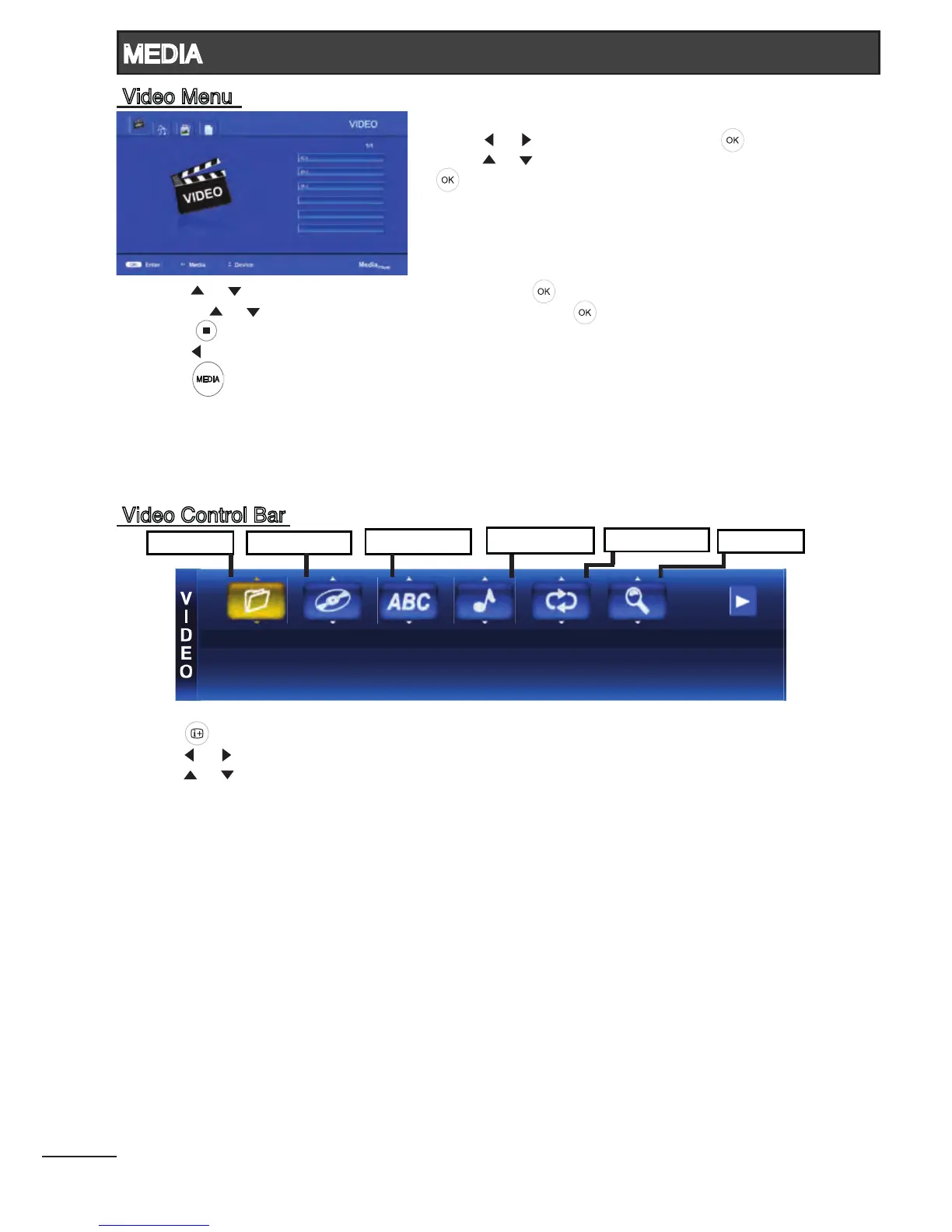
1. Press [ ] / [ ] to select VIDEO. Press [ ] to enter.
2. Press [ ] / [ ] to select the desired drive and press
[ ] to enter.
3. Press [ ] / [ ] to select the desired folder and press [ ] to open the folder;
or press [ ] / [ ] to select the desired video le and press [ ] to start playing.
4. Press [ ] to stop video playing and return to video list.
5. Press [ ] to return to the previous menu.
6. Press [ ] to return to Media Player main menu.
- Press [ ] to display Video Control Bar while playing the video.
- Press [ ] / [ ] to navigate.
- Press [ ] / [ ] to select the desired settings.
Select File : Select the video les stored in the USB storage device.
Select Chapter : Select the chapters in that video le. (if available)
Select Subtitle : Select the subtitle languages. (if available)
Audio Channel : Select the audio channel. (if available)
Repeat Mode : Select from All / None / Current.
Zoom Mode : Select from X1, X2, X4, 1/4, 1/2.
23



 To Next Page