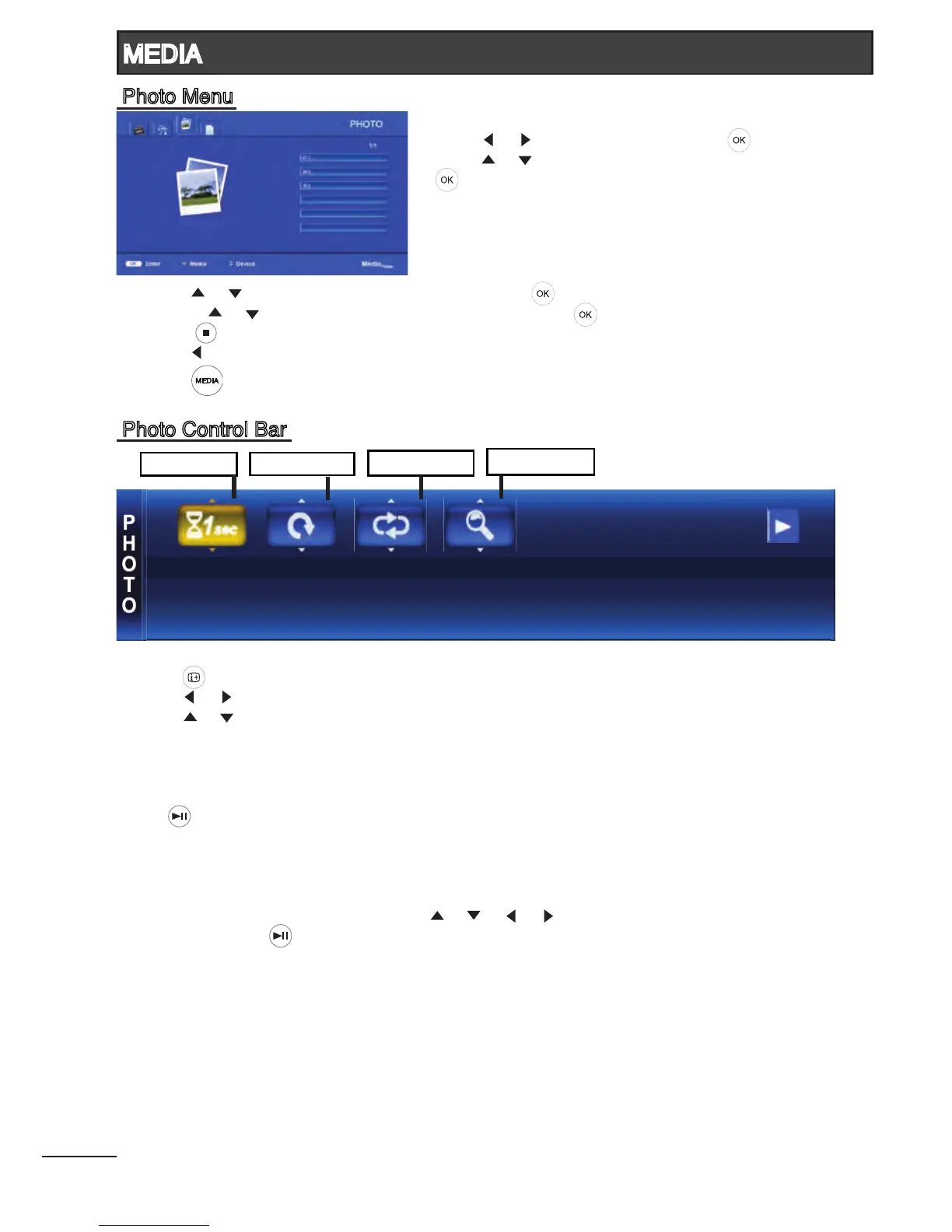
3. Press [ ] / [ ] to select the desired folder and press [ ] to open the folder;
or press [ ] / [ ] to select the desired photo le and press [ ] to start the slideshow.
4. Press [ ] to stop slideshow and return to photo list.
5. Press [ ] to return to the previous menu.
6. Press [ ] to return to Media Player main menu.
- Press [ ] to display Photo Control Bar during photo slide show.
- Press [ ] / [ ] to navigate.
- Press [ ] / [ ] to select the desired settings.
Slide Time : Select slideshow time intervals of 1sec, 3secs and 5secs.
Rotate Photo : Select the rotating angle of 90, 180 and 270 degrees.
Press [ ] to continue the slideshow.
Repeat Mode : Select modes between “None” and “All”.
Zoom Mode : Select from X1, X2, X4, 1/4, 1/2.
In zoom mode, you can use [ ] / [ ] / [ ] / [ ] to pan the zoomed picture.
Press [ ] to continue the slideshow.
25
Slide Time
Rotate Photo
Repeat Mode
Zoom Mode
MEDIA
Photo Control Bar
Photo Menu
1. Press [ ] / [ ] to select PHOTO. Press [ ] to enter.
2. Press [ ] / [ ] to select the desired drive and press
[ ] to enter.




 To Next Page