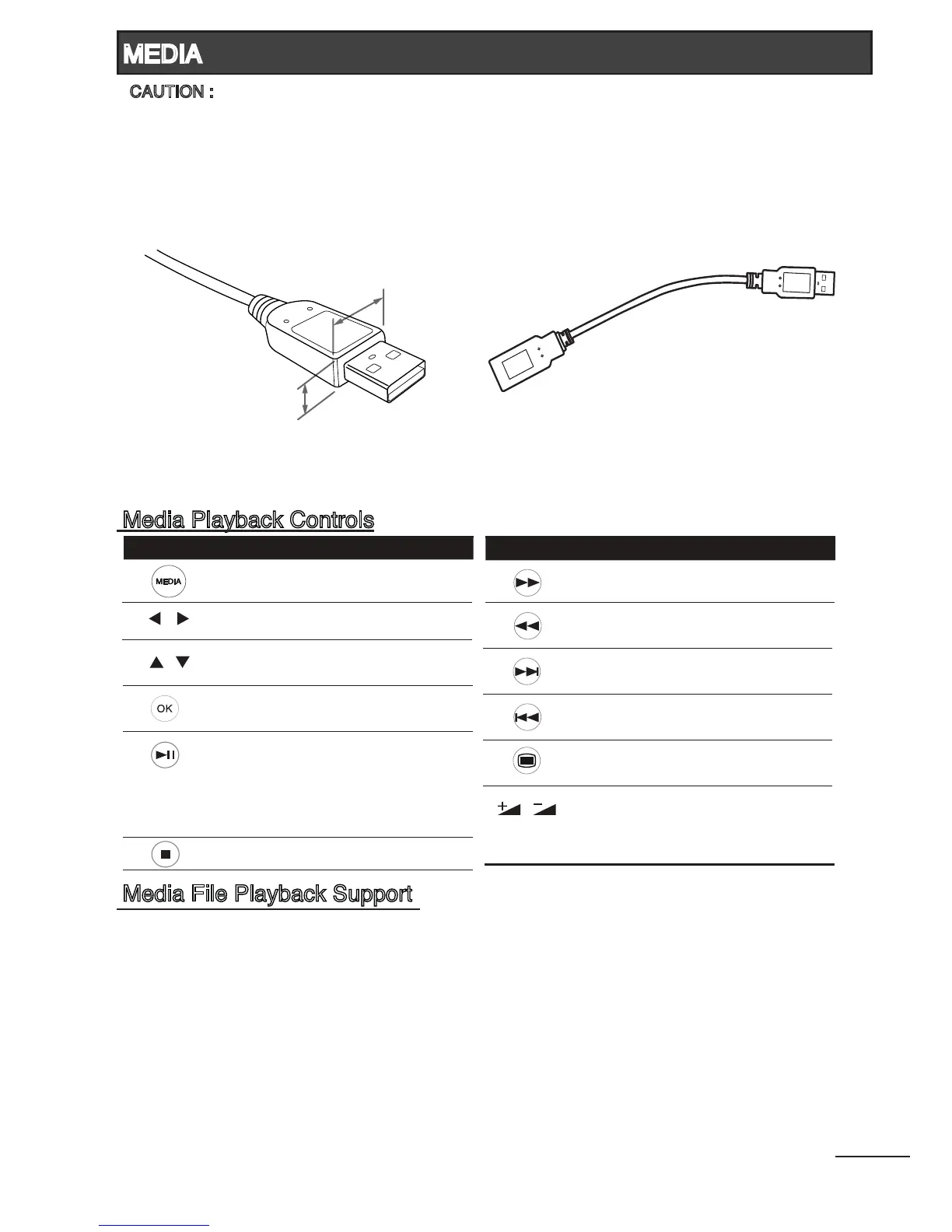
CAUTION :
In situation whereby the cable insertion of USB storage device is restricted, you may use the
USB extension cable provided.
1. Media Input : Should not exceed by 7(H) x 18(W)mm.
* Dimension of (H) should not exceed 7mm.
Video Supporting File
Video Format : DivX, MPEG2, MPEG4, H264/AVC, RMVB
Resolution(max) : 1920 x 1080
Frame rate : under 30 frames / sec (1920x1080)
Audio format : mpeg, mp3
Music Supporting File : (*.mp3)
Photo Supporting File : (*.jpg)
Text Supporting File : (*.txt)
22
Button Action
Press to select a folder or media
file.
•
Press to open a folder.
Press to start playback.
•
•
In pause mode, press to resume
playing.
•
•
Press to start/pause the playback.
In search forward/backward mode,
press to resume playing.
•
Press to stop the playback.•
During the playback, press to
search forward.
•
During the playback, press to
search backward.
•
During the playback, press to skip
to the next track.
•
During the playback, press to skip
to the previous track.
•
Press to enter or exit TV menu.•
/
Press to adjust the volume of the
playback.
•
Button Action
Press to select types of media modes.
(VIDEO, MUSIC, PHOTO, TEXT)
•
Press to return to Media Player main
menu.
•
/
/



 To Next Page