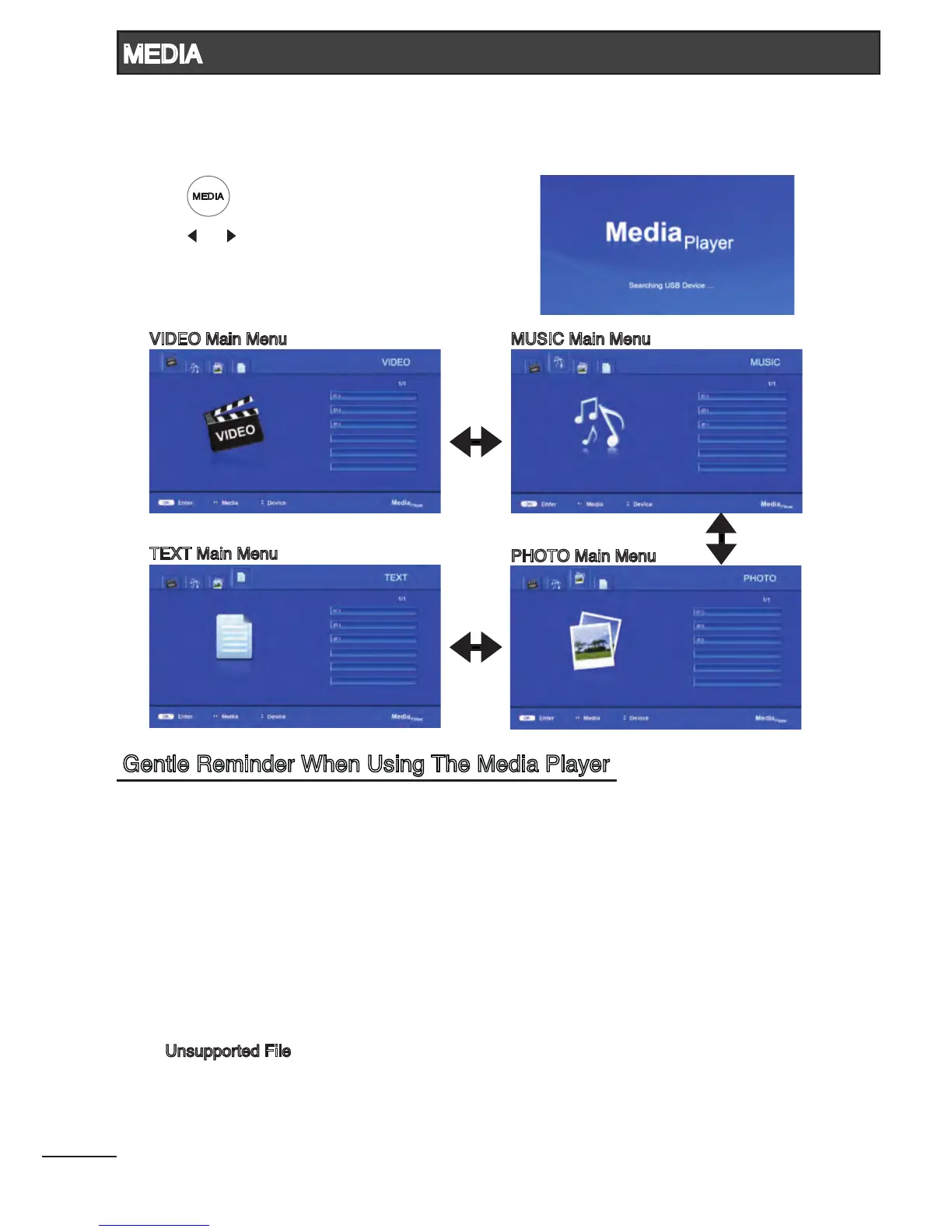
You can view video, music, photo and text les from your USB storage devices. Depending on which
media input terminal you connect rst, that particular USB port will be named as C:\ drive follow by D:\ .
1. Connect USB storage device to MEDIA1 / MEDIA2 input terminal.
2. Press [ ] to enter Media Player mode.
3. Press [ ] / [ ] to select the types of media modes.
(VIDEO, MUSIC, PHOTO and TEXT)
4. Refer to page 23 - 26 for more instructions.
1. Some USB storage devices may not be compatible to operate smoothly with this TV.
2. Back up all of the data in the USB storage device in case if data was lost due to unexpected
accident. We do not assume any liability for the losses by misuse or malfunction. Data backup
is consumer’s responsibility.
3. For large le sizes, the loading speed may be slightly longer.
4. The recognition speed of a USB storage device may depend on each device.
5. When connecting or disconnecting the USB storage device, ensure that the TV is not in MEDIA
mode otherwise the USB storage device or the les stored in it may be damaged.
6. Please use only a USB storage device which is formatted in FAT16, FAT32, NTFS le system
provided with the Windows operating system. In case of a storage device formatted as a different
utility programme which is not supported by Windows, it may not be recognized.
7. When using a USB Hard Disk Drive which requires electric power source, ensure its power does
not exceed 500mA.
8. An “Unsupported File” message will be displayed if the le format is unsupported or corrupted.
VIDEO Main Menu MUSIC Main Menu
TEXT Main Menu
PHOTO Main Menu
21
MEDIA
Gentle Reminder When Using The Media Player



 To Next Page