INSTALLATION
Step 4
Set up the TV by following the instructions.
- Press [ ] to display the TV menu.
- Press [ ]
/
[ ] to select “Setup”.
- Press [ ] to select “Color System”
- Press [ ]
/
[ ] to select “Auto”.
- Press [ ] to select “Sound System”.
- Press [ ]
/
[ ] to select the correct sound
system according to local TV station.
- Press [ ] to select “Auto Tuning”.
- Press [ ] to start searching for all the available channels.
Select Adjust
Channel No.
Skip
Color System
Sound System
Manual Tuning
Fine Tuning
Auto Tuning
Channel Sorting
Volume Leveller
SETUP
1
Off
PAL
BG
175.25MHz
0
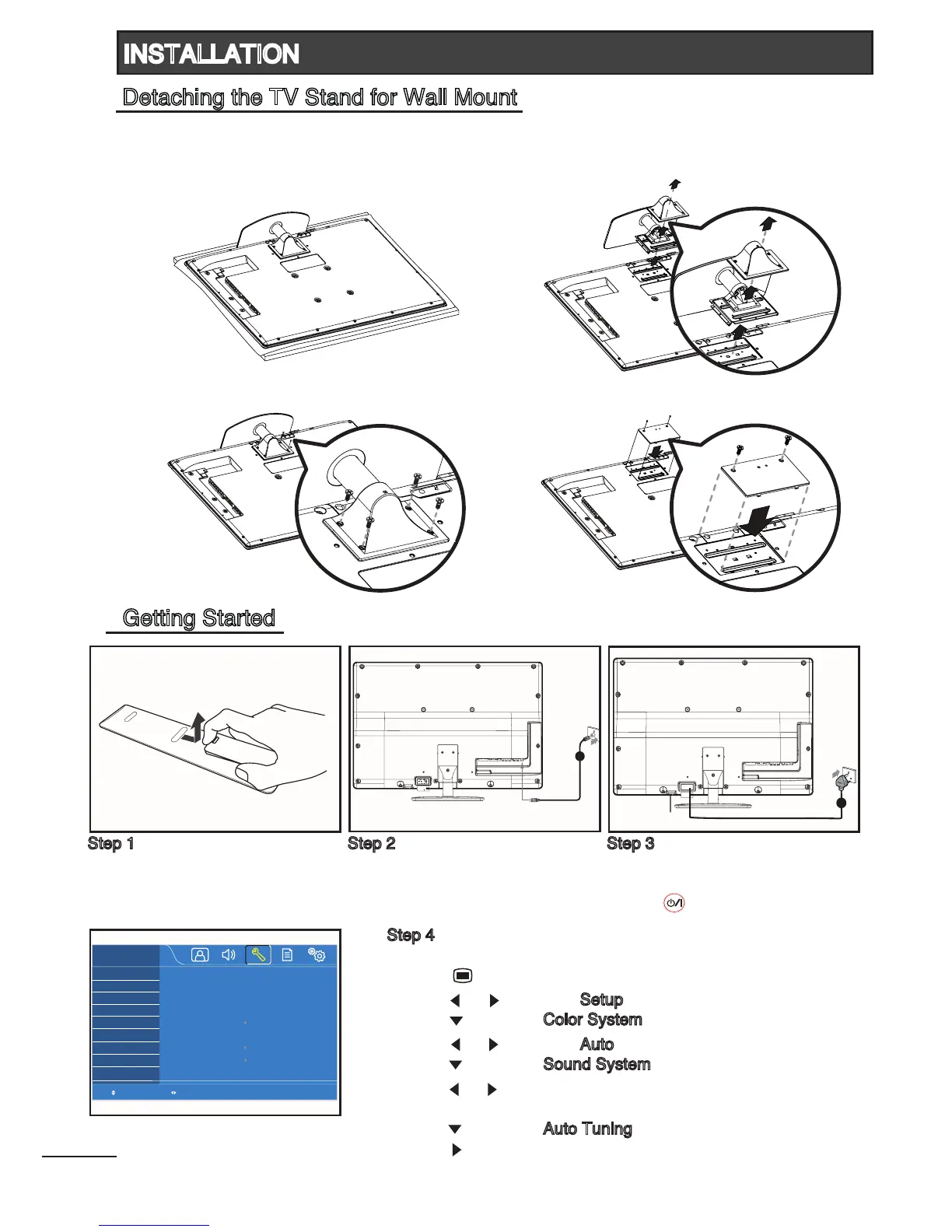
Detaching the TV Stand for Wall Mount
Step 1
Insert the batteries (supplied) into
the remote control unit.
Step 2
Connect the antenna cable to the
antenna input terminal at the rear
of TV.
Step 3
Plug in the power cord, then switch
on the main power switch.
Press [ ] on the remote control unit.
Getting Started
Before mounting the TV on the wall, the TV stand must be removed.
1
Carefully place the TV with its front side
facing down on a cushioned flat surface.
3
Remove the TV stand with two hands.
2
Unscrew and remove the 4 screws as shown.
4
Attach the cap as shown.



 To Next Page