Error! Reference source not found.
10-9
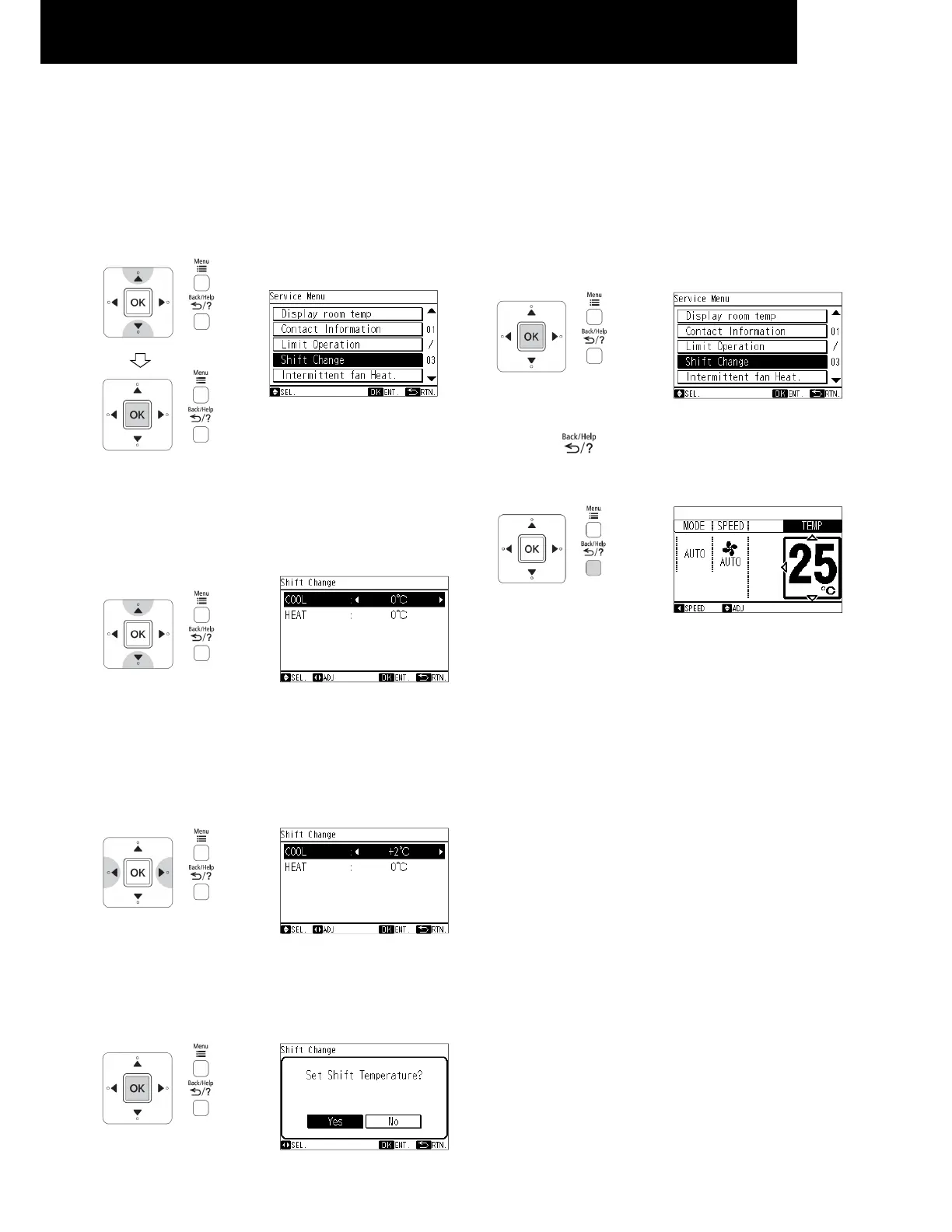
10.3.3 SHIFT VALUE CHANGE
The shift value setting temperature for cooling and heating
mode operation can be changed.
1 Select "Shift Change" from the service menu and press
"OK". The shift change setting will be displayed.
2 Press "△" or "▽" to select the operation mode.
( "COOL" or "HEAT" )
3 By pressing "△ "or "▽", the shift value will be changed as
below.
"....+3℃ <--> -3℃ <--> -2℃ <--> -1℃ <--> 0℃ <--> +1℃
<--> +2℃ <--> +3℃ <--> -3℃..."
4 Press "OK" to finish the shift value setting. The
confirmation screen will be displayed.
5 Select "Yes" by pressing "△ "or "▽" and press "OK".
The setting will be confirmed and the screen will return to
the service menu.
6 Press " "(return/help) to return to the normal
mode.
NOTE
• When the setting is done, fan speed will be
changed to “silent”.
• This setting cannot use during operation.
• The “shift value change” setting will remain
unchanged after the unit is turned off.




 To Next Page