Error! Reference source not found.
10-12
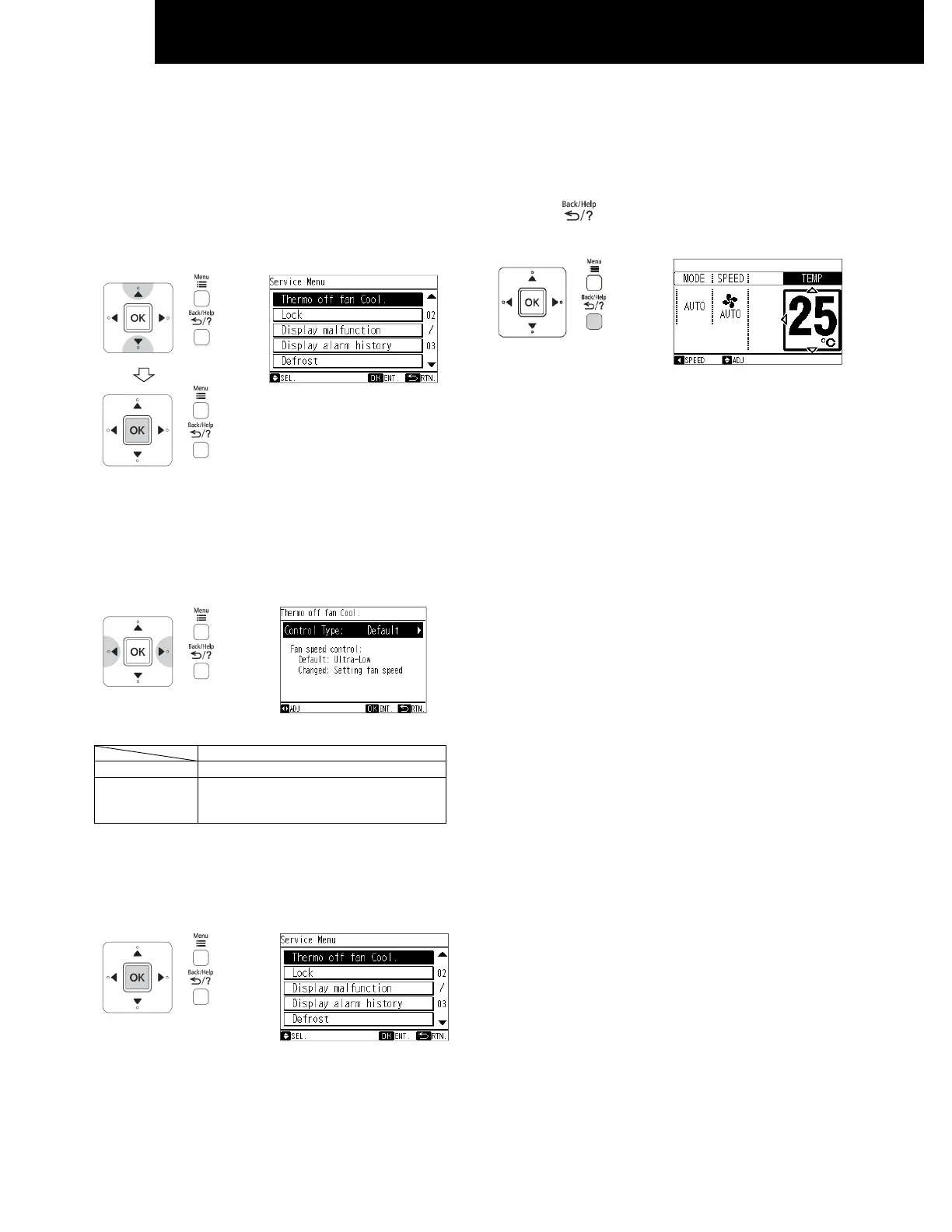
10.3.6 FAN SPEED DURING THERMO OFF
The fan speed during thermo off in Cooling mode can be changed.
1 Select "Thermo off fan Cool." from the service menu and
press "OK".
The fan speed during themo off setting will be displayed.
2 By pressing "△ "or "▽", the "Control Type" will be
changed as below.
"Default" <---> "Changed"
Fan speed during thermo off
Default Ultra low
Changed Set fan speed
(When auto fan is set, the fan speed is
low)
3 Select "Yes" by pressing "△ "or "▽" and press "OK".
The setting will be confirmed and the screen will return to
the service menu.
4 Press " " to return to the normal mode.
NOTE:
• This setting cannot use during operation.
• The fan speed during thermo off setting will remain
unchanged after the unit is turned off.




 To Next Page