Error! Reference source not found.
10-10
10.3.4 OPERATION LOCK
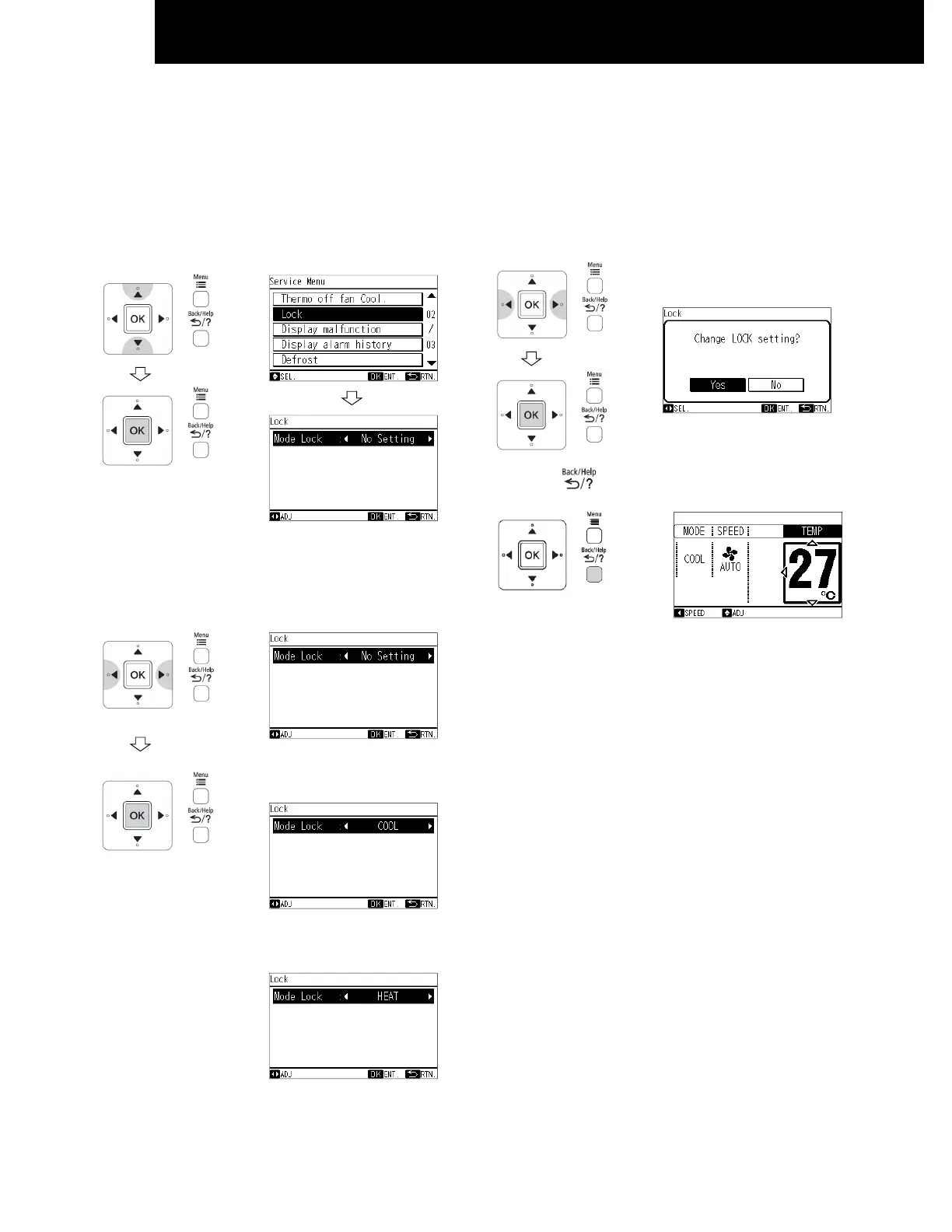
This function is used to lock the operation mode from the remote controller.
The remote controller can be set to fix the "Heating" mode (including "Fan"), "Cooling" mode and "Dehumidifying" mode
(including "Fan") operations.
1 When unit is OFF, select "Lock" from the service menu
and press "OK".
The screen of "Mode Lock" selection will be displayed.
2 By repeatedly pressing "△ "or "▽", the indication is
changed in order of "No Setting" <---> "COOL" <--->
"HEAT"
Select the function target and press "OK".
The confirmation screen will be displayed.
When this function is not
used
When "Cooling" mode lock is
selected
When "Heating" mode lock is
selected
3 Select "Yes" by pressing "△ "or "▽" and press "OK".
The setting will be confirmed and the screen will return to
the service menu.
4 Press " " to return to the normal mode.
Example: Select "Cooling"
mode lock
NOTE:
The operation lock setting will remain unchanged after the
unit is turned off.




 To Next Page