Error! Reference source not found.
10-18
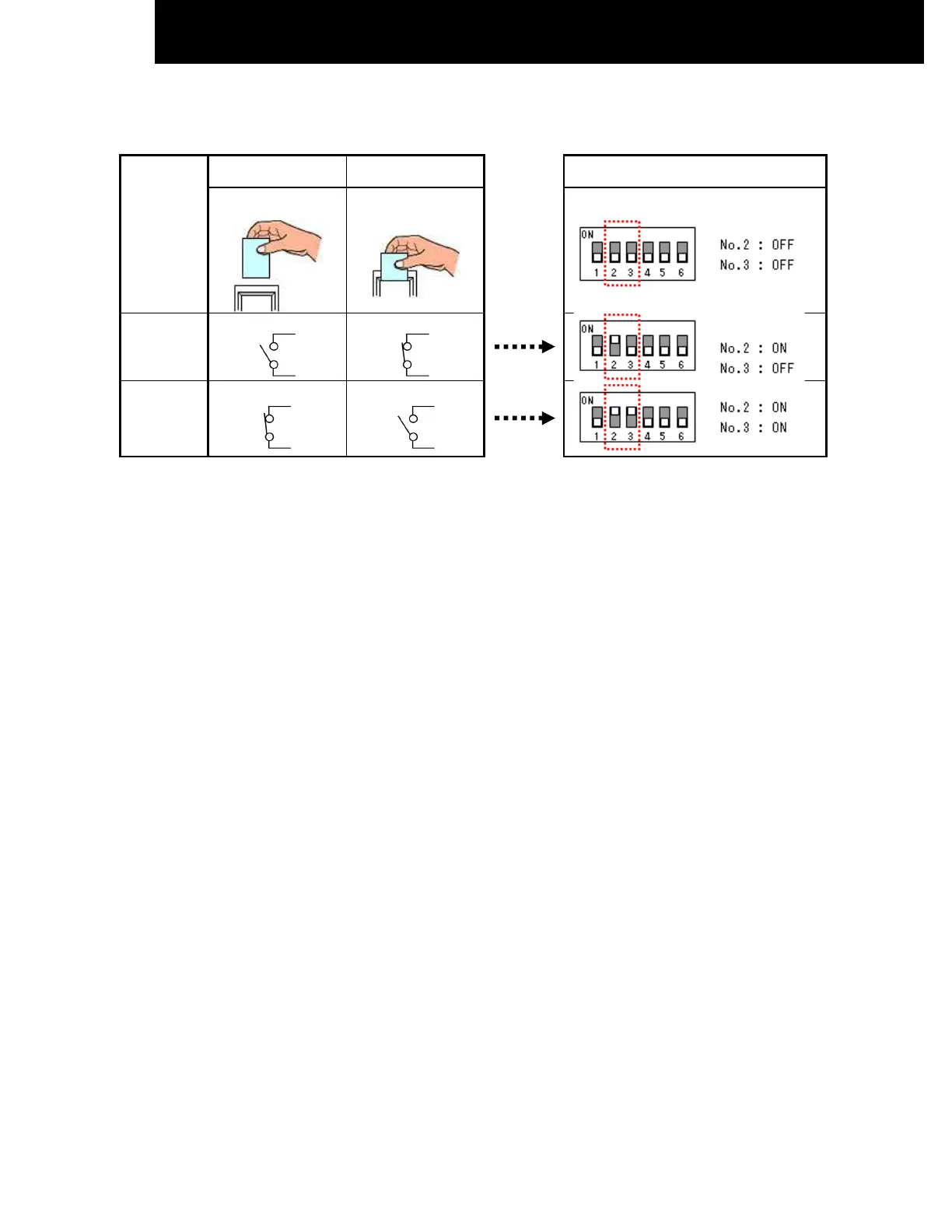
• Please decide the type of dry contact you will be using and set the position of the DIP Switch No. 2 and 3 accordingly
[1] CHECK DRY CONTACT OF CARD KEY UNIT [2] SET THE POSITION OF DIP SWITCH
AIR CONDITIONER
Standby
AIR CONDITIONER
Operating
POSITION CONDITION OF DIP SWITCH
CARD KEY
(Door
Switch)
REMOVE INSERT
INITIAL CONDITION
(CARD KEY NO USE)
Contact
type a
OPEN CLOSE
Contact
type b
CLOSE OPEN
After all connection has been done as below diagram, ON the breaker and push ON button of wireless remote controller or
wired remote controller to operate the air conditioner unit.
• When the CARD KEY is in insert condition, the air conditioner operation is allowable by remote controller.
• When the dry contact switch on the Card Key Unit is open (refer to diagram below for contact type a), the unit stops to
operate (it takes 10 seconds to stop the unit operation after the dry contact switch on the card key turns off) and vice
versa.
• When the card key is removed from the Card Key Unit, the wireless remote controller cannot be used.
• When the card key is removed from the Card Key Unit, the wired remote controller LCD display is activated; however it
has no control over the unit.
• The suitable accessory Connecting Cord (accessory code#: SPX-WDC3) need to be used to connect the Card Key Unit’s
dry contact switch to the connector on the control board of the indoor unit. Please refer to Table 1 to select suitable
accessory code# for the concerning indoor model.
LO Input Active




 To Next Page