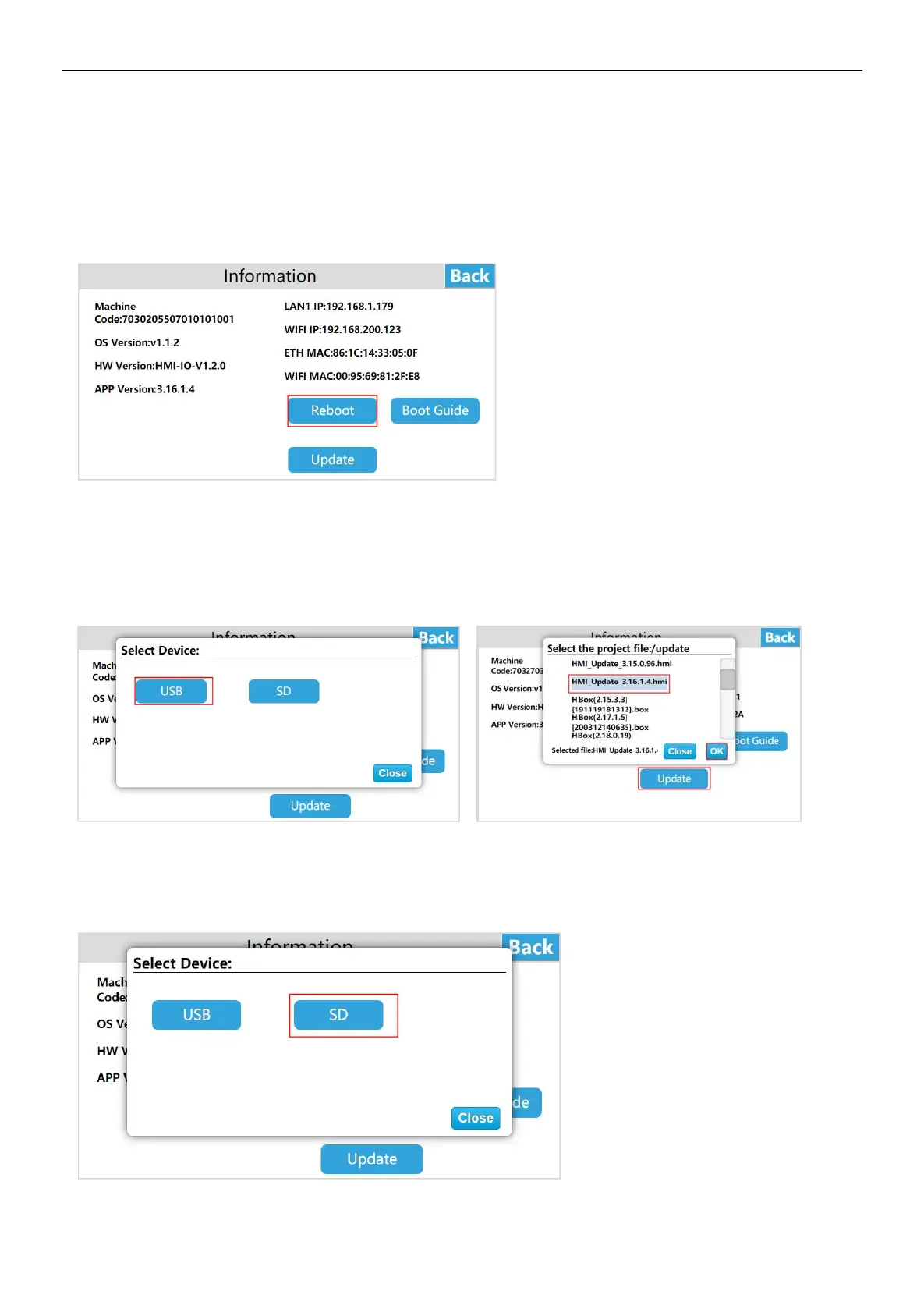
System Information
① Reboot
The user enters the HMI background settings interface, click [Information], select [Reboot], then can restart the HMI device;
also can restart the device through the device manager, the operation method can refer to "Device Manager-Restart Device"
Instructions for use.
Related topic: How to restart the HMI device through the device manager?
② Firmware update
U disk update firmware
Enter the HMI background settings, click [Information], select [Update], enter the firmware upgrade interface, select [USB], then
select the appropriate firmware update package, and click [OK] to upgrade the firmware. After the upgrade is successful, the
device will restart.
SD card update firmware
Enter the HMI background settings, click [Information], select [Update], enter the firmware update interface, select [SD], select
the appropriate firmware update package, and click [OK] to update the firmware. After the update is successful, the device will
restart.


 To Next Page