HomeSecure HS-PRO-01 Manual: 22-08-2014
Copyright © 2015 HomeSecure
28
7.3.1 Arm with Open Doors
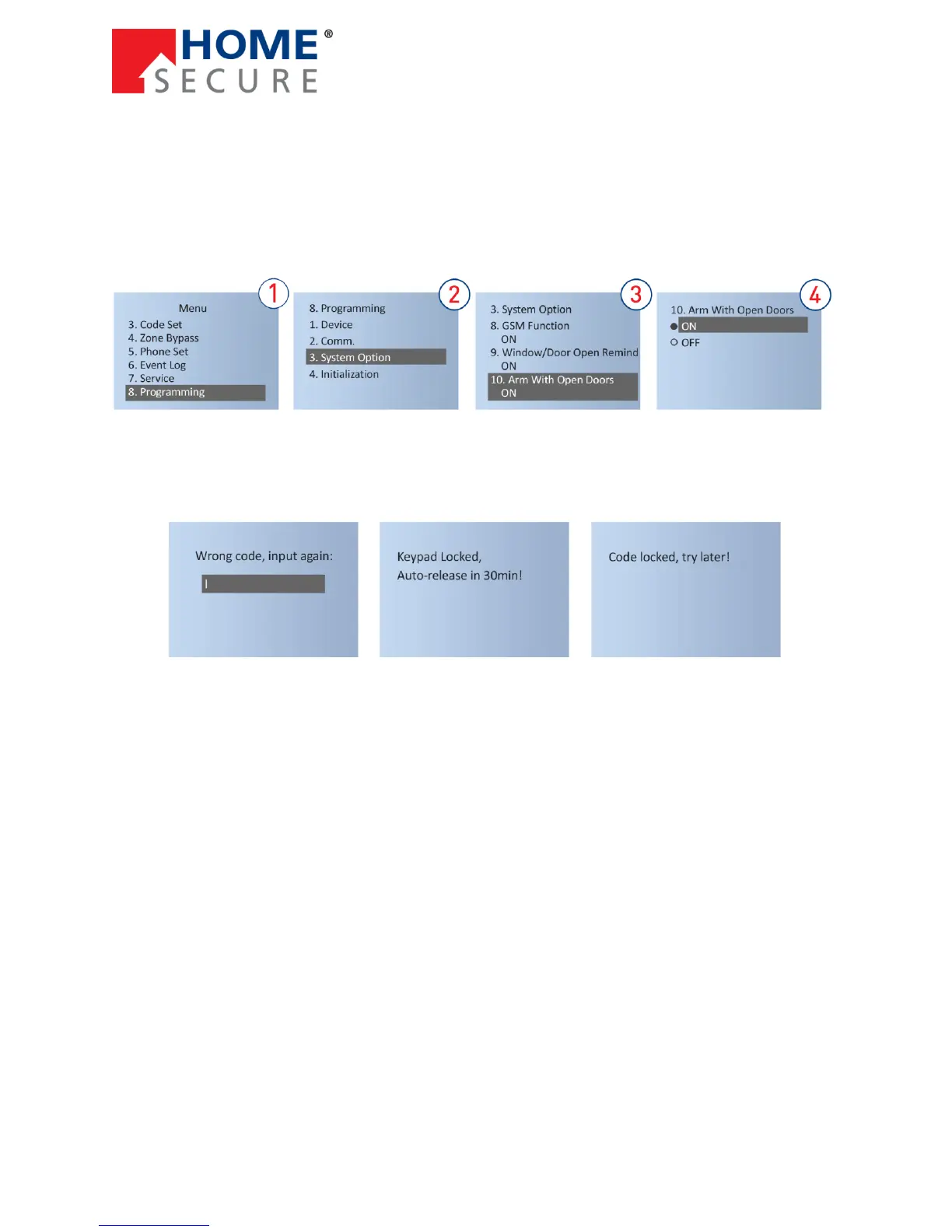
If you want to arm the alarm system in spite of having open doors or windows, you must set this
function to ON (standard). If the function [Arm With Open Doors] is set to [OFF], it will not be possible to
arm the alarm system before all doors and windows have been closed. When you attempt to arm the
alarm system, the voice guide will say, ”Window or door is open. Arm fail.”
To set the function [ON]/[OFF]:
7.4 Keypad Lock
If you input the wrong code 5 times in a row, the alarm panel will be locked. The voice guide
says, ”Wrong code, please re-input!”, and the LCD display shows:
If you input wrong code 5
times in a row, the alarm
panel is locked.
If you attempt to operate
the alarm panel while it is
locked, the voice guide
says, ”Access locked,
please try later!”
The alarm panel is automatically unlocked after 30 minutes.
If the alarm system is triggered before the 30 minutes run out, it is unlocked so you can input the code
to disarm the alarm system.
You can also restart the alarm system by unplugging the power supply and the backup battery to reset
access.


 To Next Page