HomeSecure HS-PRO-01 Manual: 22-08-2014
Copyright © 2015 HomeSecure
38
10.1 Wireless zone monitoring
The wireless devices emits a tracking signal to the alarm panel at specific intervals. If the system does
not receive this signal the device will be considered as "lost" (loss).
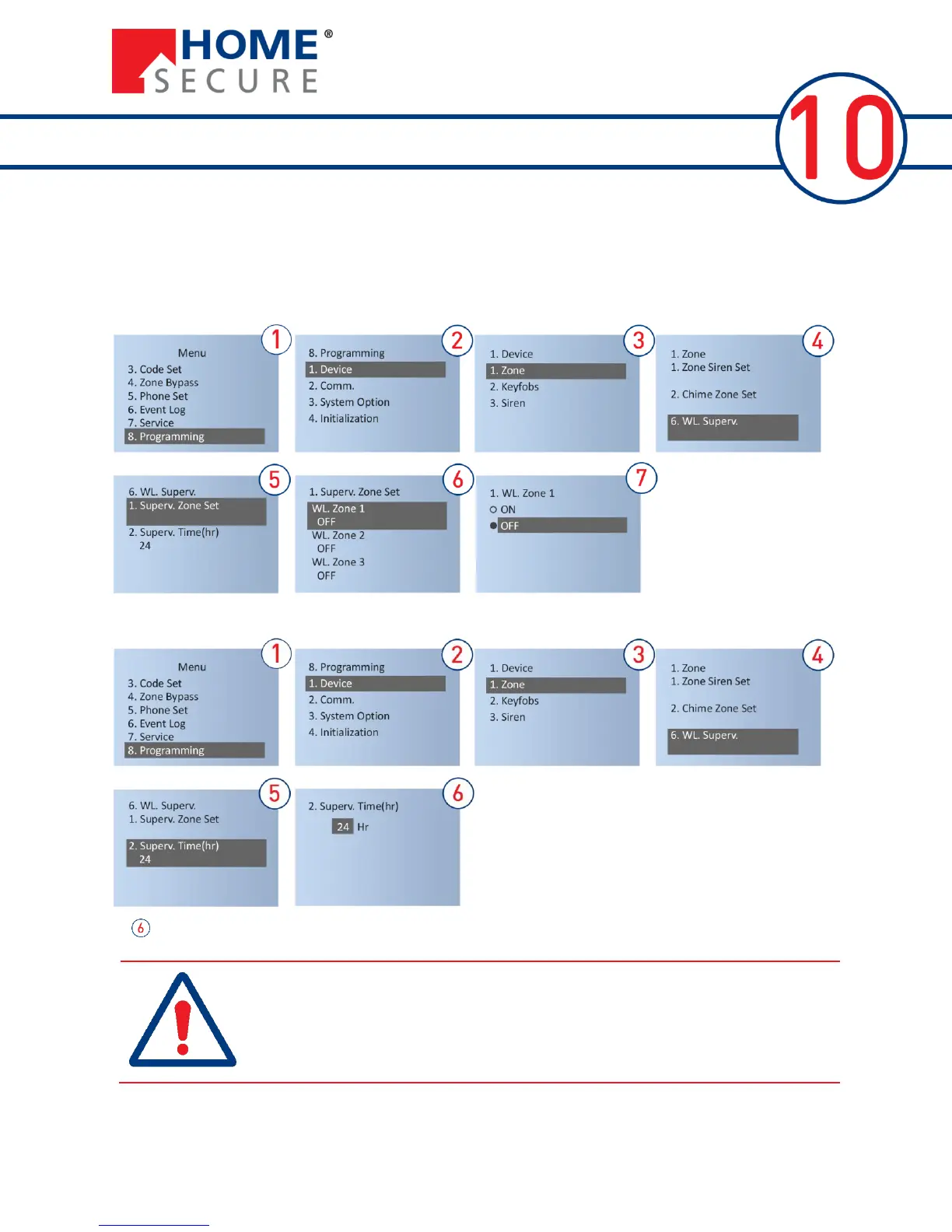
To turn monitoring on or off for each zone:
Set the monitoring interval. The alarm system monitors sensors in this range.
At , enter the desired monitoring interval in hours (2-99)
Set the monitoring interval. The alarm system monitors sensors in this We
recommend that zone monitoring is plugged in, but it shortens the battery life
of the sensors. If you do want to turn it off, Zone Supervision is set to OFF
above and the SS signal must be deactivated from physically on the sensors
(see sensor manual for details).


 To Next Page