HomeSecure HS-PRO-01 Manual: 22-08-2014
Copyright © 2015 HomeSecure
47
14.1 PGM output settings
Here you determine which parameters to trigger the PGM compound, which is made under [3.2 Connect
Corded Devices] on page 8. Below is a list of the parameters you choose. It is also possible to use
SMS/App to manually trigger the PGM output.
Deactivates or PGM cut-off
Zone 17- 19, 21, 22 og 30
alarm
Deactivates or PGM cut-off
Cut-off after the PGM session
Telephone line supervision
trouble
By changing the activation status
By changing the activation status
By changing the activation status
Deactivates or PGM cut-off
Deactivates or PGM cut-off
Deactivates or PGM cut-off
Deactivates or PGM cut-off
Deactivates or PGM cut-off
Deactivates or PGM cut-off
Deactivates or PGM cut-off
Deactivates or PGM cut-off
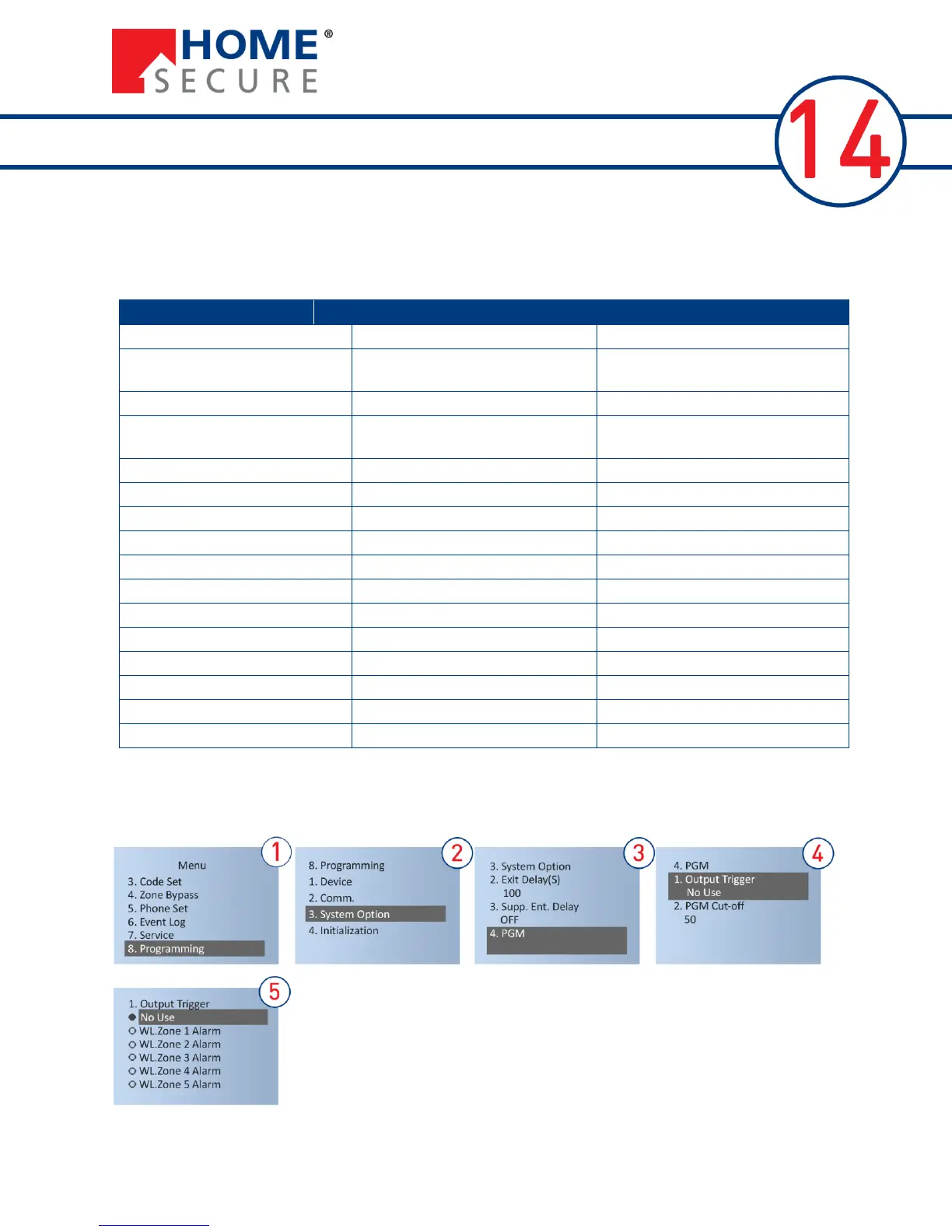
Follow the steps below to select the parameter:


 To Next Page