5 Commissioning
Rotary actuators 135 • M140 • M150 • M180
20 Version 2.0 - June 2012 Operating instructions
5.1 Setting a limit position switch
You need to set the limit position switch before you can take the rotary actuator
into operation. Set the two limit position switches separately. Try out the sequence
of operations for each limit position switch once.
Risk of damage from incorrectly set limit position switches
The limit position switches WE 1 and WE 2 turn off the motor in a path-dependant
way.
Do not change the factory setting if the actuator is delivered together with the flap.
• If actuator and flap are delivered separately, set the limit position switches
WE
1 (di
rection of rotation clockwise) and WE 2 (direction of rotation anti-
clockwise).
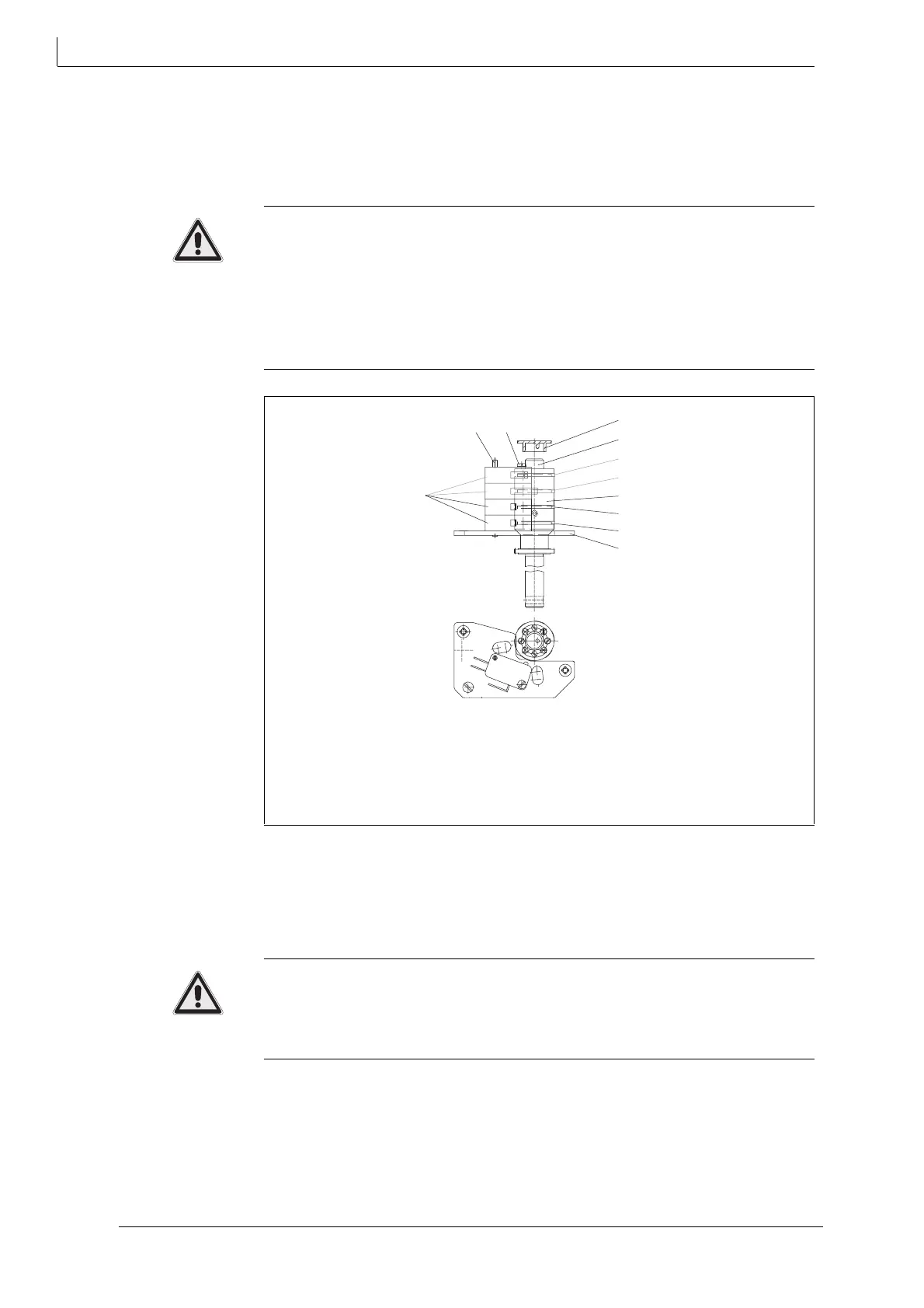
Hint: The cam disks (45.1) to (45.4) inside the cam block (40) can be adjusted
separately. The pairs of screws are allocated to each cam ring by height.
How to set limit position switches WE 1 and WE 2
Risk of injury from electric shock by live parts!
When the supply voltage is turned on there is a risk of electric shock from live
parts.
• Take care not to touch any live parts.
1 Remove the hood (200).
4.4 Assembling/disassembling a hood on page 13
2 Pull off the pointer (64) off the shaft (12).
3 Remove the respective pair of screws.
4 Move the actuator in the respective end position.
12 Shaft
40 Cam block
45.1Cam disk for WE 1
45.2Cam disk for WE 2
45.3Cam disk for WE 3
45.4Cam disk for WE 4
64 Pointer
106 Path switch / limit position switch
170 Path switch board
350 Pin
393 Slotted screw
Fig. 13 Setting limit position switch
WE
WE
106
350
393
64
12
45.4
45.3
40
45.2
45.1
170



 To Next Page