4 Assembly
Rotary actuators 135 • M140 • M150 • M180
16 Version 2.0 - June 2012 Operating instructions
4.6 Fitting accessories
Accessories are not part of the scope of delivery for the rotary actuator unless
expressly ordered! The rotary actuators are prepared for retro-fitting with:
• Path switch (106)
• Potentiometer (180)
• Actuator heater (190)
2.2 Accessories on page 7
4.6.1 Fitting path switches WE 3 and WE 4
Risk of injury from electric shock by live parts!
When the supply voltage is turned on there is a risk of electric shock from live
parts.
• Prior to commencing any work, ensure that the actuator is safely disconnected
from the power supply system.
• Secure against unauthorised restarting.
1 1 Remove the hood (200).
4.4 Assembling/disassembling a hood on page 13
2 Remove slotted screw M3 x 25 (393) and thrust washer.
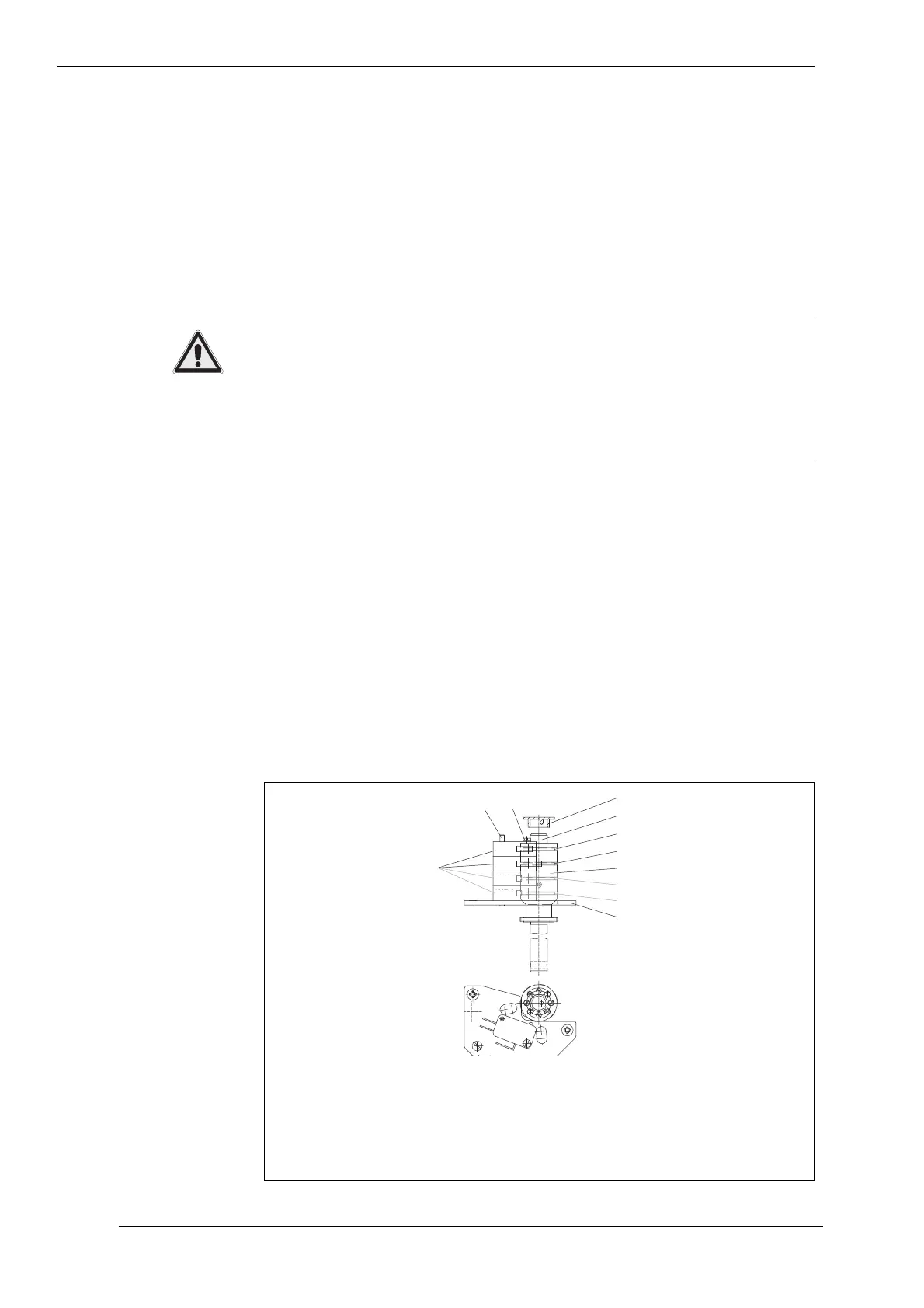
3 Put path switches WE 3 (45.3) and WE 4 (45.4) on pin (350).
4 Secure path switches WE 3 (45.3) and WE 4 (45.4) with slotted screw M3 x 45
(393)
an
d thrust washer.
5 Run the cables for the path switches to the angle bracket.
6 Secure the terminals for the pacam diskth switches with the slotted screws on
the angle bracket at terminal designations 20, 21, 22 and 23, 24, 25.
Fig. 9 Wiring diagram on page 15
7 Set the path switches.
5.2 Setting the potential-free path switches on page 21
12 Shaft
40 Cam block
45.1Cam disk for WE 1
45.2Cam disk for WE 2
45.3Cam disk for WE 3
45.4Cam disk for WE 4
64 Pointer
106 Path switch / limit position switch
170 Path switch board
350 Pin
393 Slotted screw
Fig. 10 Fit path switch
WE
WE
106
350
393
64
12
45.4
45.3
40
45.2
45.1
170



 To Next Page