p.48
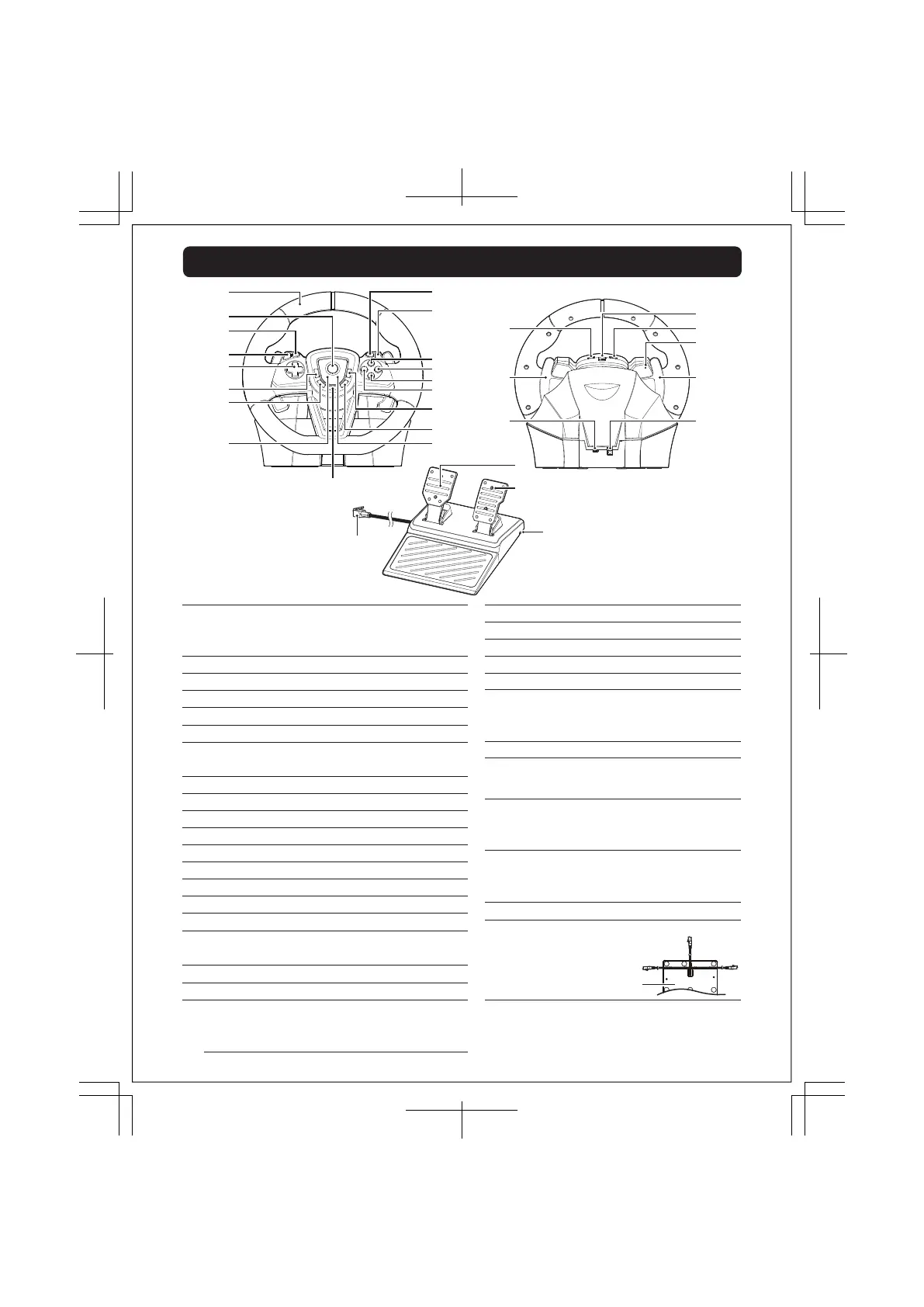
Layout and Features
[PC]
L Stick X Axis
[PC]
HOME button
[PC]
LB button
[PC]
LT button
[PC] Left Stick button
[PC] BACK button
[PC] RB button
[PC] RT button
[PC]
Y button
[PC]
B button
[PC]
A button
[PC]
X button
[PC]
Right Stick button
[PC]
START button
Steering Wheel
[PS5®, PS4™ Normal Mode]
L Stick X Axis
[PS5®, PS4™ Steering Mode]
Steering
[PS5®, PS4™]
p
(
PS
)
button
[PS5®, PS4™]
L1 button
[PS5®, PS4™]
L2 button
[PS5®, PS4™]
Directional buttons
[PS5®, PS4™]
L3 button
[PS5®]
. (create) button
[PS4™]
SHARE button
LED (L)
ASSIGN button
[PS5®, PS4™]
R1 button
[PS5®, PS4™]
R2 button
[PS5®, PS4™]
h button
[PS5®, PS4™]
j button
[PS5®, PS4™]
k button
[PS5®, PS4™]
l button
[PS5®, PS4™]
R3 button
[PS5®]
, (options) button
[PS4™]
OPTIONS button
LED (R)
①…
②…
③…
④…
⑤…
⑥…
⑦…
⑧…
⑨…
⑩…
⑪…
⑫…
⑬…
⑭…
⑮…
⑯…
⑰…
⑱…
Steering Unit
R paddle
[PS5®, PS4™ Normal Mode] R1 button
[PS5®, PS4™ Steering Mode] R1 paddle
⑲…
[PC]
X button
Steering Unit (Back View)
[PC]
LT button
[PC]
RT button
L pedal
[PS5®, PS4™ Normal Mode] L2 button
[PS5®, PS4™ Steering Mode] Brake
R pedal
[PS5®, PS4™ Normal Mode] R2 button
[PS5®, PS4™ Steering Mode] Accelerate
Modular Plug
Cable Groove
㉗…
㉘…
㉙…
㉚…
Foot Pedal
USB-C™ Connector
Directional buttons Toggle Switch
Mode Toggle Switch
Hardware Toggle Switch
Reset button
L paddle
[PS5®, PS4™ Normal Mode] L1 button
[PS5®, PS4™ Steering Mode] L1 paddle
Foot Pedal Connection
⑳…
㉑…
㉒…
㉓…
㉔…
㉕…
㉖…
[PC] A button
Bottom of Foot Pedal
Slide the foot pedal cable through
any of the three grooves on the
bottom of the foot pedal.
6 / 20













 To Next Page