p.58
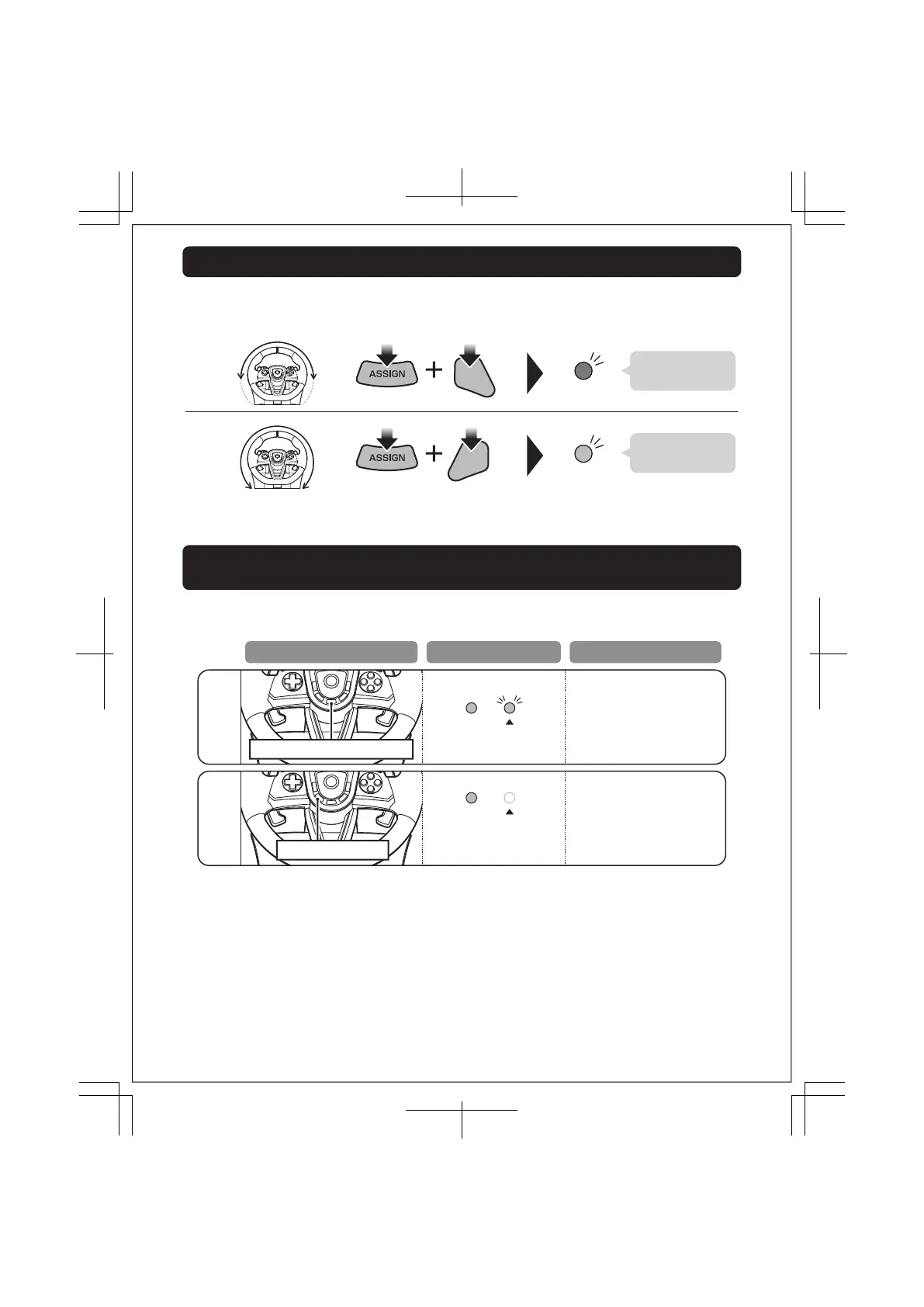
Experience quicker handling by switching the max steering output from 270 degrees to 180 degrees.
180°
MAX MAX
270°
MAX MAX
R2
L2
LED (L )
Blue light is lit
for 3 seconds
LED (L )
Green light is lit
for 3 seconds
Quick Handling Mode
Adjustable Dead Zone / Adjustable Sensitivity / Quick Handling Mode
Reset Back to Default Settings
If you do not perform step after , the LED (R) will turn off after four seconds and setting mode will automatically end.
To simultaneously reset all of the following :
Dead Zone Adjustment Sensitivity Adjustment Quick Handling Mode.
Controller settings are stored even if the PlayStation®5 console, PlayStation®4 console,
or PC is turned o or the receiver is disconnected.
Dead zone and sensitivity default
values are set to “4”.
When Quick Handling Mode is
cancelled, steering wheel input
value will default to 270°.
Hold ASSIGN button for 3 seconds
Press . (create) button
All settings will return to default.
LED (R) will flash slowly.
LED (R) will turn off
The LED (R) will light green
when assigning buttons.
Operation LED Status Setting Status
16 / 20













 To Next Page