p.56
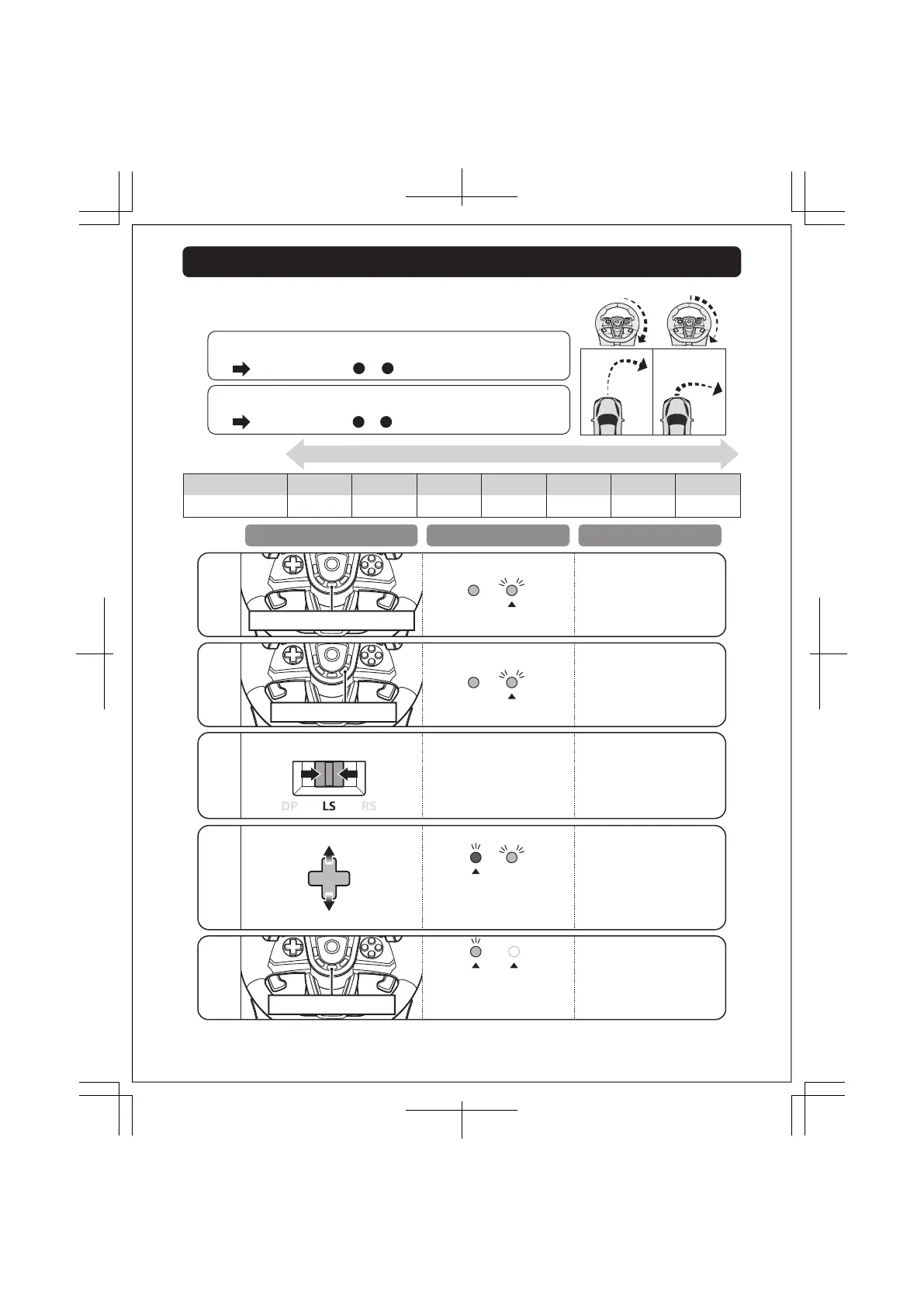
I want to make a wide turn.
The steering is too sensitive and dicult to maneuver.
Set the sensitivity to or
1 2
Set the sensitivity to or
6 7
I want to make turn with a little steering.
It is dicult to make a turn, or it's not turning fast enough.
Preferred settings
Steering wheel sensitivity is adjustable to seven levels.
The LED (L) color will change to indicate the sensitivity value.
1 2
3
5 6Sensitivity value
LED color
4 7
Green Yellow
Red
Blue Light BluePurple White
Less sensitive More sensitiveDefault
If you do not perform step after , the LED (R) will turn o after four seconds and Adjustable
Sensitivity setting mode will automatically end.
Controller settings are stored even if the PlayStation®5, PlayStation®4, or PC is turned o or the receiver is disconnected.
Adjustable Sensitivity - Steering
1 7
Sensitivity value Sensitivity value
Operation LED Status Setting Status
LED (R) will flash slowly.
Sensitivity value increases
by pressing up on the
Directional buttons.
Sensitivity value decreases
by pressing down on the
Directional buttons.
LED (L) color will change
according to setting and
chart above.
Set Directional buttons
Toggle Switch to LS
Increase sensitivity
Decrease sensitivity
Hold ASSIGN button for 3 seconds
Press , (options) button
Button inputs are disabled during
setting.
Start setting
LED (R) will flash quickly.
Finish setting
Press ASSIGN button
LED (L) color will change to white.
LED (R) will turn off.
・The LED (R) will light green
when assigning buttons.
14 / 20













 To Next Page