p.53
No battery
LED O Blinks orange Blinks orange slowly LED O
Low battery Charging Charging complete
Charging Status
LED (L) Status
A
Q
If the steering or pedal input feels off
Follow the directions from to reconnect the steering unit and/or foot pedal.
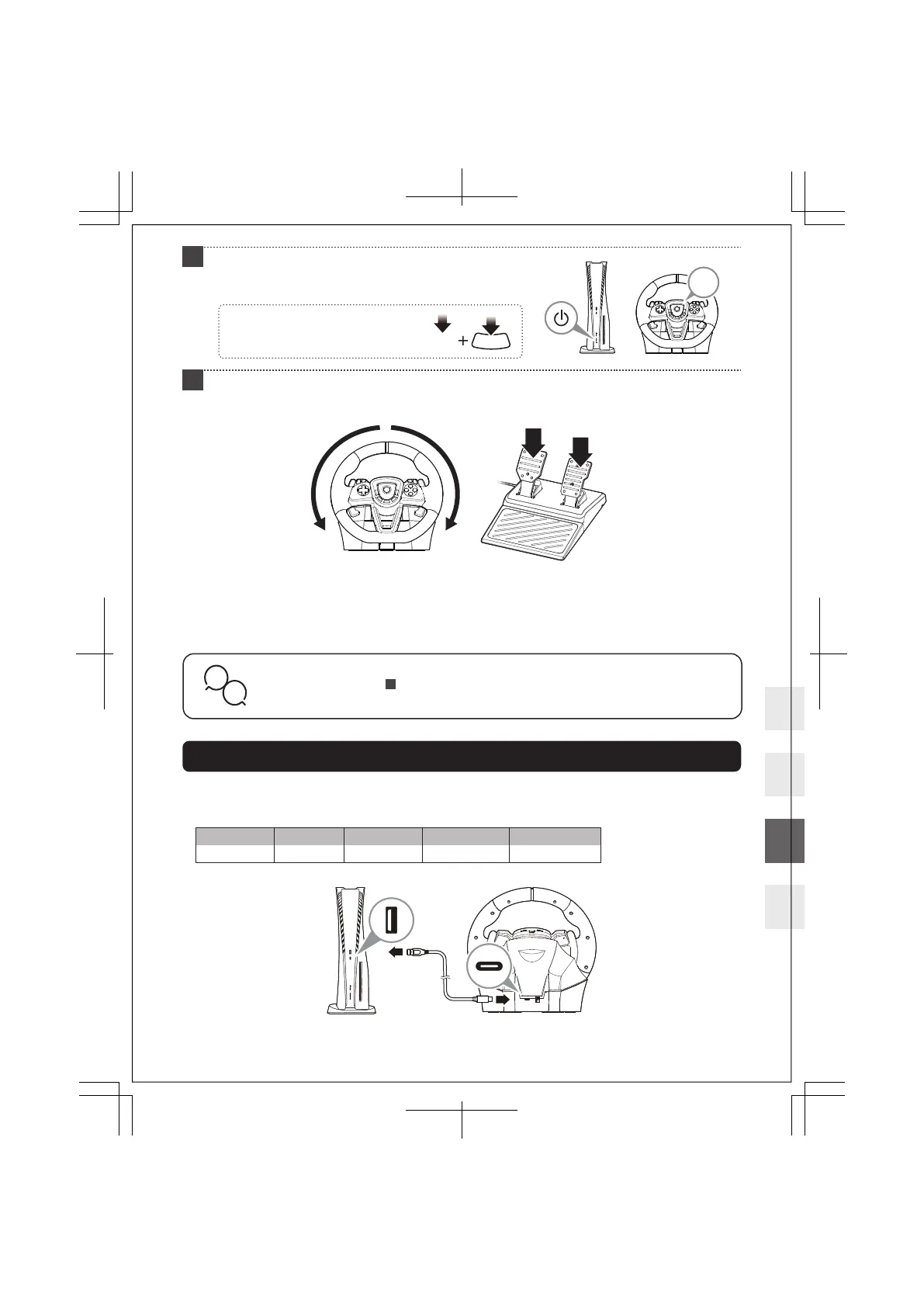
Please turn the steering wheel fully to the right and left one time each and press the L and R pedals one
time each until they are fully pressed.
1
If you have issues connecting, simultaneously press
and hold the p(PS) button and .(create) button
until the LED (L) turns white.
p
.
Turn the console on and press the p (PS) button on
the product, then log-in with the racing wheel.
When the connection is complete, the LED (L) will turn white.
Turn the steering wheel fully to the right, then fully to the left.
Press down fully on the L pedal and R pedal one at a time. This ensures proper wheel calibration.
Please perform this before each of the following actions:
After connecting the product to the PlayStation®5 console, PlayStation®4 console, or PC.
After turning on the PlayStation®5 console, PlayStation®4 console, or PC.
After deactivating the Rest Mode.
4
5
p
How to Charge
Charge this product by connecting it to the USB-A port on the PlayStation®5 console, PlayStation®4 console,
or PC when power is on or in Rest Mode.
11 / 20













 To Next Page