p.52
This function can be switched on only when
used with PS5® console and PS4™ console.
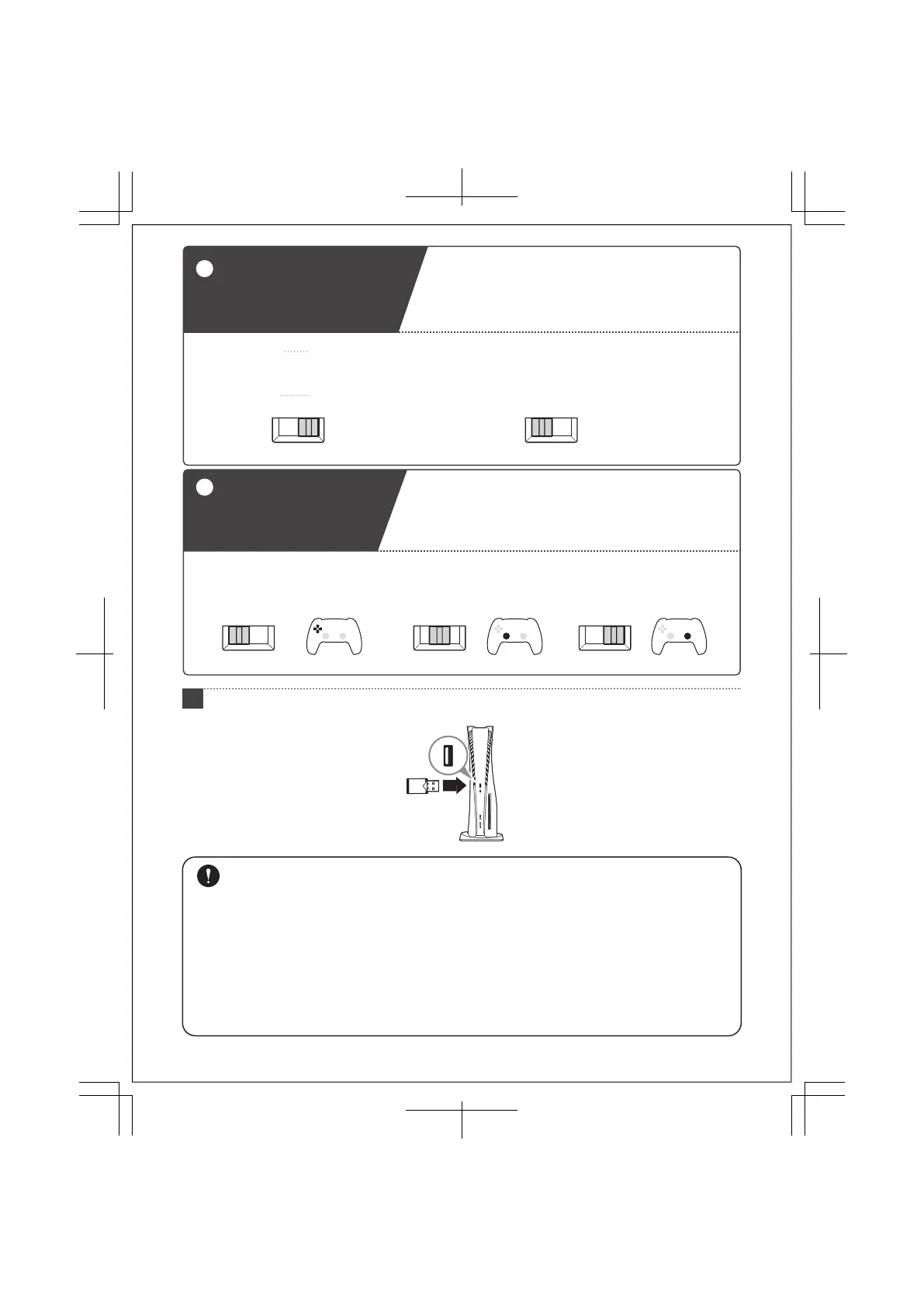
Directional buttons
Toggle Switch
3
Directional buttons controls can be set to directional
buttons, left stick, or right stick controls.
Directional buttons cannot be set to analog functionality.
The Directional buttons Toggle Switch may not be compatible with some software titles. Please refer to the
software's instruction manual for further information.
LSDP RS
Directional buttons
LSDP RS
Left stick
LSDP RS
Right stick
Steering Mode
Normal Mode
Response of steering wheel and pedals are more realistic in Steering Mode.
Some software titles do not support Steering Mode.
Steering Mode
NORMAL STEERING NORMAL STEERING
Normal Mode
Mode Toggle Switch
2
Switch between Steering Mode and Normal Mode.
When using with PS5® console or PS4™ console, the
appropriate setting of the Mode Toggle Switch will
depend on the software that the product is used with.
When using with PC, Mode Toggle Switch can be
set to either setting.
Please use Normal Mode when software title is not compatible with Steering Mode.
Please check the direction of the receiver carefully before connecting.
The steering unit and the receiver are paired by default.
Please note that if multiple units of this product are purchased, each receiver can only be paired with the steering unit
that was included together.
Do not use this product with a USB hub or extension cable.
Do not plug / unplug the Receiver or Modular Cable during gameplay.
Do not push any buttons or move the steering unit or pedals when doing the following:
-When connecting the product to the PlayStation®5 console, PlayStation®4 console, or PC
-When turning on the PlayStation®5 console, PlayStation®4, or PC
-When waking the console from Rest Mode
Please follow the instructions below to avoid malfunction.
Connect the receiver to the PlayStation®5 console, PlayStation®4 console, or PC.
3
10 / 20













 To Next Page