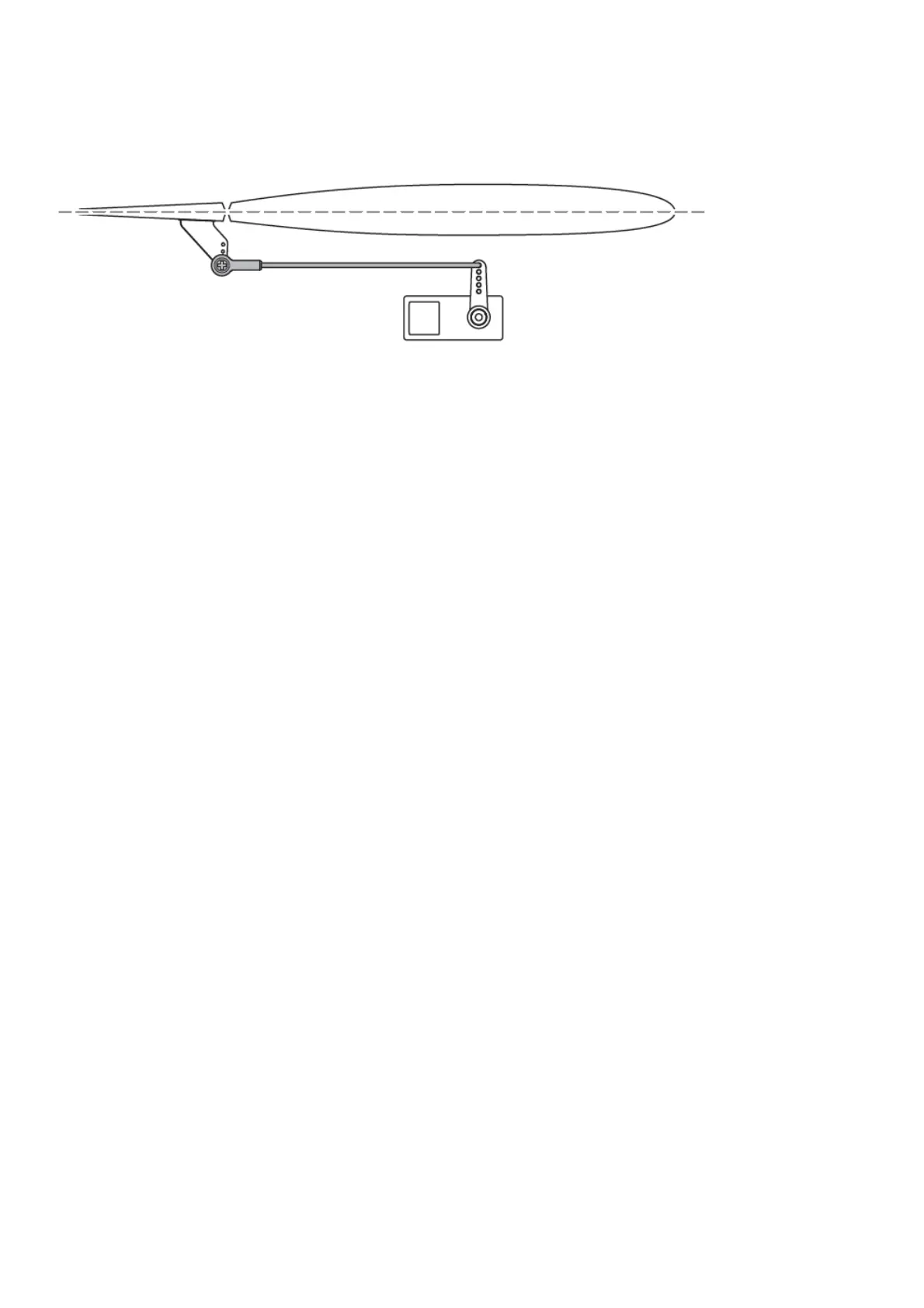
1. Verify the trims and subtrims on your transmitter are zero
2. Power up the model in AS3X mode and leave the throttle at zero
3. Look at the tip of each control surface and verify it is mechanically centered.
4. If adjustment is required, turn the ball link on the linkage to change the length of the linkage between the servo
arm and the control horn.
Control Surface Centering
Switch on the transmitter and connect the battery. Use the transmitter to operate the aileron and elevator controls.
View the aircraft from the rear when checking the control directions.
Ailerons
1. Move the aileron stick to the left. The right aileron should move down and the left aileron up, which will cause the
aircraft to bank left.
2. Move the aileron stick to the right. The right aileron should move up and the left aileron down, which will cause the
aircraft to bank right.
Elevators
3. Pull the elevator stick back. The elevators should move up, which will cause the aircraft to pitch up.
4. Push the elevator stick forward. The elevators should move down, which will cause the aircraft to pitch down.
Rudder
5. Move the rudder stick to the left. The rudder should move to the left, which will cause the aircraft to yaw left.
6. Move the rudder stick to the right. The rudder should move to the right, which will cause the aircraft to yaw right.





 To Next Page