&xJQy~ &l~~@g
L?}’dnf2mtYds9
{’&@& ‘--’~@~&I’hi’ngs:
STEP !:
Remove broiler pan, rack and other
cookware from the oven. (Oven
shelvesmay be left in oven. Note:
Shelvesmay become gray after sev-
eral cleanings.)
GJ~~p ~;
Wipe up heavy soil on oven
bottom.
o
~
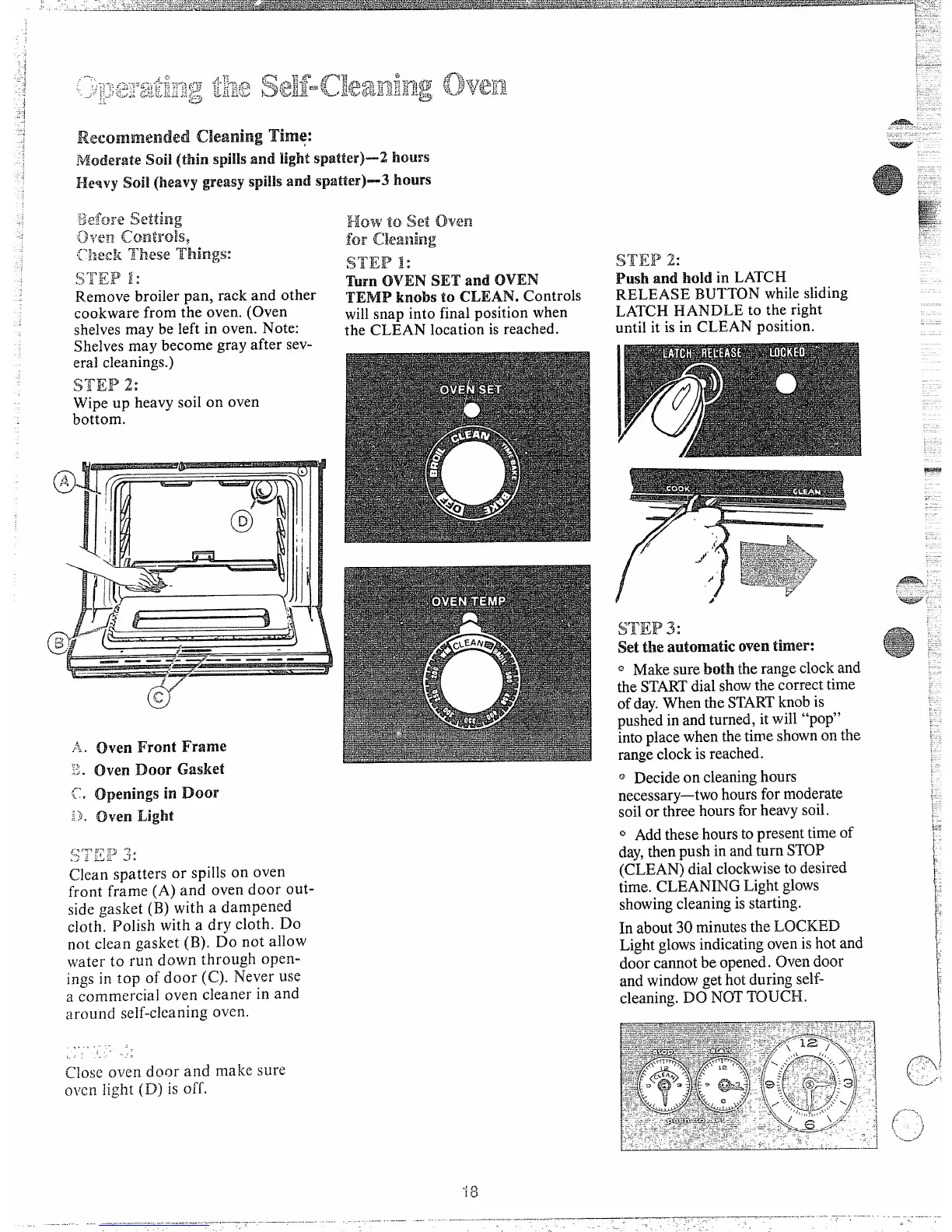
ovenFront Frame
ownDoor Gasket
openingsh-lDoor
ovenLight
<:mjl ii-l w ‘i
. !i- [j-
J :
.> - -
Clean spatters or spills on oven
front frame (A) and oven door out-
side gasket (B) with a dampened
cloth. Polish with a dry cloth. Do
not clean gasket (B). Do not allow
~~iaterto run down through open-
ings in top of door (C). Never use
a commercial oven cleaner in and
around self-cleaning oven.
.. !, .- .
,.
~.,.
Close oven door and make sLlre
Ollcn}ight(D) is off.
How
tosetCh%m
farCkaning
STEP 1:
‘Mm OVEN SET and OVEN
TEMIPknobs to CLEAN. Controls
willsnap into final positionwhen
the CLEAN location is reached.
STEW 2:
Push and hold in LATCH
RELEASE BUTTONwhilesliding
LATCH HANDLE to the right
until it is in CLEAN position.
$j~~p ~ :
setthe automatic oventimer:
~ Makesureboth therangeclockand
theSTARTdialshowthecorrecttime
ofday.WhentheSTARTknobis
pushedin andturned, itwill “pop”
intoplacewhen thetimeshownonthe
rangeclockis reached.
o Decideon cleaninghours
necessary—twohoursfor moderate
soilor three hoursforheavysoil.
@Addthesehourstopresenttimeof
day,thenpush in andturn STOP
(CLEAN)dialclockwisetodesired
time. CLEANING Lightglows
showingcleaningis starting.
In about30 minutesthe LOCKED
Lightglowsindicatingovenishot and
door cannotbe opened. Ovendoor
and windowgethotduring self-
cleaning.DO NOTTOUCH.
( -““-’
)
‘.
‘/
~.-..



 To Next Page