Hybrid/AC-coupled Inverter User Manual
© 2024 Hoymiles Power Electronics Inc. All rights reserved.
40
3.5.3.2 System Commissioning of Wireless Access Point (AP) Connection
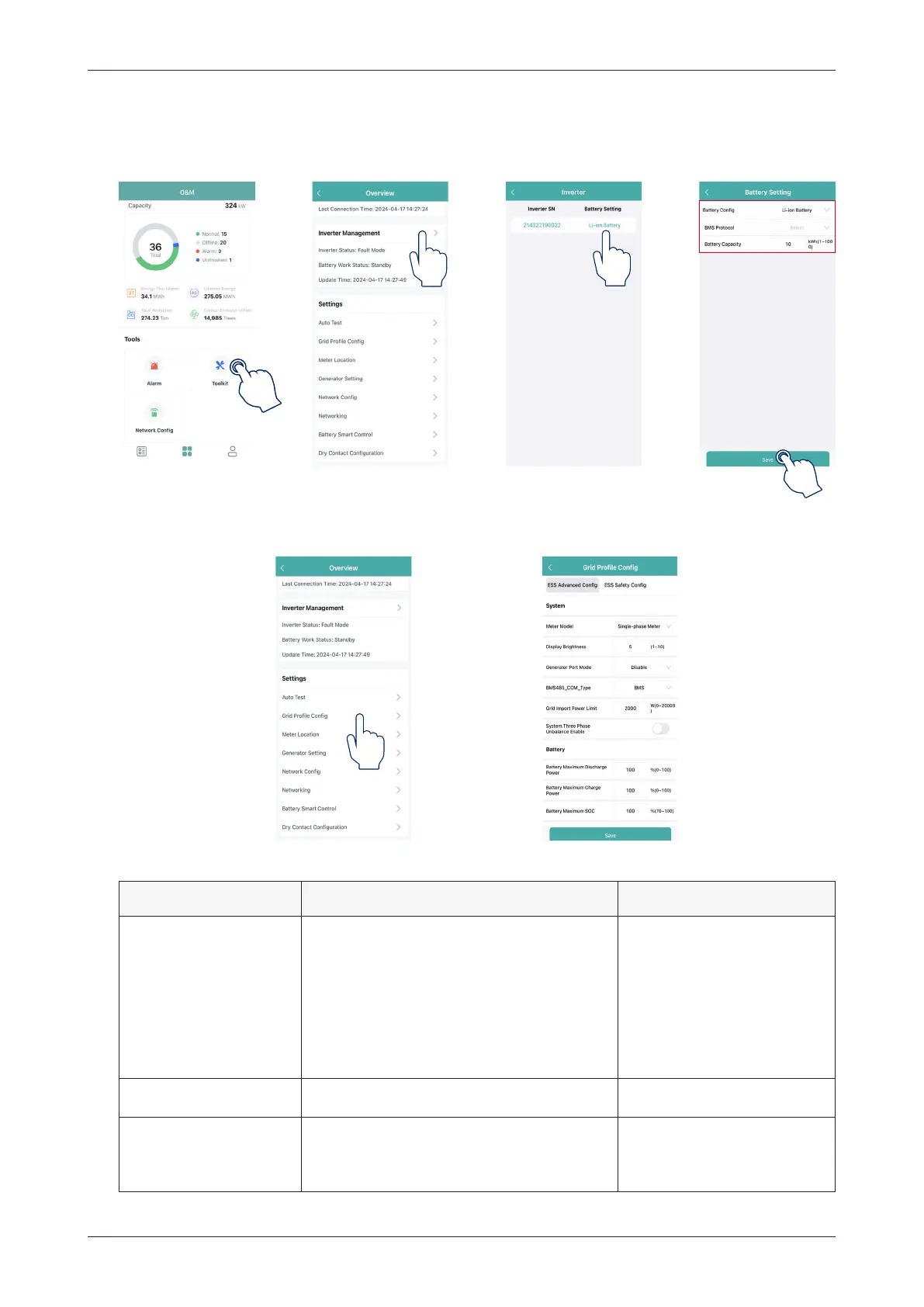
1. Connect the wireless network of DTU. Open the App, tap “Toolkit
→
Inverter Management
→
Battery
Setting” to set battery type, BMS protocol, and battery capacity, and tap “Save”. (The default setting is
“No battery”.)
2. Tap “Grid Profile Config
→
ESS Advanced Config” to configure relevant parameters of the system, battery,
emergency power supply (EPS), and generator, and tap “Save”.
★
System
Parameter Description Default Value
Meter Model
For single-phase inverter, please choose
“Single-phase Meter” or “Three-phase
Meter”;
For three-phase inverter, please choose
“Three-phase Meter”;
For inverter used in North America, please
choose “Two-phase Meter”.
No Meter
Display Brightness The brightness of the machine display lamp. 10
Generator Port Mode
After the generator port is connected to
the PV inverter or generator, choose the
corresponding option.
Disable



 To Next Page