12
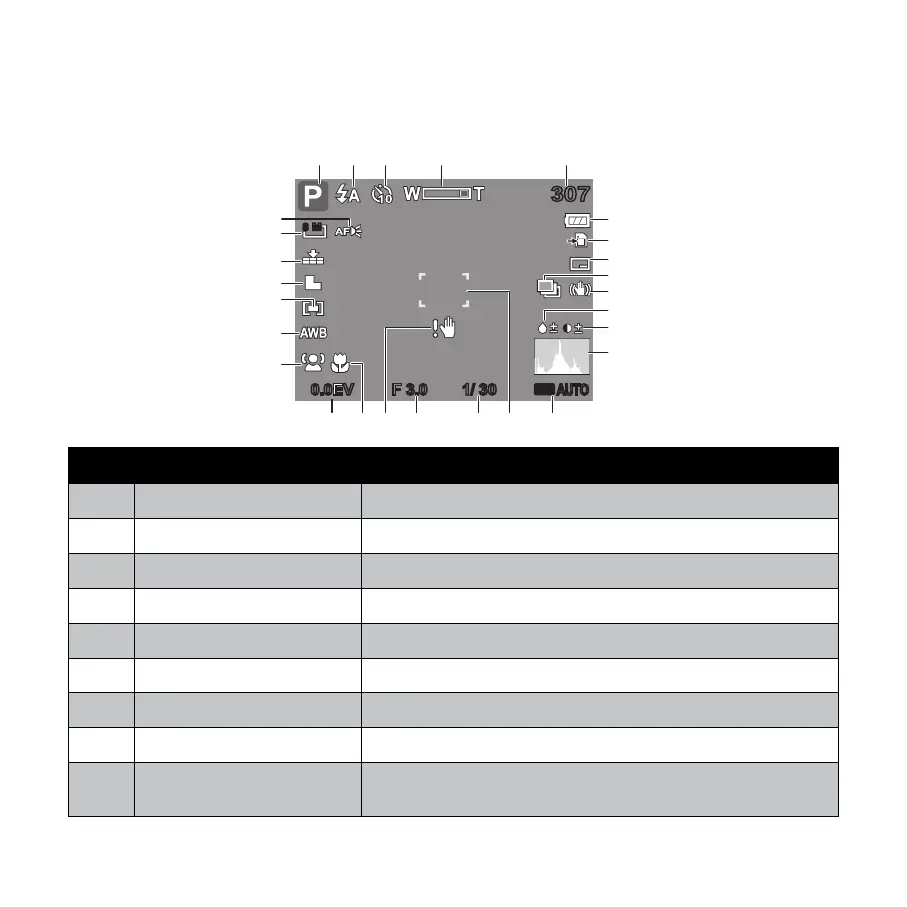
LCD Monitor Layout and Icon Descriptions
Shooting Mode Screen Layout
307307
ISO
AUTO
F 3.0F 3.0 1/ 301/ 300.0EV0.0EV
8 M
1
2
3
4
5
13
14
15
16
17
18
19
20
21
22
23
24
25
26
27 6
7
8
9
10
11
12
No. Item Description
1 Shooting mode Indicates the current mode.
2 Flash Indicates fl ash settings.
3 Self-Timer/Burst Indicates Self-Timer/Burst settings.
4 Zoom indicator Displays zoom.
5 Shots remaining Indicates the remaining shots available.
6 Battery Indicates battery level.
7 Storage media Indicates current storage media in use.
8 Date & Time Imprint Indicates date & time imprint is enabled.
9
Auto Exposure Bracketing
(AEB)
Indicates AEB function is enabled










 To Next Page