Expansion card
iLO-M.2-serial module
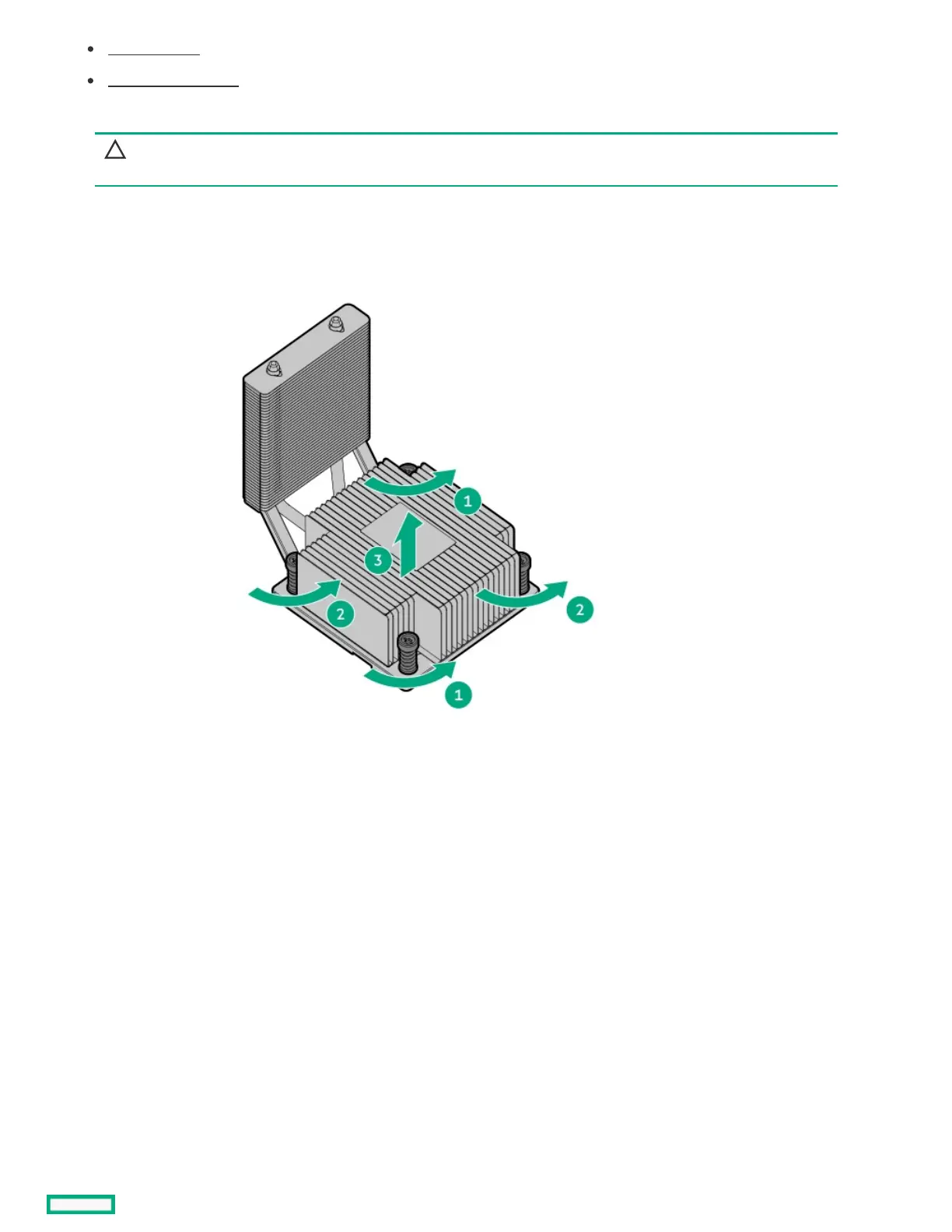
14. Remove the heatsink:
CAUTION:CAUTION: To prevent mechanical damage or depositing oil on your hands or other contaminants to the heatsink contact
surface, hold the heatsink only by the edge of its base plate. Do not touch the heatsink fins.
a. Loosen one pair of diagonally opposite screws halfway, then loosen the other pair of screws.
b. Completely loosen all screws in the same sequence.
c. Lift the heatsink away from the processor socket.
d. Place the heatsink on a flat work surface with its contact side facing upward.
15. Use an alcohol wipe to remove the existing thermal grease from the heatsink and the top of the processor.
Allow the alcohol to evaporate before continuing.
16. Open the processor load plate:
a. Push the hinge lever down to unclamp it, and then pivot it to the fully open position.
b. Open the processor load plate.













 To Next Page