THT45 - THT45W - THT46
“Alignment” section
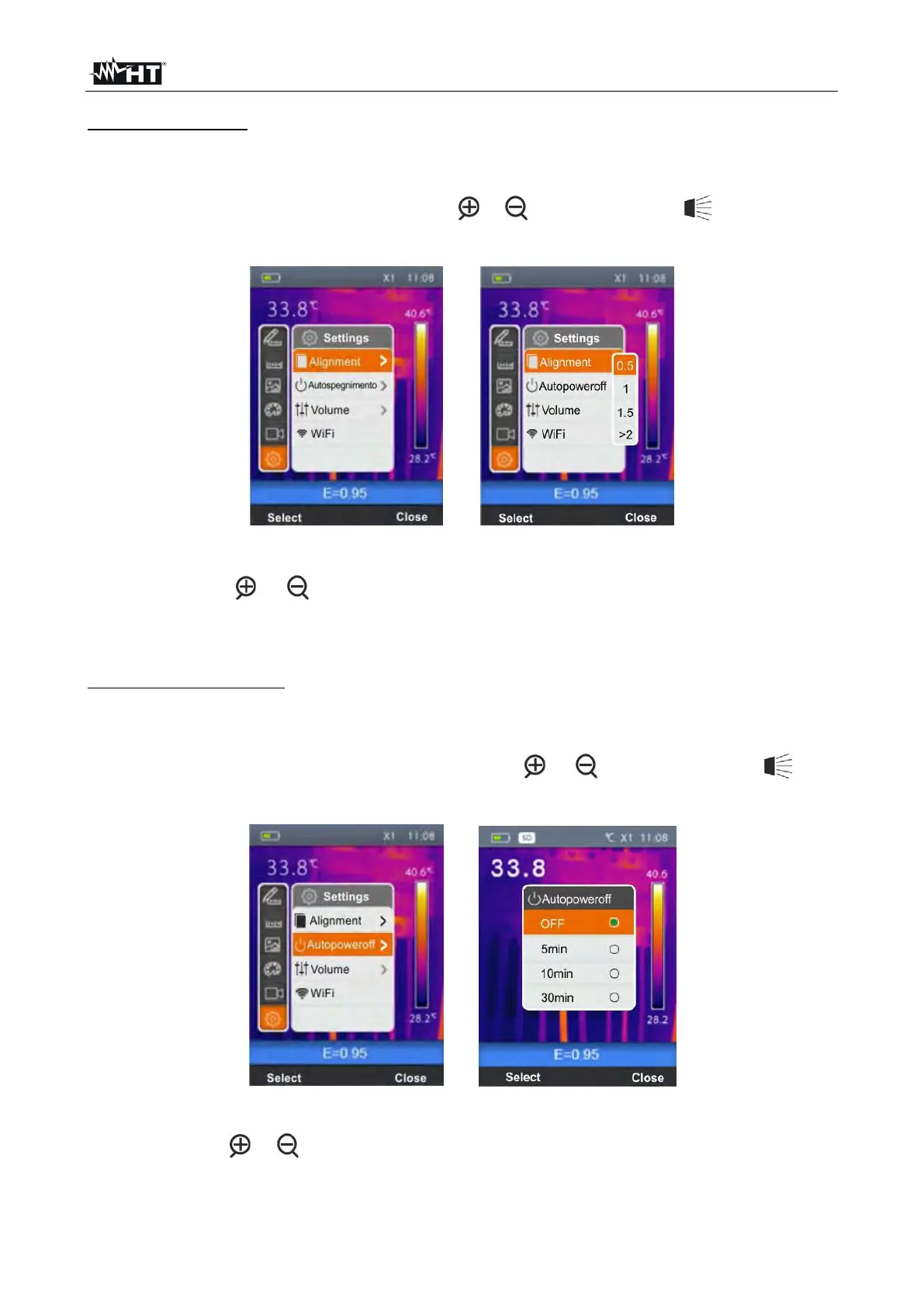
In this section it is possible to define the distance between the lens and the object which
the instrument considers for “Fusion” display (see § 5.1.3).
1. Select the item “Alignment” with the keys or and press the key . The screen of
Fig. 13 – Right side is shown on the display.
Fig. 13: Setting the alignment distance
2. Use the keys or to select the distance among the options; 0.5m, 1m, 1.5m or
>2m
3. Press the key “Select” to confirm or “Close” to exit without saving.
“Auto power off” section
In this section it is possible to enable/disable and adjust the auto power-off time of the
instrument after a period of inactivity.
1. Select the item “Auto power-off” using the keys or and press the key . The
screen Fig. 14 – Right side is shown on the display
Fig. 14: Setting the alignment distance
2. Use the keys or to select the auto power-off time among the options; OFF, 5min,
10min or 30min
3. Press the key “Select” to confirm or “Close” to exit without saving.


 To Next Page