63
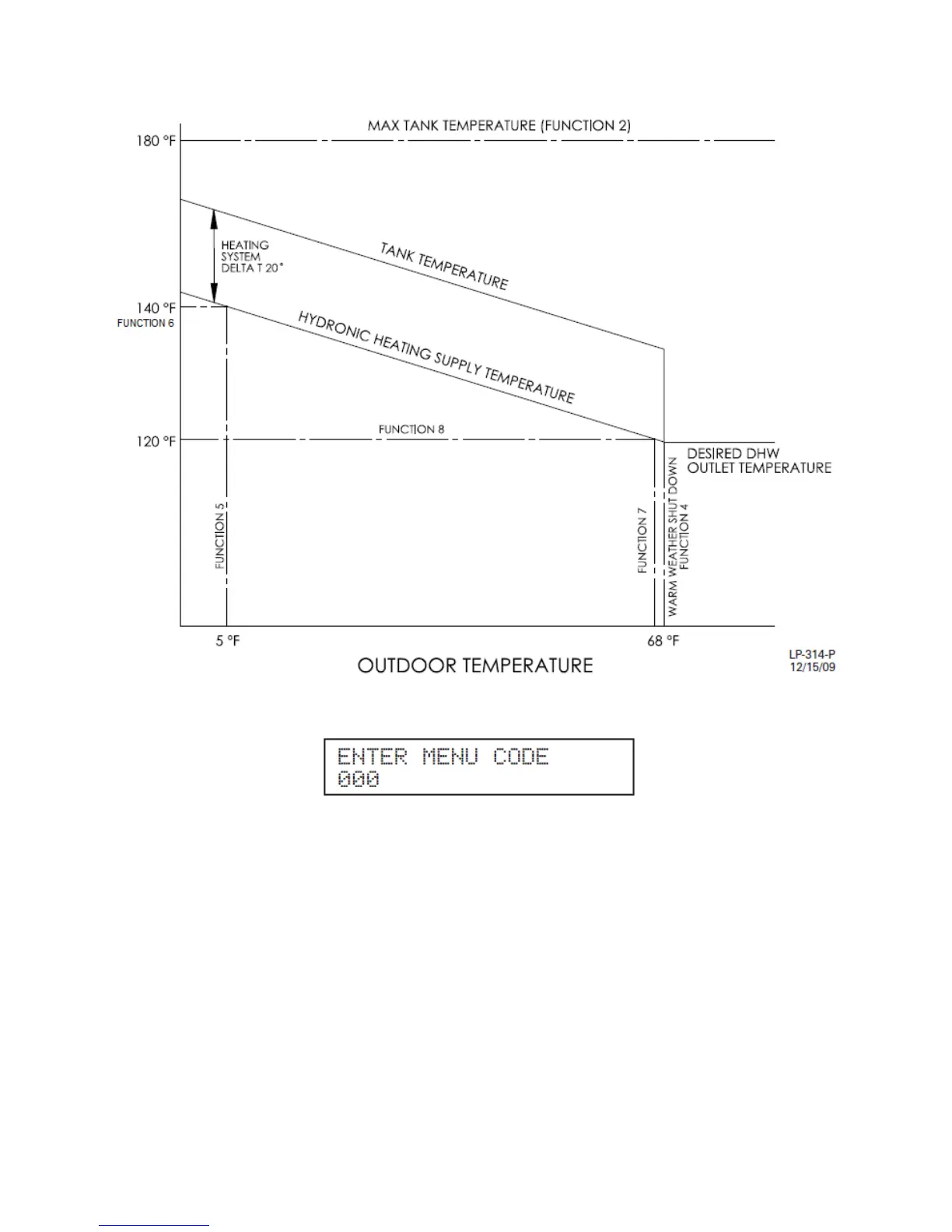
Figure 27
10. Press and hold ENTER for 4 seconds until you see the screen to log in the access code.
11. Use the and arrow keys to move the blinking zero to the left and right. Next, use the ▲ and ▼
arrow keys on to log in the access code of 925. Press ENTER to access the System Setting Program
Navigation menu. Once the code is confirmed, you can set the System Settings. Use and to
navigate through the System Setting Program.
12. Press 3 times to scroll to Function 4 - “WARM WEATHER OFF”. This is the warm weather
shutdown. This function determines the outdoor temperature that will turn off the hydronic heating module
and operate the appliance only as a water heater for the warmer weather. To adjust this value, press
ENTER and the factory default of 68°F starts to blink. Use ▲ and ▼ to adjust this value to your system
needs. To store the new value press ENTER.
13. Next, press once to scroll to Function 5 - “MIN OUTDOOR TEMP”. This function is the first step to
setting the outdoor reset curve. Enter your system’s minimum outdoor temperature value. To adjust the
value, press ENTER and the factory default of 5 °F starts to blink. Use ▲ and ▼ to adjust to your
designed temperature. To store the new value press ENTER.







 To Next Page