BoostLi Energy Storage Module ESM-48100B1
User Manual
3 Transportation and Storage
Copyright © Huawei Technologies Co., Ltd.
3.2.4 Recharge Solution
Recharge ESMs that pass tests using either of the following solutions based on site
requirements.
Recharge ESMs using a power system:
1. Identify qualified ESMs that can be recharged.
2. Install the ESMs and connect cables to the ESMs by referring to the quick installation
guide of the related power system.
3. Use the power system to recharge the ESMs.
Table 3-2 Recharge parameter settings
Use the default charge current limit coefficient. The maximum charge
current is 100 A.
The charge duration is greater than 10 minutes and the charge current is
less than 0.02 C (2 A), or the ESM is protected.
4. Hold down the red MANUAL ON/OFF button on the front panel for at least 5s and less
than 15s. Wait all indicators on the front panel turn off and then remove the cables. Place
the ESM in the original packing case. Modify the latest charge time and the next
recharge time marked on the original packing case.
Recharge the ESMs of a purchased or borrowed DC regulated power supply that supports 48
V charge by performing the following operation:
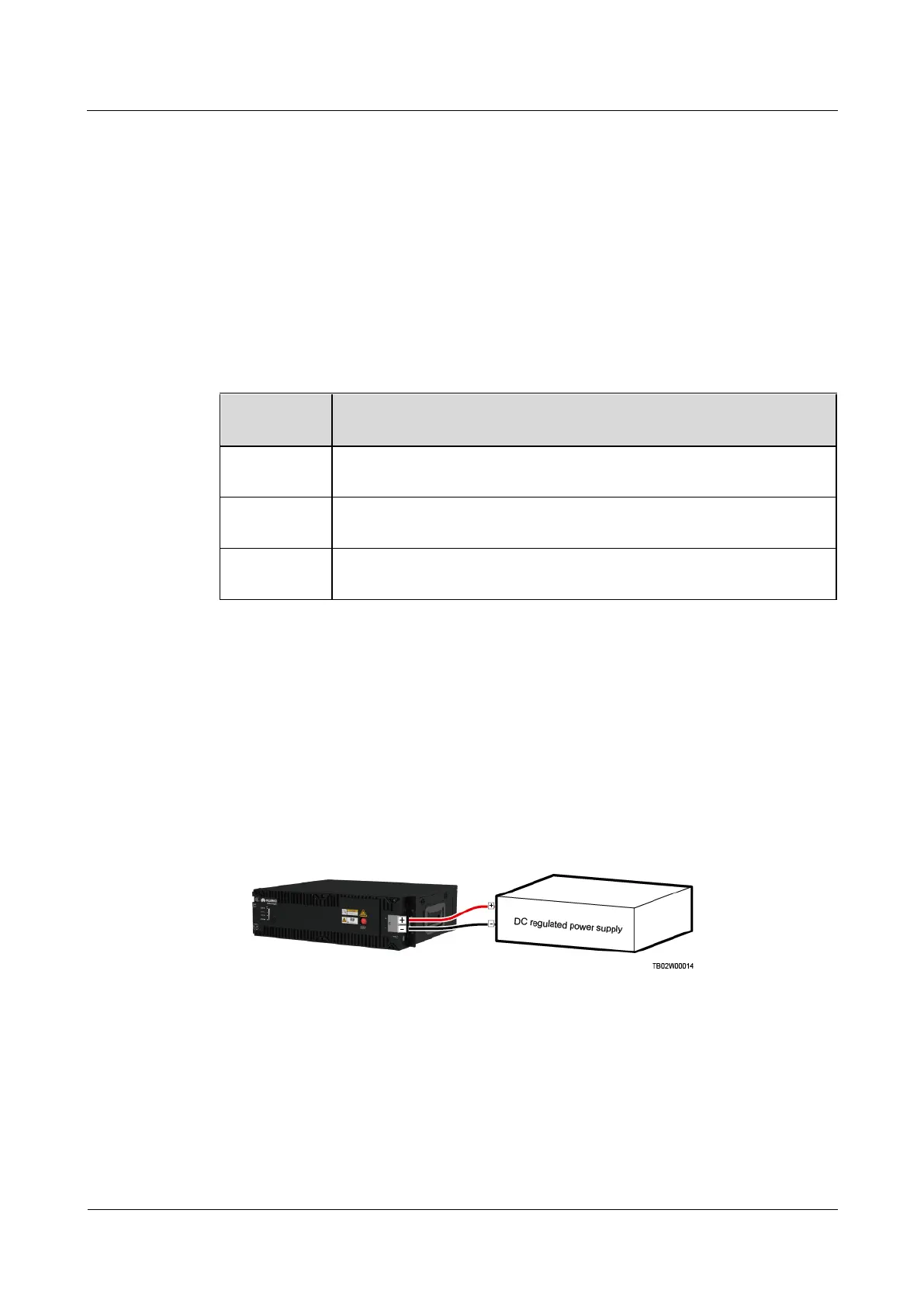
1. Connect the positive and negative poles of an ESM to the output positive and negative
terminals on a DC regulated power supply respectively.
Figure 3-1 Connecting cables between an ESM and DC regulated power supply equipment
2. Set charge parameters for the DC regulated power supply equipment. For details,
seeTable 3-2.
3. Hold down the red MANUAL ON/OFF button on the front panel for at least 5s and less
than 15s. Wait all indicators on the front panel turn off and then remove the cables. Place
the ESM in the original packing case. Modify the latest charge time and the next
recharge time marked on the original packing case.



 To Next Page