BoostLi Energy Storage Module ESM-48100B1
User Manual
4 Installation and Commissioning
Copyright © Huawei Technologies Co., Ltd.
Table 4-1 Setting battery parameters on the LCD
Charge
current limit
coefficient
Set based on
the site
requirements
To check the ESM running status or change the charge current limit coefficient on the Web UI,
perform the following operations:
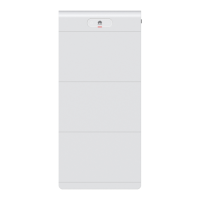
Set the PC IP address in the same network segment as the SMU IP address, enter https://local
IP address of the SMU (for example, https://192.168.0.10) in the address box of Internet
Explorer, and press Enter. The login page is displayed.
Figure 4-16 Login page
On the login page, choose Monitoring > DC Power > Lithium Battery Group > Running
Parameter > Charge Parameters to modify the charge current limit coefficient and set the
value range to 0.05 C10 to 1.0 C10.



 To Next Page