Function description
OPERATION MANUAL Chapter 3
Unistat® V2.0.0en/09.06.16//15.09
Function E-grade Basic
E-grade
Exclusive
E-grade
Professional
Storage/loading temperature control programs
to/from a USB stick
Service data recorders (flight recorder)
Process data recording directly to a USB stick:
- Setpoint, actual value internally, actual value process
- heating capacity %, cooling capacity %, pump
pressure, pump speed, VPC pressure
Calendar start
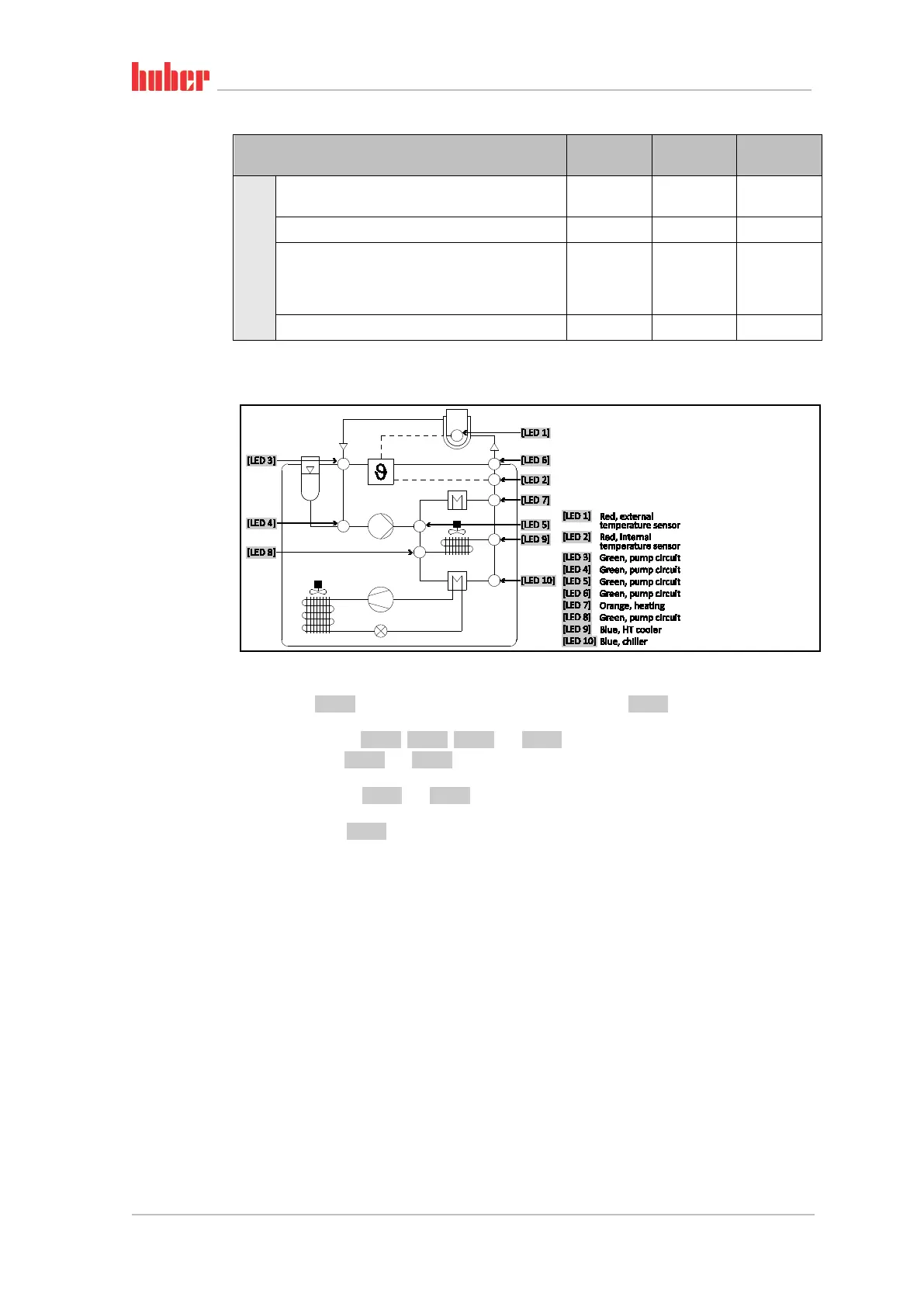
3.5 Unistat® LED diagram
Operating states
▪ Stand-by: [LED 2] (when selecting Jacket temperature control) or [LED 1] (when selecting Process
temperature control).
▪ Circulation active:[LED 3], [LED 4], [LED 5] and [LED 6] illuminate.
▪ Cooling active: [LED 8] and [LED 9] illuminate. Only in connection with the operating state “Circu-
lation active”.
▪ HT cooling active: [LED 8] and [LED 9] illuminate. Only in connection with the operating state
“Circulation active”. Only for temperature control units with HT cooling.
▪ Heating active: [LED 7] illuminates. Only in connection with the operating state “Circulation ac-
tive”.
3.6 Clock/event function
3.6.1 Rechargeable accumulator
“Pilot ONE” is fitted with a clock that continues to run even when the temperature control unit is
switched off. The energy required for this purpose is provided by a rechargeable accumulator, which
is automatically charged when the temperature control unit is switched on. The accumulator is
dimensioned so that the clock can also continue to run for prolonged switch-off intervals (up to
several months). If, after extremely prolonged switch-off time, time and date have been deleted,
leaving the temperature control unit switched on for a few hours will usually suffice (no tempera-
ture control required). During this time, you can reset the time and date.
If after switching the unit off and back on again, the previously set time and date re-appear, it can be
safely assumed that the rechargeable accumulator is defective. In this case, contact Customer Sup-
port. The telephone number can be found on page 95 in section »Phone number and company
address«.
Diagram



 To Next Page