Setup mode
Chapter 4 OPERATION MANUAL
V2.0.0en/09.06.16//15.09 Unistat®
4.2.12 Setting the setpoint thresholds
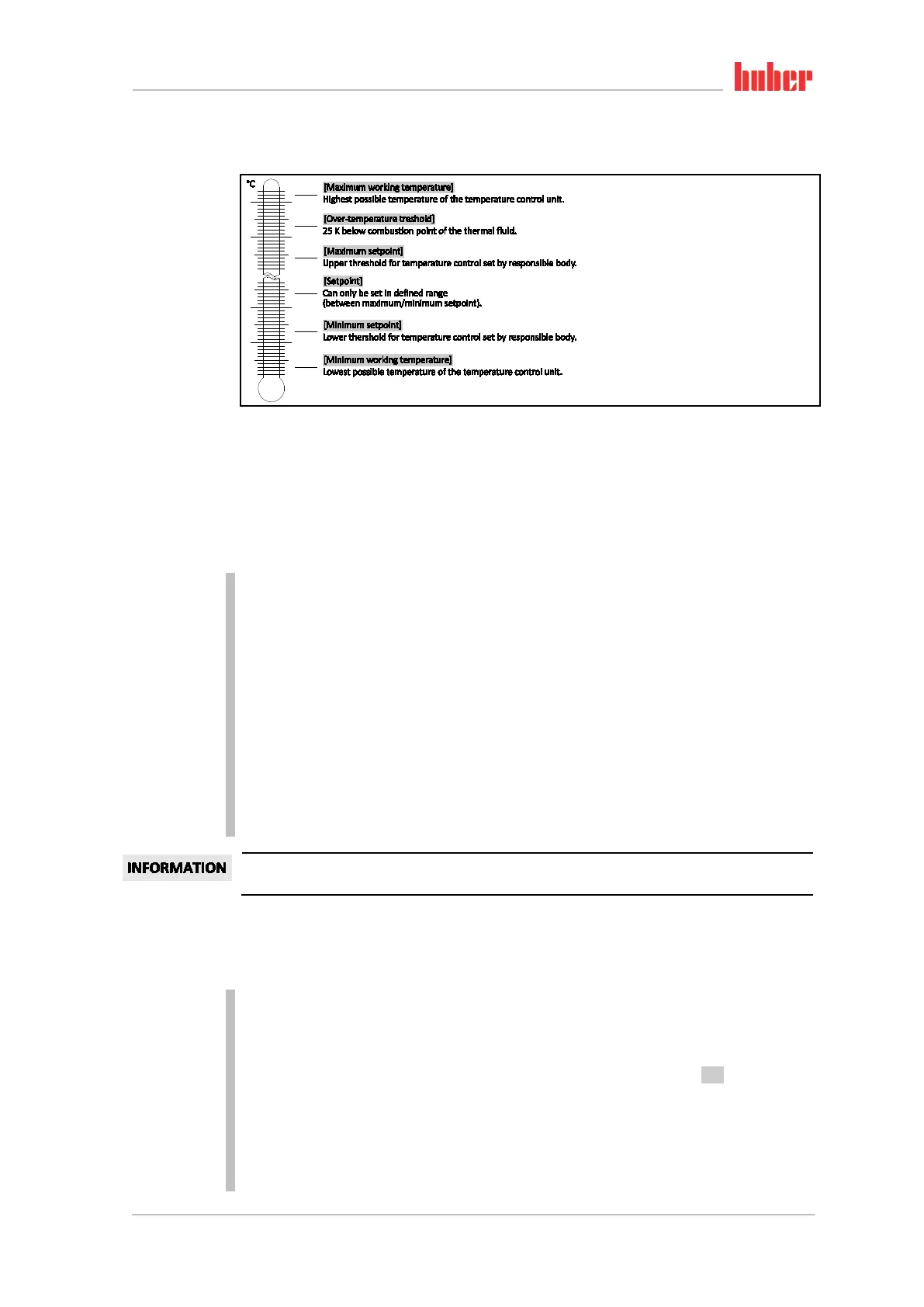
The limits for the minimum and maximum setpoints serve for the safety of your system. They should be set for
the application field of the thermal fluid before starting the first temperature control and when changing the
thermal fluid. The maximum setpoint limit limits the setpoint setting for the bath or flow temperature. The
minimum setpoint limit protects against high viscosity or freezing at low temperatures. Setpoint settings are only
available in the temperature range between the minimum and maximum setpoint limit.
PROCEDURE
Go to the “Categories Menu”.
Tap on the category “Protection Options”.
Tap on the category “Setpoint Limits”.
Tap on the sub-category “Minimum Setpoint”.
Enter the new value, using the numeric keypad that appears.
Confirm your entry by tapping on “OK”.
In the display that follows, confirm your entry again by tapping on “OK”.
The correct selection will be displayed graphically and the “Min. setpoint” will be changed
promptly. If tapping on “OK” is not correct, it will be displayed graphically for 2 seconds. The dis-
play will then return to the category “Setpoint Limits”. Try changing the “Min. Setpoint” again.
Tap on the sub-category “Maximum Setpoint”.
Enter the new value, using the numeric keypad that appears.
Confirm your entry by tapping on “OK”.
In the display that follows, confirm your entry again by tapping on “OK”.
The correct selection will be displayed graphically and the “Max. Setpoint” will be changed
promptly. If tapping on “OK” is not correct, it will be displayed graphically for 2 seconds. The dis-
play will then return to the category “Setpoint Limits”. Try changing the “Max. Setpoint” again.
Check the set values for the minimum and maximum setpoint at any system change, especially
when changing the thermal fluid.
4.2.13 Setting the setpoint
PROCEDURE
Go to the “Home” screen.
Tap on the keypad symbol next to “T
Setpoint
”.
Enter a new setpoint using the number keypad that appears.
The following must apply:
[Minimum setpoint limit] ≤ [Setpoint] ≤ [Maximum setpoint limit].
If these conditions are not met, a message will appear on the >Touchscreen< [88] and the entry
will be ignored. In this case, delete the value just entered either with the “Arrow” key or with the
“clear” key. Enter the setpoint again.
Confirm your entry by tapping on “OK”.
In the display that follows, confirm your entry again by tapping on “OK”.
The correct selection will be displayed graphically and the setpoint will be changed immediately.
If tapping on “OK” is not correct, this is displayed graphically for 2 seconds. After this, the display
will return to the “Home” screen again. Try changing the setpoint again.
Overview of the
temperature thresh-
olds



 To Next Page