28MEGA 360 Installation
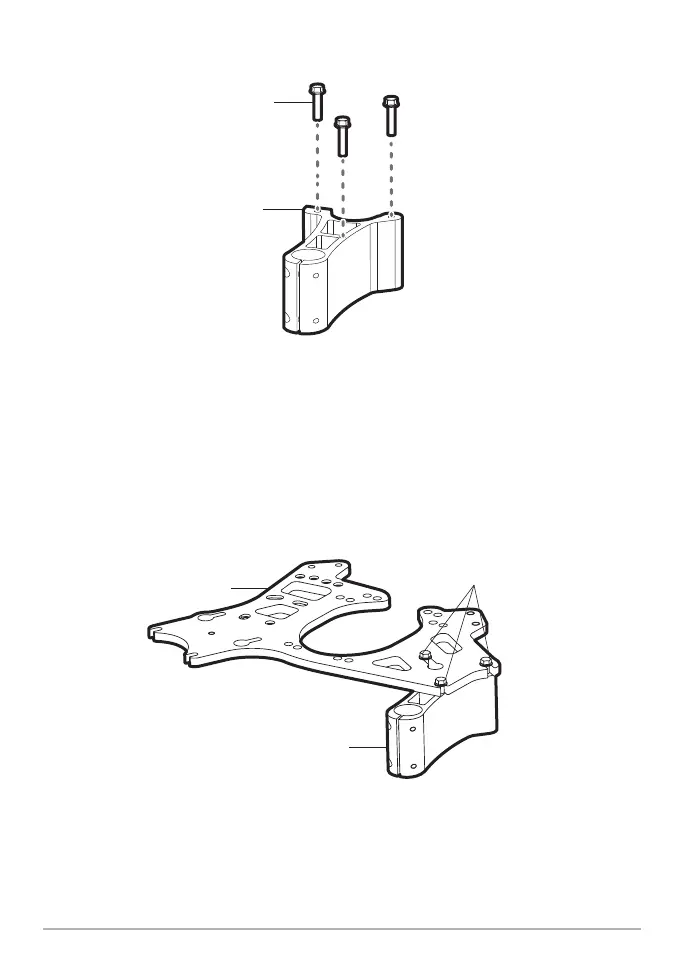
1" screw
(1/4 - 20 x 1")
bracket
(straight edge on the left)
Installing the Screws onto the Mount
3. Align the left screw (left side installation) or right screw (right side installation)
under the center hole of the dual mounting plate (see the illustration Securing
the Mount and Plate).
4. Slide the screw into the plate slot and then slide the other two screws into the
outside slots on the plate.
bracket
plate
slide the plate into place
and hand-tighten screws
Securing the Plate and Bracket
5. Hand-tighten the screws using a 1/4" nut driver or socket wrench. Hand-tighten
only!













 To Next Page