EasyManua.ls Logo

Hunter SRR - User Manual

Hunter SRR
32 pages
Print Icon
To Next Page IconTo Next Page
Loading...
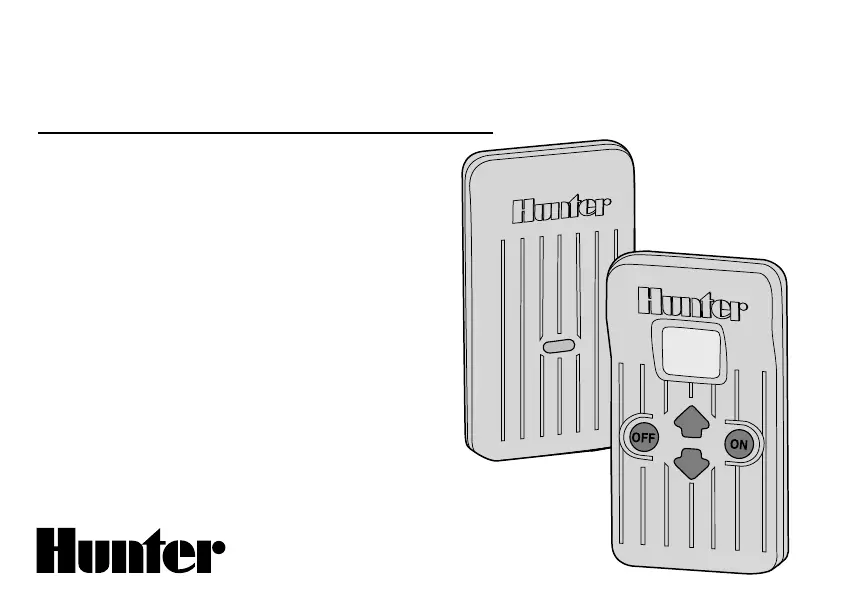
Remote Control System
Owner’s Manual and
Installation Instructions
For use with Hunter
SRC, Pro-C, and ICC
Controllers
SRR
®

Questions and Answers

  • Z
    zbrownJul 31, 2025
    Why is the Hunter SRR transmitter display blank?
    • G
      Gary DelgadoJul 31, 2025
      If the Hunter Remote Control transmitter display is blank, it could be due to the transmitter being off or a dead battery. Try pressing any button for 1 second. If that doesn't work, replace the battery.
  • D
    Donald NguyenAug 5, 2025
    What to do if Hunter Remote Control receiver doesn’t beep two times after plugging it in?
    • A
      Arthur HowardAug 5, 2025
      If the Hunter Remote Control receiver doesn't beep twice after plugging it in, it could be due to the SmartPort® not being connected properly or the controller having no power. Recheck the SmartPort wiring and check the controller power.
  • C
    Charles PopeAug 12, 2025
    What to do if Hunter Remote Control receiver beeps twice but won’t respond to the transmitter?
    • J
      James KimAug 12, 2025
      If the Hunter Remote Control receiver beeps twice after plugging it in but won’t respond to the transmitter, the receiver and transmitter address might not match. Relearn the address at the receiver.
  • E
    Elizabeth ShahAug 17, 2025
    Why does the Hunter SRR Remote Control transmitter display stay on?
    • A
      Anthony GardnerAug 17, 2025
      If the Hunter Remote Control transmitter display stays on, it will turn off automatically. Wait approximately 5 minutes without pressing any buttons; the transmitter will 'fall asleep'.
  • A
    Arthur DanielAug 25, 2025
    What to do if I see an “ERR” message on Hunter SRR display?
    • B
      Bruce HarperAug 25, 2025
      If you see an “ERR” message on the Hunter Remote Control controller display when the controller is in the run position, it could be because the SmartPort wiring leads have been extended and are receiving radio interference. Replace the lengthened wire with shielded cable to prohibit radio interference. Use Hunter SRR-SCWH.

Summary

Introduction to the SRR Remote Control System

SRR Components Overview

Wiring Harness and SmartPort Connection Kit

Installing the SRR Remote Wiring Harness

Wiring the SmartPort to Hunter Controllers

SRC Controller SmartPort Installation

Instructions for connecting the SmartPort to an SRC controller's terminal strip.

Pro-C Controller SmartPort Installation

Instructions for connecting the SmartPort to a Pro-C controller's terminal strip.

ICC Controller SmartPort Installation

Instructions for connecting the SmartPort to an ICC controller's terminal strip.

Typical Installation Scenarios

Receiver Mounted Indoors

Ideal installation for permanent connection in an indoor area.

Temporary Receiver Connection

For temporary access from outside a locked building or garage.

Maximizing Operating Range

Extending Wiring on SmartPort Harness

Preparing the Transmitter for Use

Installing the Transmitter Battery

Changing Remote Activated Station Run Time

Changing the Transmitter Address

Changing the Maximum Station Number

Preparing the Receiver for Use

Changing the Receiver Address

Activating a Station with the SRR Remote Control System

A Word About Range

Troubleshooting Guide

Specifications

Information About Your Sprinkler System

FCC Compliance Notice

Hunter SRR Specifications

General IconGeneral
BrandHunter
ModelSRR
CategoryRemote Control
LanguageEnglish

Related product manuals