22
4.2. Main Body Screen Description
4.2.1. OCT/Fundus mode (HOCT-1F only)
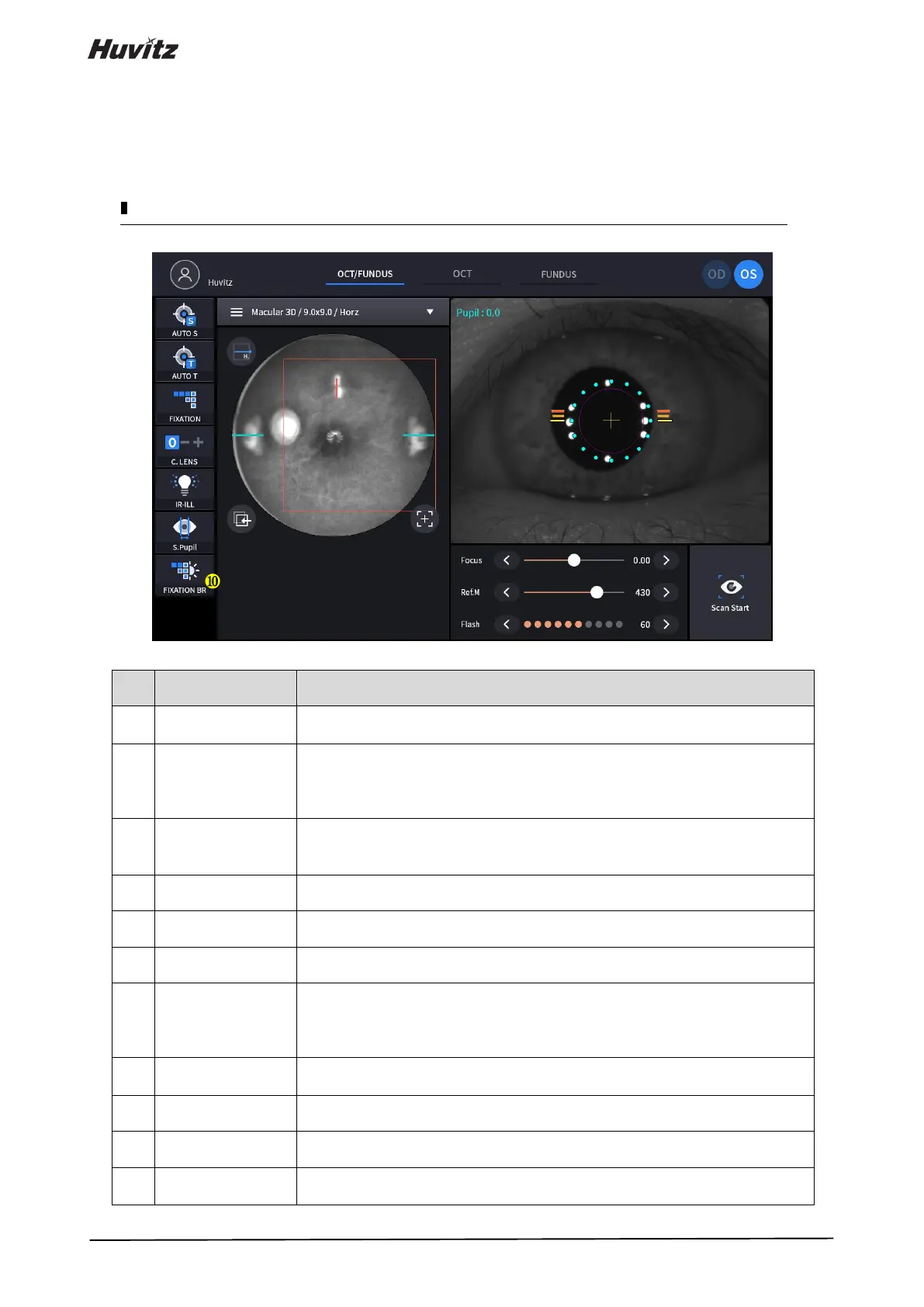
Shows the information of patient ID and name. Go back to patient list by clicking
the icon.
Show current observation mode.
- OCT/Fundus: Capture OCT and Fundus image simultaneously.
- OCT: Capture OCT image.
- Fundus: Capture Fundus image.
Show current eye position.
- OD: right eye
- OS: left eye
Show auto shooting selection status.
Show auto tracking selection status.
Select position of internal fixation target.
Show compensation lens status.
0: No compensation lens is used.
-: Minus compensation lens is used.
+: Plus compensation lens is used.
Select brightness level of IR light for fundus observation.
Normal / Bright mode is toggled by clicking.
Show small pupil mode selection status for fundus image.
Control Fixation brightness.
Select capture region and capture mode
- Fundus/OCT or OCT mode: Macular, Disk, Anterior


 To Next Page