
 To Next Page
A
Alfred RodriguezAug 2, 2025
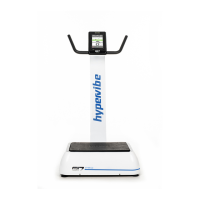
Why is my HYPERVIBE G17 PRO machine loud and rocking?
- MmillermichaelAug 2, 2025
To stop your HYPERVIBE Power Tool machine from being loud and rocking, make sure it is placed on a firm, stable surface.

Why is my HYPERVIBE G17 PRO machine loud and rocking?
To stop your HYPERVIBE Power Tool machine from being loud and rocking, make sure it is placed on a firm, stable surface.
What to do if there is no power to the LCD display of HYPERVIBE G17 PRO?
If there's no power to the LCD display on your HYPERVIBE Power Tool, try these steps: - Ensure the power lead is securely pushed into the power socket at the rear of the machine. - Turn the power off and then back on at the base unit. - Check that both the base unit wire connector and the control panel wire connector are firmly connected to the post connectors. - If the power switch on the rear of the machine isn't lit, replace the fuse (a spare is located inside the fuse holder in the mains socket).
Why is the post loose on my HYPERVIBE Power Tool, especially at higher speeds?
Some movement in the post of your HYPERVIBE Power Tool is normal. However, if it becomes excessively loose, especially at higher speeds, the bolts attaching the post to the base may need tightening over time.
Connect base unit wire connector to the lower post wire connector.
Connect control panel wire connector to the upper post wire connector.
 General
| Model | G17 PRO |
|---|---|
| Category | Whole Body Vibration Platform |
| Vibration Speed Range | 1-99 Levels |
| Remote Control | Yes |
| Built-in Handles | Yes |
| Resistance Bands Included | Yes |
| Vibration Amplitude | 10mm |
| Max User Weight | 150 kg |
| Display Type | LED display |
| Timer Range | 1-10 minutes |
| Power Supply | AC 220-240V |
| Frequency | 5-40Hz |
| Amplitude | 10 mm |